
We've updated our "Built with Cloudflare" button to make it easier to share that you're building on Cloudflare with the world. Embed it in your project's README, blog post, or wherever you want to let people know.

Check out the documentation for usage information.
Deploying static site to Workers is now easier. When you run
wrangler deploy [directory]orwrangler deploy --assets [directory]without an existing configuration file, Wrangler CLI now guides you through the deployment process with interactive prompts.Before: Required remembering multiple flags and parameters
Terminal window wrangler deploy --assets ./dist --compatibility-date 2025-09-09 --name my-projectAfter: Simple directory deployment with guided setup
Terminal window wrangler deploy dist# Interactive prompts handle the rest as shown in the example flow belowInteractive prompts for missing configuration:
- Wrangler detects when you're trying to deploy a directory of static assets
- Prompts you to confirm the deployment type
- Asks for a project name (with smart defaults)
- Automatically sets the compatibility date to today
Automatic configuration generation:
- Creates a
wrangler.jsoncfile with your deployment settings - Stores your choices for future deployments
- Eliminates the need to remember complex command-line flags
Terminal window # Deploy your built static sitewrangler deploy dist# Wrangler will prompt:✔ It looks like you are trying to deploy a directory of static assets only. Is this correct? … yes✔ What do you want to name your project? … my-astro-site# Automatically generates a wrangler.jsonc file and adds it to your project:{"name": "my-astro-site","compatibility_date": "2025-09-09","assets": {"directory": "dist"}}# Next time you run wrangler deploy, this will use the configuration in your newly generated wrangler.jsonc filewrangler deploy- You must use Wrangler version 4.24.4 or later in order to use this feature
You can now upload up to 100,000 static assets per Worker version
- Paid and Workers for Platforms users can now upload up to 100,000 static assets per Worker version, a 5x increase from the previous limit of 20,000.
- Customers on the free plan still have the same limit as before — 20,000 static assets per version of your Worker
- The individual file size limit of 25 MiB remains unchanged for all customers.
This increase allows you to build larger applications with more static assets without hitting limits.
To take advantage of the increased limits, you must use Wrangler version 4.34.0 or higher. Earlier versions of Wrangler will continue to enforce the previous 20,000 file limit.
For more information about Workers static assets, see the Static Assets documentation and Platform Limits.
You can now manage Workers, Versions, and Deployments as separate resources with a new, resource-oriented API (Beta).
This new API is supported in the Cloudflare Terraform provider ↗ and the Cloudflare Typescript SDK ↗, allowing platform teams to manage a Worker's infrastructure in Terraform, while development teams handle code deployments from a separate repository or workflow. We also designed this API with AI agents in mind, as a clear, predictable structure is essential for them to reliably build, test, and deploy applications.
- New beta API endpoints
- Cloudflare TypeScript SDK v5.0.0 ↗
- Cloudflare Go SDK v6.0.0 ↗
- Terraform provider v5.9.0 ↗:
cloudflare_worker↗ ,cloudflare_worker_version↗, andcloudflare_workers_deployments↗ resources. - See full examples in our Infrastructure as Code (IaC) guide
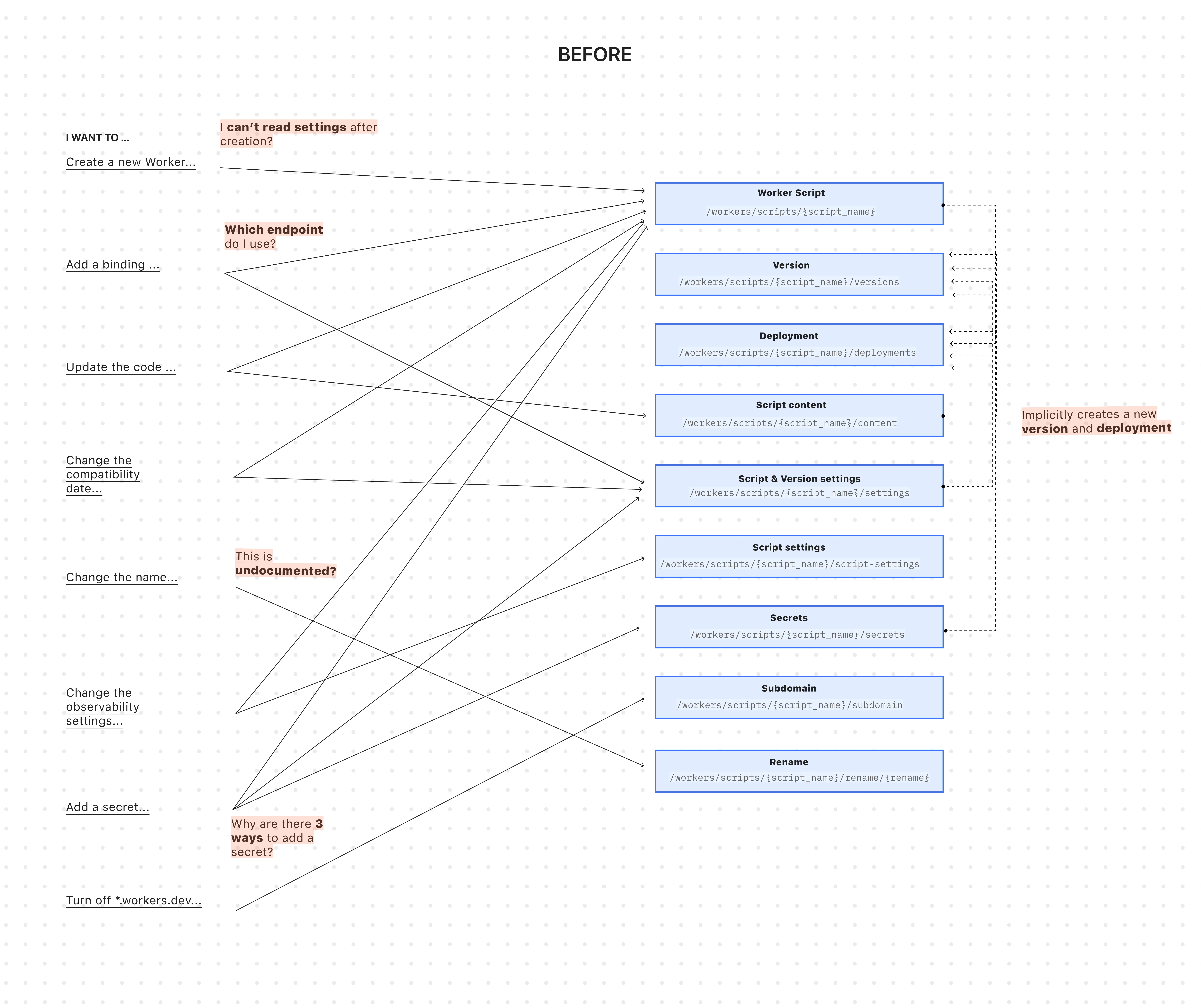
The existing API was originally designed for simple, one-shot script uploads:
Terminal window curl -X PUT "https://api.cloudflare.com/client/v4/accounts/$ACCOUNT_ID/workers/scripts/$SCRIPT_NAME" \-H "X-Auth-Email: $CLOUDFLARE_EMAIL" \-H "X-Auth-Key: $CLOUDFLARE_API_KEY" \-H "Content-Type: multipart/form-data" \-F 'metadata={"main_module": "worker.js","compatibility_date": "$today$"}' \-F "worker.js=@worker.js;type=application/javascript+module"This API worked for creating a basic Worker, uploading all of its code, and deploying it immediately — but came with challenges:
-
A Worker couldn't exist without code: To create a Worker, you had to upload its code in the same API request. This meant platform teams couldn't provision Workers with the proper settings, and then hand them off to development teams to deploy the actual code.
-
Several endpoints implicitly created deployments: Simple updates like adding a secret or changing a script's content would implicitly create a new version and immediately deploy it.
-
Updating a setting was confusing: Configuration was scattered across eight endpoints with overlapping responsibilities. This ambiguity made it difficult for human developers (and even more so for AI agents) to reliably update a Worker via API.
-
Scripts used names as primary identifiers: This meant simple renames could turn into a risky migration, requiring you to create a brand new Worker and update every reference. If you were using Terraform, this could inadvertently destroy your Worker altogether.
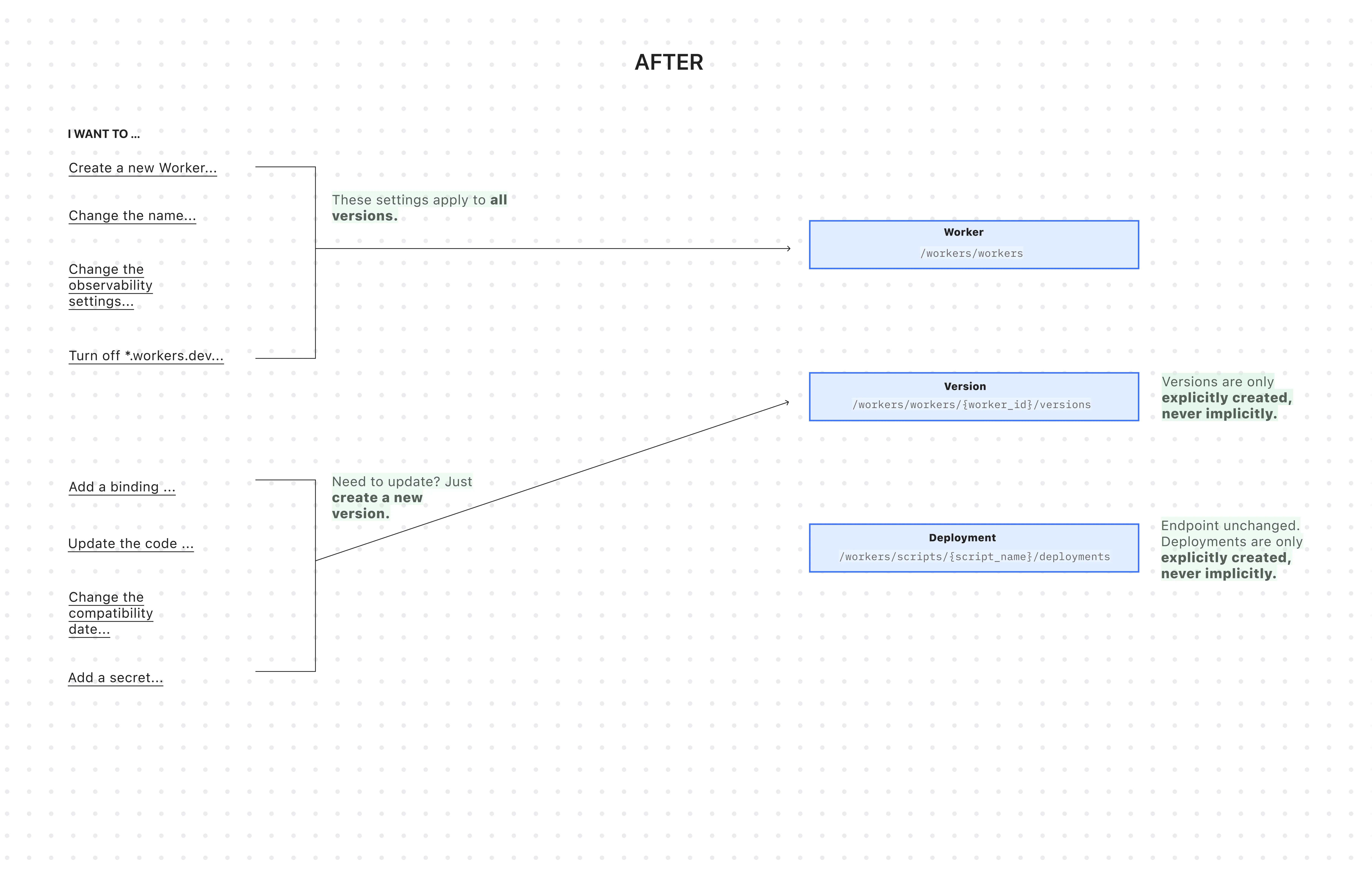
All endpoints now use simple JSON payloads, with script content embedded as
base64-encoded strings -- a more consistent and reliable approach than the previousmultipart/form-dataformat.-
Worker: The parent resource representing your application. It has a stable UUID and holds persistent settings like
name,tags, andlogpush. You can now create a Worker to establish its identity and settings before any code is uploaded. -
Version: An immutable snapshot of your code and its specific configuration, like bindings and
compatibility_date. Creating a new version is a safe action that doesn't affect live traffic. -
Deployment: An explicit action that directs traffic to a specific version.
Workers are now standalone resources that can be created and configured without any code. Platform teams can provision Workers with the right settings, then hand them off to development teams for implementation.
TypeScript // Step 1: Platform team creates the Worker resource (no code needed)const worker = await client.workers.beta.workers.create({name: "payment-service",account_id: "...",observability: {enabled: true,},});// Step 2: Development team adds code and creates a version laterconst version = await client.workers.beta.workers.versions.create(worker.id, {account_id: "...",main_module: "worker.js",compatibility_date: "$today",bindings: [ /*...*/ ],modules: [{name: "worker.js",content_type: "application/javascript+module",content_base64: Buffer.from(scriptContent).toString("base64"),},],});// Step 3: Deploy explicitly when readyconst deployment = await client.workers.scripts.deployments.create(worker.name, {account_id: "...",strategy: "percentage",versions: [{percentage: 100,version_id: version.id,},],});If you use Terraform, you can now declare the Worker in your Terraform configuration and manage configuration outside of Terraform in your Worker's
wrangler.jsoncfile and deploy code changes using Wrangler.resource "cloudflare_worker" "my_worker" {account_id = "..."name = "my-important-service"}# Manage Versions and Deployments here or outside of Terraform# resource "cloudflare_worker_version" "my_worker_version" {}# resource "cloudflare_workers_deployment" "my_worker_deployment" {}Creating a version and deploying it are now always explicit, separate actions - never implicit side effects. To update version-specific settings (like bindings), you create a new version with those changes. The existing deployed version remains unchanged until you explicitly deploy the new one.
Terminal window # Step 1: Create a new version with updated settings (doesn't affect live traffic)POST /workers/workers/{id}/versions{"compatibility_date": "$today","bindings": [{"name": "MY_NEW_ENV_VAR","text": "new_value","type": "plain_text"}],"modules": [...]}# Step 2: Explicitly deploy when ready (now affects live traffic)POST /workers/scripts/{script_name}/deployments{"strategy": "percentage","versions": [{"percentage": 100,"version_id": "new_version_id"}]}Configuration is now logically divided: Worker settings (like
nameandtags) persist across all versions, while Version settings (likebindingsandcompatibility_date) are specific to each code snapshot.Terminal window # Worker settings (the parent resource)PUT /workers/workers/{id}{"name": "payment-service","tags": ["production"],"logpush": true,}Terminal window # Version settings (the "code")POST /workers/workers/{id}/versions{"compatibility_date": "$today","bindings": [...],"modules": [...]}The
/workers/workers/path now supports addressing a Worker by both its immutable UUID and its mutable name.Terminal window # Both work for the same WorkerGET /workers/workers/29494978e03748669e8effb243cf2515 # UUID (stable for automation)GET /workers/workers/payment-service # Name (convenient for humans)This dual approach means:
- Developers can use readable names for debugging.
- Automation can rely on stable UUIDs to prevent errors when Workers are renamed.
- Terraform can rename Workers without destroying and recreating them.
- The pre-existing Workers REST API remains fully supported. Once the new API exits beta, we'll provide a migration timeline with ample notice and comprehensive migration guides.
- Existing Terraform resources and SDK methods will continue to be fully supported through the current major version.
- While the Deployments API currently remains on the
/scripts/endpoint, we plan to introduce a new Deployments endpoint under/workers/to match the new API structure.
JavaScript asset responses have been updated to use the
text/javascriptContent-Type header instead ofapplication/javascript. While both MIME types are widely supported by browsers, the HTML Living Standard explicitly recommendstext/javascriptas the preferred type going forward.This change improves:
- Standards alignment: Ensures consistency with the HTML spec and modern web platform guidance.
- Interoperability: Some developer tools, validators, and proxies expect text/javascript and may warn or behave inconsistently with application/javascript.
- Future-proofing: By following the spec-preferred MIME type, we reduce the risk of deprecation warnings or unexpected behavior in evolving browser environments.
- Consistency: Most frameworks, CDNs, and hosting providers now default to text/javascript, so this change matches common ecosystem practice.
Because all major browsers accept both MIME types, this update is backwards compatible and should not cause breakage.
Users will see this change on the next deployment of their assets.
You can now build Workflows using Python. With Python Workflows, you get automatic retries, state persistence, and the ability to run multi-step operations that can span minutes, hours, or weeks using Python’s familiar syntax and the Python Workers runtime.
Python Workflows use the same step-based execution model as JavaScript Workflows, but with Python syntax and access to Python’s ecosystem. Python Workflows also enable DAG (Directed Acyclic Graph) workflows, where you can define complex dependencies between steps using the depends parameter.
Here’s a simple example:
Python from workers import Response, WorkflowEntrypointclass PythonWorkflowStarter(WorkflowEntrypoint):async def run(self, event, step):@step.do("my first step")async def my_first_step():# do some workreturn "Hello Python!"await my_first_step()await step.sleep("my-sleep-step", "10 seconds")@step.do("my second step")async def my_second_step():# do some more workreturn "Hello again!"await my_second_step()class Default(WorkerEntrypoint):async def fetch(self, request):await self.env.MY_WORKFLOW.create()return Response("Hello Workflow creation!")Python Workflows support the same core capabilities as JavaScript Workflows, including sleep scheduling, event-driven workflows, and built-in error handling with configurable retry policies.
To learn more and get started, refer to Python Workflows documentation.
You can now create a client (a Durable Object stub) to a Durable Object with the new
getByNamemethod, removing the need to convert Durable Object names to IDs and then create a stub.JavaScript // Before: (1) translate name to ID then (2) get a clientconst objectId = env.MY_DURABLE_OBJECT.idFromName("foo"); // or .newUniqueId()const stub = env.MY_DURABLE_OBJECT.get(objectId);// Now: retrieve client to Durable Object directly via its nameconst stub = env.MY_DURABLE_OBJECT.getByName("foo");// Use client to send request to the remote Durable Objectconst rpcResponse = await stub.sayHello();Each Durable Object has a globally-unique name, which allows you to send requests to a specific object from anywhere in the world. Thus, a Durable Object can be used to coordinate between multiple clients who need to work together. You can have billions of Durable Objects, providing isolation between application tenants.
To learn more, visit the Durable Objects API Documentation or the getting started guide.
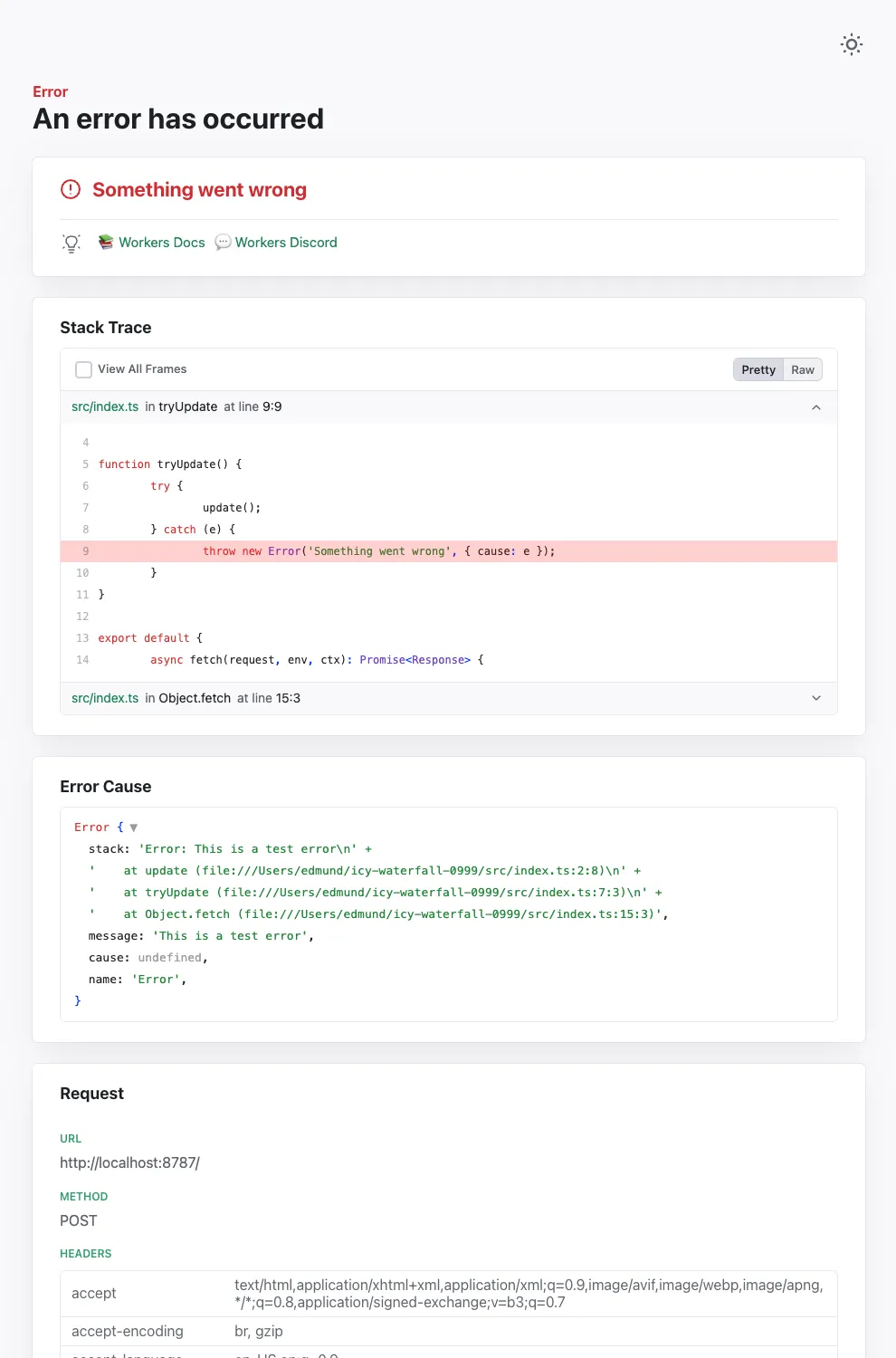
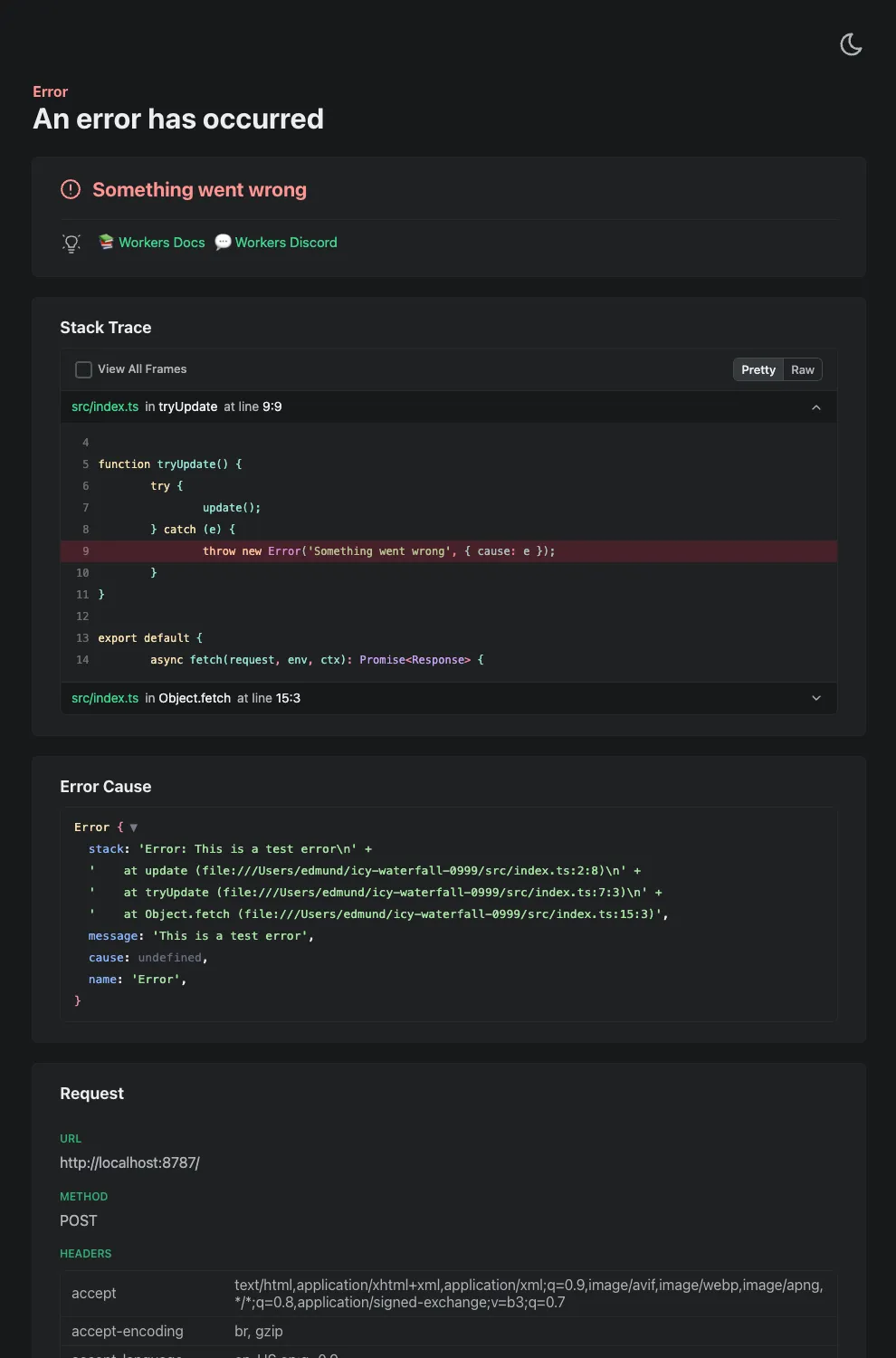
Wrangler's error screen has received several improvements to enhance your debugging experience!
The error screen now features a refreshed design thanks to youch ↗, with support for both light and dark themes, improved source map resolution logic that handles missing source files more reliably, and better error cause display.
Before After (Light) After (Dark) 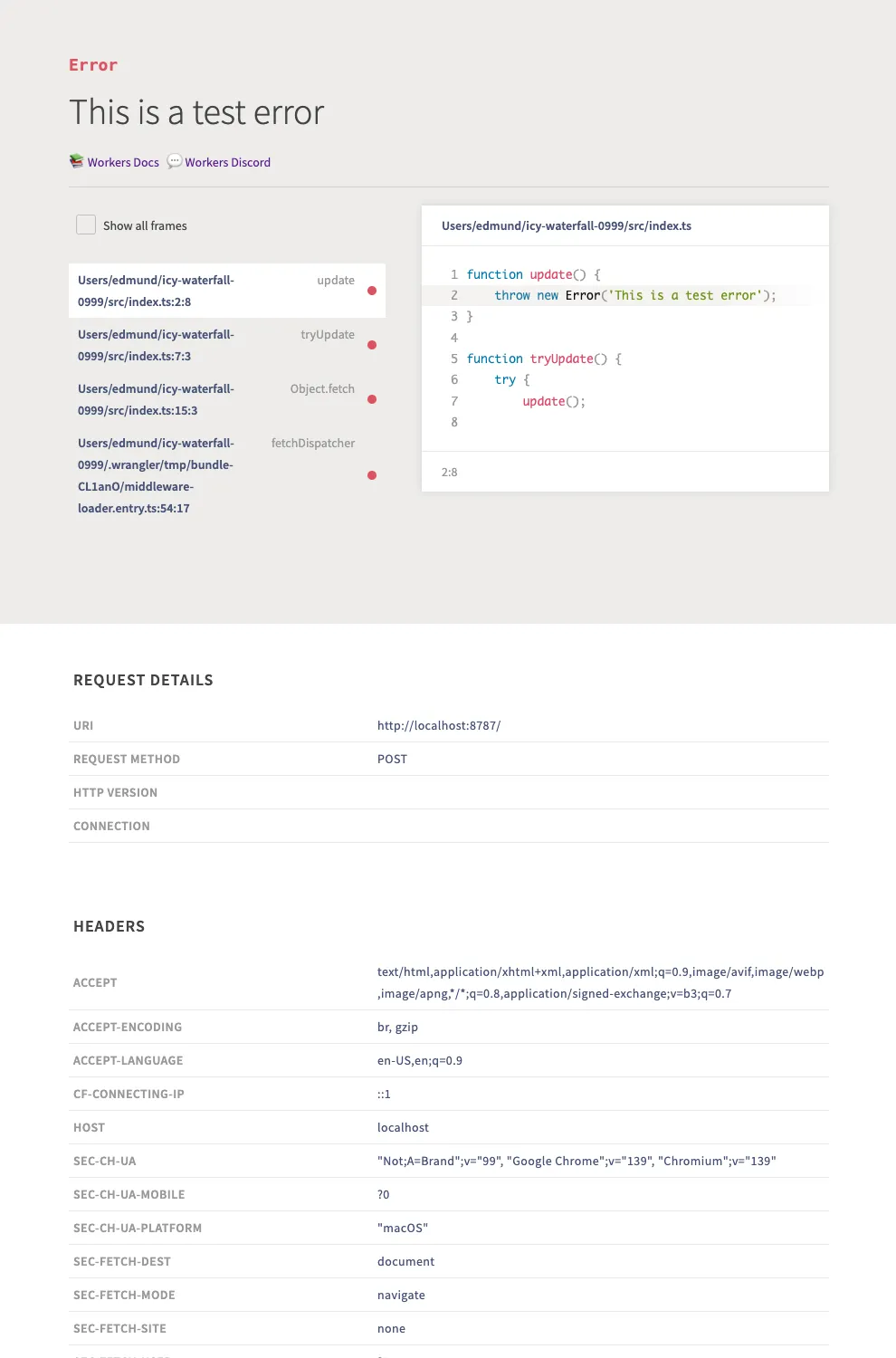
Try it out now with
npx wrangler@latest devin your Workers project.
Implementations of the
node:fsmodule ↗ and the Web File System API ↗ are now available in Workers.The
node:fsmodule provides access to a virtual file system in Workers. You can use it to read and write files, create directories, and perform other file system operations.The virtual file system is ephemeral with each individual request havig its own isolated temporary file space. Files written to the file system will not persist across requests and will not be shared across requests or across different Workers.
Workers running with the
nodejs_compatcompatibility flag will have access to thenode:fsmodule by default when the compatibility date is set to2025-09-01or later. Support for the API can also be enabled using theenable_nodejs_fs_modulecompatibility flag together with thenodejs_compatflag. Thenode:fsmodule can be disabled using thedisable_nodejs_fs_modulecompatibility flag.JavaScript import fs from "node:fs";const config = JSON.parse(fs.readFileSync("/bundle/config.json", "utf-8"));export default {async fetch(request) {return new Response(`Config value: ${config.value}`);},};There are a number of initial limitations to the
node:fsimplementation:- The glob APIs (e.g.
fs.globSync(...)) are not implemented. - The file watching APIs (e.g.
fs.watch(...)) are not implemented. - The file timestamps (modified time, access time, etc) are only partially supported. For now, these will always return the Unix epoch.
Refer to the Node.js documentation ↗ for more information on the
node:fsmodule and its APIs.The Web File System API provides access to the same virtual file system as the
node:fsmodule, but with a different API surface. The Web File System API is only available in Workers running with theenable_web_file_systemcompatibility flag. Thenodejs_compatcompatibility flag is not required to use the Web File System API.JavaScript const root = navigator.storage.getDirectory();export default {async fetch(request) {const tmp = await root.getDirectoryHandle("/tmp");const file = await tmp.getFileHandle("data.txt", { create: true });const writable = await file.createWritable();const writer = writable.getWriter();await writer.write("Hello, World!");await writer.close();return new Response("File written successfully!");},};As there are still some parts of the Web File System API that are not fully standardized, there may be some differences between the Workers implementation and the implementations in browsers.
- The glob APIs (e.g.
Static Assets: Fixed a bug in how redirect rules ↗ defined in your Worker's
_redirectsfile are processed.If you're serving Static Assets with a
_redirectsfile containing a rule like/ja/* /:splat, paths with double slashes were previously misinterpreted as external URLs. For example, visiting/ja//example.comwould incorrectly redirect tohttps://example.cominstead of/example.comon your domain. This has been fixed and double slashes now correctly resolve as local paths. Note: Cloudflare Pages was not affected by this issue.
We've updated preview URLs for Cloudflare Workers to support long branch names.
Previously, branch and Worker names exceeding the 63-character DNS limit would cause alias generation to fail, leaving pull requests without aliased preview URLs. This particularly impacted teams relying on descriptive branch naming.
Now, Cloudflare automatically truncates long branch names and appends a unique hash, ensuring every pull request gets a working preview link.
- 63 characters or less:
<branch-name>-<worker-name>→ Uses actual branch name as is - 64 characters or more:
<truncated-branch-name>--<hash>-<worker-name>→ Uses truncated name with 4-character hash - Hash generation: The hash is derived from the full branch name to ensure uniqueness
- Stable URLs: The same branch always generates the same hash across all commits
- Wrangler 4.30.0 or later: This feature requires updating to wrangler@4.30.0+
- No configuration needed: Works automatically with existing preview URL setups
- 63 characters or less:
We are changing how Python Workers are structured by default. Previously, handlers were defined at the top-level of a module as
on_fetch,on_scheduled, etc. methods, but now they live in an entrypoint class.Here's an example of how to now define a Worker with a fetch handler:
Python from workers import Response, WorkerEntrypointclass Default(WorkerEntrypoint):async def fetch(self, request):return Response("Hello World!")To keep using the old-style handlers, you can specify the
disable_python_no_global_handlerscompatibility flag in your wrangler file:JSONC {"compatibility_flags": ["disable_python_no_global_handlers"]}TOML compatibility_flags = [ "disable_python_no_global_handlers" ]Consult the Python Workers documentation for more details.
The recent Cloudflare Terraform Provider ↗ and SDK releases (such as cloudflare-typescript ↗) bring significant improvements to the Workers developer experience. These updates focus on reliability, performance, and adding Python Workers support.
Resolved several issues with the
cloudflare_workers_scriptresource that resulted in unwarranted plan diffs, including:- Using Durable Objects migrations
- Using some bindings such as
secret_text - Using smart placement
A resource should never show a plan diff if there isn't an actual change. This fix reduces unnecessary noise in your Terraform plan and is available in Cloudflare Terraform Provider 5.8.0.
You can now specify
content_fileandcontent_sha256instead ofcontent. This prevents the Workers script content from being stored in the state file which greatly reduces plan diff size and noise. If your workflow synced plans remotely, this should now happen much faster since there is less data to sync. This is available in Cloudflare Terraform Provider 5.7.0.resource "cloudflare_workers_script" "my_worker" {account_id = "123456789"script_name = "my_worker"main_module = "worker.mjs"content_file = "worker.mjs"content_sha256 = filesha256("worker.mjs")}Fixed the
cloudflare_workers_scriptresource to properly support headers and redirects for Assets:resource "cloudflare_workers_script" "my_worker" {account_id = "123456789"script_name = "my_worker"main_module = "worker.mjs"content_file = "worker.mjs"content_sha256 = filesha256("worker.mjs")assets = {config = {headers = file("_headers")redirects = file("_redirects")}# Completion jwt from:# https://docs.ahq.lat/api/resources/workers/subresources/assets/subresources/upload/jwt = "jwt"}}Available in Cloudflare Terraform Provider 5.8.0.
Added support for uploading Python Workers (beta) in Terraform. You can now deploy Python Workers with:
resource "cloudflare_workers_script" "my_worker" {account_id = "123456789"script_name = "my_worker"content_file = "worker.py"content_sha256 = filesha256("worker.py")content_type = "text/x-python"}Available in Cloudflare Terraform Provider 5.8.0.
Fixed an issue where Workers script versions in the SDK did not allow uploading files. This now works, and also has an improved files upload interface:
JavaScript const scriptContent = `export default {async fetch(request, env, ctx) {return new Response('Hello World!', { status: 200 });}};`;client.workers.scripts.versions.create('my-worker', {account_id: '123456789',metadata: {main_module: 'my-worker.mjs',},files: [await toFile(Buffer.from(scriptContent),'my-worker.mjs',{type: "application/javascript+module",})]});Will be available in cloudflare-typescript 4.6.0. A similar change will be available in cloudflare-python 4.4.0.
Previously when creating a KV value like this:
JavaScript await cf.kv.namespaces.values.update("my-kv-namespace", "key1", {account_id: "123456789",metadata: "my metadata",value: JSON.stringify({hello: "world"})});...and recalling it in your Worker like this:
TypeScript const value = await c.env.KV.get<{hello: string}>("key1", "json");You'd get back this:
{metadata:'my metadata', value:"{'hello':'world'}"}instead of the correct value of{hello: 'world'}This is fixed in cloudflare-typescript 4.5.0 and will be fixed in cloudflare-python 4.4.0.
A minimal implementation of the MessageChannel API ↗ is now available in Workers. This means that you can use
MessageChannelto send messages between different parts of your Worker, but not across different Workers.The
MessageChannelandMessagePortAPIs will be available by default at the global scope with any worker using a compatibility date of2025-08-15or later. It is also available using theexpose_global_message_channelcompatibility flag, or can be explicitly disabled using theno_expose_global_message_channelcompatibility flag.JavaScript const { port1, port2 } = new MessageChannel();port2.onmessage = (event) => {console.log('Received message:', event.data);};port2.postMessage('Hello from port2!');Any value that can be used with the
structuredClone(...)API can be sent over the port.There are a number of key limitations to the
MessageChannelAPI in Workers:- Transfer lists are currently not supported. This means that you will not be able to transfer
ownership of objects like
ArrayBufferorMessagePortbetween ports. - The
MessagePortis not yet serializable. This means that you cannot send aMessagePortobject through thepostMessagemethod or via JSRPC calls. - The
'messageerror'event is only partially supported. If the'onmessage'handler throws an error, the'messageerror'event will be triggered, however, it will not be triggered when there are errors serializing or deserializing the message data. Instead, the error will be thrown when thepostMessagemethod is called on the sending port. - The
'close'event will be emitted on both ports when one of the ports is closed, however it will not be emitted when the Worker is terminated or when one of the ports is garbage collected.
- Transfer lists are currently not supported. This means that you will not be able to transfer
ownership of objects like
Now, you can use
.envfiles to provide secrets and override environment variables on theenvobject during local development with Wrangler and the Cloudflare Vite plugin.Previously in local development, if you wanted to provide secrets or environment variables during local development, you had to use
.dev.varsfiles. This is still supported, but you can now also use.envfiles, which are more familiar to many developers.You can create a
.envfile in your project root to define environment variables that will be used when runningwrangler devorvite dev. The.envfile should be formatted like adotenvfile, such asKEY="VALUE":.env TITLE="My Worker"API_TOKEN="dev-token"When you run
wrangler devorvite dev, the environment variables defined in the.envfile will be available in your Worker code via theenvobject:JavaScript export default {async fetch(request, env) {const title = env.TITLE; // "My Worker"const apiToken = env.API_TOKEN; // "dev-token"const response = await fetch(`https://api.example.com/data?token=${apiToken}`,);return new Response(`Title: ${title} - ` + (await response.text()));},};If your Worker defines multiple environments, you can set different variables for each environment (ex: production or staging) by creating files named
.env.<environment-name>.When you use
wrangler <command> --env <environment-name>orCLOUDFLARE_ENV=<environment-name> vite dev, the corresponding environment-specific file will also be loaded and merged with the.envfile.For example, if you want to set different environment variables for the
stagingenvironment, you can create a file named.env.staging:.env.staging API_TOKEN="staging-token"When you run
wrangler dev --env stagingorCLOUDFLARE_ENV=staging vite dev, the environment variables from.env.stagingwill be merged onto those from.env.JavaScript export default {async fetch(request, env) {const title = env.TITLE; // "My Worker" (from `.env`)const apiToken = env.API_TOKEN; // "staging-token" (from `.env.staging`, overriding the value from `.env`)const response = await fetch(`https://api.example.com/data?token=${apiToken}`,);return new Response(`Title: ${title} - ` + (await response.text()));},};For more information on how to use
.envfiles with Wrangler and the Cloudflare Vite plugin, see the following documentation:
You can now import
waitUntilfromcloudflare:workersto extend your Worker's execution beyond the request lifecycle from anywhere in your code.Previously,
waitUntilcould only be accessed through the execution context (ctx) parameter passed to your Worker's handler functions. This meant that if you needed to schedule background tasks from deeply nested functions or utility modules, you had to pass thectxobject through multiple function calls to accesswaitUntil.Now, you can import
waitUntildirectly and use it anywhere in your Worker without needing to passctxas a parameter:JavaScript import { waitUntil } from "cloudflare:workers";export function trackAnalytics(eventData) {const analyticsPromise = fetch("https://analytics.example.com/track", {method: "POST",body: JSON.stringify(eventData),});// Extend execution to ensure analytics tracking completeswaitUntil(analyticsPromise);}This is particularly useful when you want to:
- Schedule background tasks from utility functions or modules
- Extend execution for analytics, logging, or cleanup operations
- Avoid passing the execution context through multiple layers of function calls
JavaScript import { waitUntil } from "cloudflare:workers";export default {async fetch(request, env, ctx) {// Background task that should complete even after response is sentcleanupTempData(env.KV_NAMESPACE);return new Response("Hello, World!");}};function cleanupTempData(kvNamespace) {// This function can now use waitUntil without needing ctxconst deletePromise = kvNamespace.delete("temp-key");waitUntil(deletePromise);}For more information, see the
waitUntildocumentation.
By setting the value of the
cacheproperty tono-cache, you can force Cloudflare's cache to revalidate its contents with the origin when making subrequests from Cloudflare Workers.index.js export default {async fetch(req, env, ctx) {const request = new Request("https://cloudflare.com", {cache: "no-cache",});const response = await fetch(request);return response;},};index.ts export default {async fetch(req, env, ctx): Promise<Response> {const request = new Request("https://cloudflare.com", { cache: 'no-cache'});const response = await fetch(request);return response;}} satisfies ExportedHandler<Environment>When
no-cacheis set, the Worker request will first look for a match in Cloudflare's cache, then:- If there is a match, a conditional request is sent to the origin, regardless of whether or not the match is fresh or stale. If the resource has not changed, the cached version is returned. If the resource has changed, it will be downloaded from the origin, updated in the cache, and returned.
- If there is no match, Workers will make a standard request to the origin and cache the response.
This increases compatibility with NPM packages and JavaScript frameworks that rely on setting the
cacheproperty, which is a cross-platform standard part of theRequestinterface. Previously, if you set thecacheproperty onRequestto'no-cache', the Workers runtime threw an exception.- Learn how the Cache works with Cloudflare Workers
- Enable Node.js compatibility for your Cloudflare Worker
- Explore Runtime APIs and Bindings available in Cloudflare Workers
The latest releases of @cloudflare/agents ↗ brings major improvements to MCP transport protocols support and agents connectivity. Key updates include:
MCP servers can now request user input during tool execution, enabling interactive workflows like confirmations, forms, and multi-step processes. This feature uses durable storage to preserve elicitation state even during agent hibernation, ensuring seamless user interactions across agent lifecycle events.
TypeScript // Request user confirmation via elicitationconst confirmation = await this.elicitInput({message: `Are you sure you want to increment the counter by ${amount}?`,requestedSchema: {type: "object",properties: {confirmed: {type: "boolean",title: "Confirm increment",description: "Check to confirm the increment",},},required: ["confirmed"],},});Check out our demo ↗ to see elicitation in action.
MCP now supports HTTP streamable transport which is recommended over SSE. This transport type offers:
- Better performance: More efficient data streaming and reduced overhead
- Improved reliability: Enhanced connection stability and error recover- Automatic fallback: If streamable transport is not available, it gracefully falls back to SSE
TypeScript export default MyMCP.serve("/mcp", {binding: "MyMCP",});The SDK automatically selects the best available transport method, gracefully falling back from streamable-http to SSE when needed.
Significant improvements to MCP server connections and transport reliability:
- Auto transport selection: Automatically determines the best transport method, falling back from streamable-http to SSE as needed
- Improved error handling: Better connection state management and error reporting for MCP servers
- Reliable prop updates: Centralized agent property updates ensure consistency across different contexts
You can use
.queue()to enqueue background work — ideal for tasks like processing user messages, sending notifications etc.TypeScript class MyAgent extends Agent {doSomethingExpensive(payload) {// a long running process that you want to run in the background}queueSomething() {await this.queue("doSomethingExpensive", somePayload); // this will NOT block further execution, and runs in the backgroundawait this.queue("doSomethingExpensive", someOtherPayload); // the callback will NOT run until the previous callback is complete// ... call as many times as you want}}Want to try it yourself? Just define a method like processMessage in your agent, and you’re ready to scale.
Want to build an AI agent that can receive and respond to emails automatically? With the new email adapter and onEmail lifecycle method, now you can.
TypeScript export class EmailAgent extends Agent {async onEmail(email: AgentEmail) {const raw = await email.getRaw();const parsed = await PostalMime.parse(raw);// create a response based on the email contents// and then send a replyawait this.replyToEmail(email, {fromName: "Email Agent",body: `Thanks for your email! You've sent us "${parsed.subject}". We'll process it shortly.`,});}}You route incoming mail like this:
TypeScript export default {async email(email, env) {await routeAgentEmail(email, env, {resolver: createAddressBasedEmailResolver("EmailAgent"),});},};You can find a full example here ↗.
Custom methods are now automatically wrapped with the agent's context, so calling
getCurrentAgent()should work regardless of where in an agent's lifecycle it's called. Previously this would not work on RPC calls, but now just works out of the box.TypeScript export class MyAgent extends Agent {async suggestReply(message) {// getCurrentAgent() now correctly works, even when called inside an RPC methodconst { agent } = getCurrentAgent()!;return generateText({prompt: `Suggest a reply to: "${message}" from "${agent.name}"`,tools: [replyWithEmoji],});}}Try it out and tell us what you build!
We’ve shipped a major release for the @cloudflare/sandbox ↗ SDK, turning it into a full-featured, container-based execution platform that runs securely on Cloudflare Workers.
This update adds live streaming of output, persistent Python and JavaScript code interpreters with rich output support (charts, tables, HTML, JSON), file system access, Git operations, full background process control, and the ability to expose running services via public URLs.
This makes it ideal for building AI agents, CI runners, cloud REPLs, data analysis pipelines, or full developer tools — all without managing infrastructure.
Create persistent code contexts with support for rich visual + structured outputs.
Creates a new code execution context with persistent state.
TypeScript // Create a Python contextconst pythonCtx = await sandbox.createCodeContext({ language: "python" });// Create a JavaScript contextconst jsCtx = await sandbox.createCodeContext({ language: "javascript" });Options:
- language: Programming language ('python' | 'javascript' | 'typescript')
- cwd: Working directory (default: /workspace)
- envVars: Environment variables for the context
Executes code with optional streaming callbacks.
TypeScript // Simple executionconst execution = await sandbox.runCode('print("Hello World")', {context: pythonCtx,});// With streaming callbacksawait sandbox.runCode(`for i in range(5):print(f"Step {i}")time.sleep(1)`,{context: pythonCtx,onStdout: (output) => console.log("Real-time:", output.text),onResult: (result) => console.log("Result:", result),},);Options:
- language: Programming language ('python' | 'javascript' | 'typescript')
- cwd: Working directory (default: /workspace)
- envVars: Environment variables for the context
Returns a streaming response for real-time processing.
TypeScript const stream = await sandbox.runCodeStream("import time; [print(i) for i in range(10)]",);// Process the stream as neededInterpreter outputs are auto-formatted and returned in multiple formats:
- text
- html (e.g., Pandas tables)
- png, svg (e.g., Matplotlib charts)
- json (structured data)
- chart (parsed visualizations)
TypeScript const result = await sandbox.runCode(`import seaborn as snsimport matplotlib.pyplot as pltdata = sns.load_dataset("flights")pivot = data.pivot("month", "year", "passengers")sns.heatmap(pivot, annot=True, fmt="d")plt.title("Flight Passengers")plt.show()pivot.to_dict()`,{ context: pythonCtx },);if (result.png) {console.log("Chart output:", result.png);}Start background processes and expose them with live URLs.
TypeScript await sandbox.startProcess("python -m http.server 8000");const preview = await sandbox.exposePort(8000);console.log("Live preview at:", preview.url);Start, inspect, and terminate long-running background processes.
TypeScript const process = await sandbox.startProcess("node server.js");console.log(`Started process ${process.id} with PID ${process.pid}`);// Monitor the processconst logStream = await sandbox.streamProcessLogs(process.id);for await (const log of parseSSEStream<LogEvent>(logStream)) {console.log(`Server: ${log.data}`);}- listProcesses() - List all running processes
- getProcess(id) - Get detailed process status
- killProcess(id, signal) - Terminate specific processes
- killAllProcesses() - Kill all processes
- streamProcessLogs(id, options) - Stream logs from running processes
- getProcessLogs(id) - Get accumulated process output
Clone Git repositories directly into the sandbox.
TypeScript await sandbox.gitCheckout("https://github.com/user/repo", {branch: "main",targetDir: "my-project",});Sandboxes are still experimental. We're using them to explore how isolated, container-like workloads might scale on Cloudflare — and to help define the developer experience around them.
As part of the ongoing open beta for Workers Builds, we’ve increased the available disk space for builds from 8 GB to 20 GB for both Free and Paid plans.
This provides more space for larger projects, dependencies, and build artifacts while improving overall build reliability.
Metric Free Plan Paid Plans Disk Space 20 GB 20 GB All other build limits — including CPU, memory, build minutes, and timeout remain unchanged.
You can now configure and run Containers alongside your Worker during local development when using the Cloudflare Vite plugin. Previously, you could only develop locally when using Wrangler as your local development server.
You can simply configure your Worker and your Container(s) in your Wrangler configuration file:
JSONC {"name": "container-starter","main": "src/index.js","containers": [{"class_name": "MyContainer","image": "./Dockerfile","instances": 5}],"durable_objects": {"bindings": [{"class_name": "MyContainer","name": "MY_CONTAINER"}]},"migrations": [{"new_sqlite_classes": ["MyContainer"],"tag": "v1"}],}TOML name = "container-starter"main = "src/index.js"[[containers]]class_name = "MyContainer"image = "./Dockerfile"instances = 5[[durable_objects.bindings]]class_name = "MyContainer"name = "MY_CONTAINER"[[migrations]]new_sqlite_classes = [ "MyContainer" ]tag = "v1"Once your Worker and Containers are configured, you can access the Container instances from your Worker code:
TypeScript import { Container, getContainer } from "@cloudflare/containers";export class MyContainer extends Container {defaultPort = 4000; // Port the container is listening onsleepAfter = "10m"; // Stop the instance if requests not sent for 10 minutes}async fetch(request, env) {const { "session-id": sessionId } = await request.json();// Get the container instance for the given session IDconst containerInstance = getContainer(env.MY_CONTAINER, sessionId)// Pass the request to the container instance on its default portreturn containerInstance.fetch(request);}To develop your Worker locally, start a local dev server by running
Terminal window vite devin your terminal.
Learn more about Cloudflare Containers ↗ or the Cloudflare Vite plugin ↗ in our developer docs.
Any template which uses Worker environment variables, secrets, or Secrets Store secrets can now be deployed using a Deploy to Cloudflare button.
Define environment variables and secrets store bindings in your Wrangler configuration file as normal:
JSONC {"name": "my-worker","main": "./src/index.ts",// Set this to today's date"compatibility_date": "2026-06-04","vars": {"API_HOST": "https://example.com",},"secrets_store_secrets": [{"binding": "API_KEY","store_id": "demo","secret_name": "api-key"}]}TOML name = "my-worker"main = "./src/index.ts"# Set this to today's datecompatibility_date = "2026-06-04"[vars]API_HOST = "https://example.com"[[secrets_store_secrets]]binding = "API_KEY"store_id = "demo"secret_name = "api-key"Add secrets to a
.dev.vars.exampleor.env.examplefile:.dev.vars.example COOKIE_SIGNING_KEY=my-secret # commentAnd optionally, you can add a description for these bindings in your template's
package.jsonto help users understand how to configure each value:package.json {"name": "my-worker","private": true,"cloudflare": {"bindings": {"API_KEY": {"description": "Select your company's API key for connecting to the example service."},"COOKIE_SIGNING_KEY": {"description": "Generate a random string using `openssl rand -hex 32`."}}}}These secrets and environment variables will be presented to users in the dashboard as they deploy this template, allowing them to configure each value. Additional information about creating templates and Deploy to Cloudflare buttons can be found in our documentation.
Now, when you connect your Cloudflare Worker to a git repository on GitHub or GitLab, each branch of your repository has its own stable preview URL, that you can use to preview code changes before merging the pull request and deploying to production.
This works the same way that Cloudflare Pages does — every time you create a pull request, you'll automatically get a shareable preview link where you can see your changes running, without affecting production. The link stays the same, even as you add commits to the same branch. These preview URLs are named after your branch and are posted as a comment to each pull request. The URL stays the same with every commit and always points to the latest version of that branch.
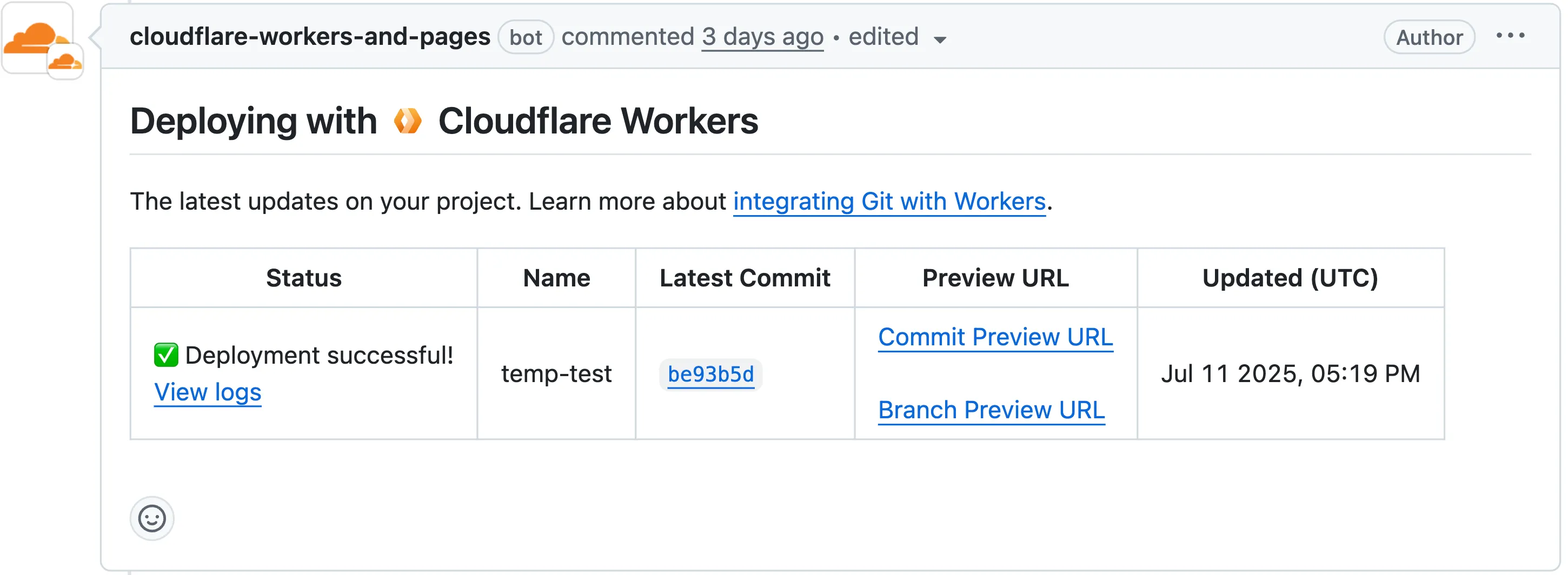
Each comment includes two preview URLs as shown above:
- Commit Preview URL: Unique to the specific version/commit (e.g.,
<version-prefix>-<worker-name>.<subdomain>.workers.dev) - Branch Preview URL: A stable alias based on the branch name (e.g.,
<branch-name>-<worker-name>.<subdomain>.workers.dev)
When you create a pull request:
- A preview alias is automatically created based on the Git branch name (e.g.,
<branch-name>becomes<branch-name>-<worker-name>.<subdomain>.workers.dev) - No configuration is needed, the alias is generated for you
- The link stays the same even as you add commits to the same branch
- Preview URLs are posted directly to your pull request as comments (just like they are in Cloudflare Pages)
You can also assign a custom preview alias using the Wrangler CLI, by passing the
--preview-aliasflag when uploading a version of your Worker:Terminal window wrangler versions upload --preview-alias staging- Only available on the workers.dev subdomain (custom domains not yet supported)
- Requires Wrangler v4.21.0+
- Preview URLs are not generated for Workers that use Durable Objects
- Not yet supported for Workers for Platforms
- Commit Preview URL: Unique to the specific version/commit (e.g.,
Vite 7 ↗ is now supported in the Cloudflare Vite plugin. See the Vite changelog ↗ for a list of changes.
Note that the minimum Node.js versions supported by Vite 7 are 20.19 and 22.12. We continue to support Vite 6 so you do not need to immediately upgrade.
Workers now support breakpoint debugging using VSCode's built-in JavaScript Debug Terminals ↗. All you have to do is open a JS debug terminal (
Cmd + Shift + Pand then typejavascript debug) and runwrangler dev(orvite dev) from within the debug terminal. VSCode will automatically connect to your running Worker (even if you're running multiple Workers at once!) and start a debugging session.In 2023 we announced breakpoint debugging support ↗ for Workers, which meant that you could easily debug your Worker code in Wrangler's built-in devtools (accessible via the
[d]hotkey) as well as multiple other devtools clients, including VSCode ↗. For most developers, breakpoint debugging via VSCode is the most natural flow, but until now it's required manually configuring alaunch.jsonfile ↗, runningwrangler dev, and connecting via VSCode's built-in debugger. Now it's much more seamless!