
Skip to content
Docs

Changelog

New updates and improvements at Cloudflare.

Network security
hero image
  1. Cloudflare Rulesets now includes encode_base64() and sha256() functions, enabling you to generate signed request headers directly in rule expressions. These functions support common patterns like constructing a canonical string from request attributes, computing a SHA256 digest, and Base64-encoding the result.


    New functions

    FunctionDescriptionAvailability
    encode_base64(input, flags)Encodes a string to Base64 format. Optional flags parameter: u for URL-safe encoding, p for padding (adds = characters to make the output length a multiple of 4, as required by some systems). By default, output is standard Base64 without padding.All plans (in header transform rules)
    sha256(input)Computes a SHA256 hash of the input string.Requires enablement

    Examples

    Encode a string to Base64 format:

    encode_base64("hello world")

    Returns: aGVsbG8gd29ybGQ

    Encode a string to Base64 format with padding:

    encode_base64("hello world", "p")

    Returns: aGVsbG8gd29ybGQ=

    Perform a URL-safe Base64 encoding of a string:

    encode_base64("hello world", "u")

    Returns: aGVsbG8gd29ybGQ

    Compute the SHA256 hash of a secret token:

    sha256("my-token")

    Returns a hash that your origin can validate to authenticate requests.

    Compute the SHA256 hash of a string and encode the result to Base64 format:

    encode_base64(sha256("my-token"))

    Combines hashing and encoding for systems that expect Base64-encoded signatures.

    For more information, refer to the Functions reference.

  1. New functions for array and map operations

    Cloudflare Rulesets now include new functions that enable advanced expression logic for evaluating arrays and maps. These functions allow you to build rules that match against lists of values in request or response headers, enabling use cases like country-based blocking using custom headers.


    New functions

    FunctionDescription
    split(source, delimiter)Splits a string into an array of strings using the specified delimiter.
    join(array, delimiter)Joins an array of strings into a single string using the specified delimiter.
    has_key(map, key)Returns true if the specified key exists in the map.
    has_value(map, value)Returns true if the specified value exists in the map.

    Example use cases

    Check if a country code exists in a header list:

    has_value(split(http.response.headers["x-allow-country"][0], ","), ip.src.country)

    Check if a specific header key exists:

    has_key(http.request.headers, "x-custom-header")

    Join array values for logging or comparison:

    join(http.request.headers.names, ", ")

    For more information, refer to the Functions reference.

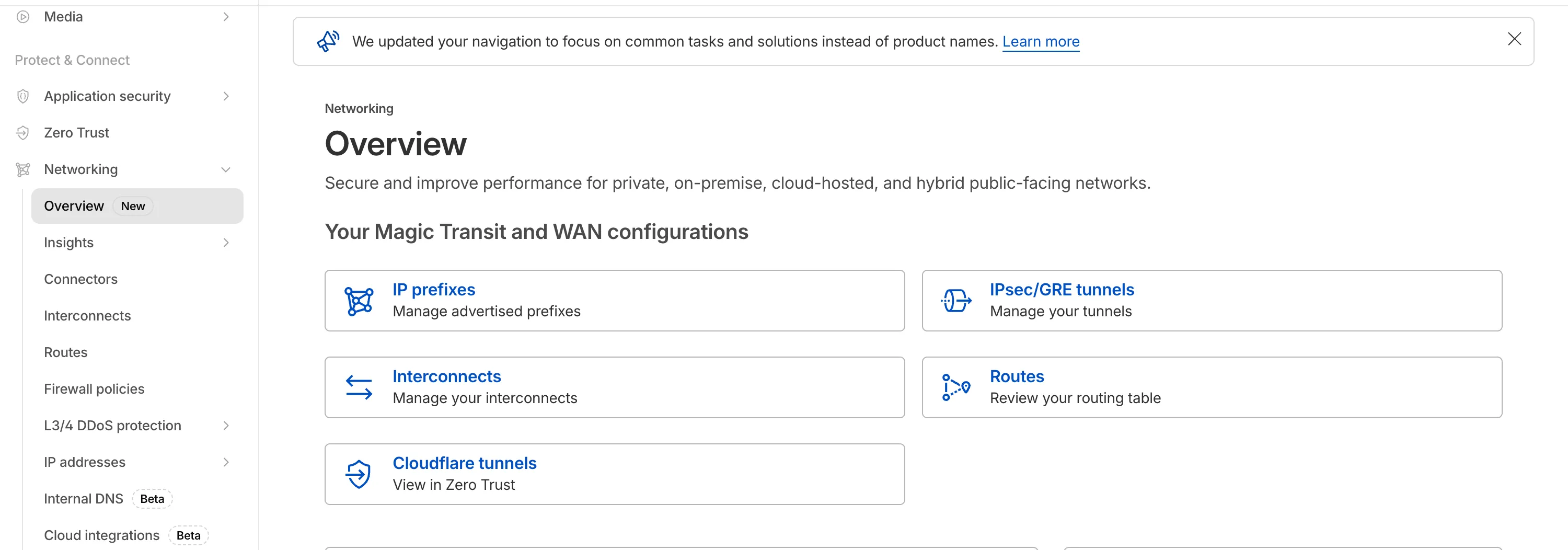
  1. The Network Services menu structure in Cloudflare's dashboard has been updated to reflect solutions and capabilities instead of product names. This will make it easier for you to find what you need and better reflects how our services work together.

    Your existing configurations will remain the same, and you will have access to all of the same features and functionality.

    The changes visible in your dashboard may vary based on the products you use. Overall, changes relate to Magic Transit, Magic WAN, and Magic Firewall.

    Summary of changes:

    • A new Overview page provides access to the most common tasks across Magic Transit and Magic WAN.
    • Product names have been removed from top-level navigation.
    • Magic Transit and Magic WAN configuration is now organized under Routes and Connectors. For example, you will find IP Prefixes under Routes, and your GRE/IPsec Tunnels under Connectors.
    • Magic Firewall policies are now called Firewall Policies.
    • Magic WAN Connectors and Connector On-Ramps are now referenced in the dashboard as Appliances and Appliance profiles. They can be found under Connectors > Appliances.
    • Network analytics, network health, and real-time analytics are now available under Insights.
    • Packet Captures are found under Insights > Diagnostics.
    • You can manage your Sites from Insights > Network health.
    • You can find Magic Network Monitoring under Insights > Network flow.

    If you would like to provide feedback, complete this form. You can also find these details in the January 7, 2026 email titled [FYI] Upcoming Network Services Dashboard Navigation Update.

    Networking Navigation
  1. We have made it easier to validate connectivity when deploying WARP Connector as part of your software-defined private network.

    You can now ping the WARP Connector host directly on its LAN IP address immediately after installation. This provides a fast, familiar way to confirm that the Connector is online and reachable within your network before testing access to downstream services.

    Starting with version 2025.10.186.0, WARP Connector responds to traffic addressed to its own LAN IP, giving you immediate visibility into Connector reachability.

    Learn more about deploying WARP Connector and building private network connectivity with Cloudflare One.

  1. The ip.src.metro_code field in the Ruleset Engine is now populated with DMA (Designated Market Area) data.

    You can use this field to build rules that target traffic based on geographic market areas, enabling more granular location-based policies for your applications.

    Field details

    FieldTypeDescription
    ip.src.metro_codeString | nullThe metro code (DMA) of the incoming request's IP address. Returns the designated market area code for the client's location.

    Example filter expression:

    ip.src.metro_code eq "501"

    For more information, refer to the Fields reference.

  1. Magic WAN Connector now exports NetFlow data for breakout traffic to Magic Network Monitoring (MNM), providing visibility into traffic that bypasses Cloudflare's security filtering.

    This feature allows you to:

    • Monitor breakout traffic statistics in the Cloudflare dashboard.
    • View traffic patterns for applications configured to bypass Cloudflare.
    • Maintain visibility across all traffic passing through your Magic WAN Connector.

    For more information, refer to NetFlow statistics.

  1. Starting February 2, 2026, the cloudflared proxy-dns command will be removed from all new cloudflared releases.

    This change is being made to enhance security and address a potential vulnerability in an underlying DNS library. This vulnerability is specific to the proxy-dns command and does not affect any other cloudflared features, such as the core Cloudflare Tunnel service.

    The proxy-dns command, which runs a client-side DNS-over-HTTPS (DoH) proxy, has been an officially undocumented feature for several years. This functionality is fully and securely supported by our actively developed products.

    Versions of cloudflared released before this date will not be affected and will continue to operate. However, note that our official support policy for any cloudflared release is one year from its release date.

    Migration paths

    We strongly advise users of this undocumented feature to migrate to one of the following officially supported solutions before February 2, 2026, to continue benefiting from secure DNS-over-HTTPS.

    End-user devices

    The preferred method for enabling DNS-over-HTTPS on user devices is the Cloudflare WARP client. The WARP client automatically secures and proxies all DNS traffic from your device, integrating it with your organization's Zero Trust policies and posture checks.

    Servers, routers, and IoT devices

    For scenarios where installing a client on every device is not possible (such as servers, routers, or IoT devices), we recommend using the WARP Connector.

    Instead of running cloudflared proxy-dns on a machine, you can install the WARP Connector on a single Linux host within your private network. This connector will act as a gateway, securely routing all DNS and network traffic from your entire subnet to Cloudflare for filtering and logging.

  1. Magic WAN now supports Automatic Return Routing (ARR), allowing customers to configure Magic on-ramps (IPsec/GRE/CNI) to learn the return path for traffic flows without requiring static routes.

    Key benefits:

    • Route-less mode: Static or dynamic routes are optional when using ARR.
    • Overlapping IP space support: Traffic originating from customer sites can use overlapping private IP ranges.
    • Symmetric routing: Return traffic is guaranteed to use the same connection as the original on-ramp.

    This feature is currently in beta and requires the new Unified Routing mode (beta).

    For configuration details, refer to Configure Automatic Return Routing.

  1. Magic WAN Connector now allows you to designate a specific WAN port for breakout traffic, giving you deterministic control over the egress path for latency-sensitive applications.

    With this feature, you can:

    • Pin breakout traffic for specific applications to a preferred WAN port.
    • Ensure critical traffic (such as Zoom or Teams) always uses your fastest or most reliable connection.
    • Benefit from automatic failover to standard WAN port priority if the preferred port goes down.

    This is useful for organizations with multiple ISP uplinks who need predictable egress behavior for performance-sensitive traffic.

    For configuration details, refer to Designate WAN ports for breakout apps.

  1. Build rules based on TCP transport and latency

    Cloudflare now provides two new request fields in the Ruleset engine that let you make decisions based on whether a request used TCP and the measured TCP round-trip time between the client and Cloudflare. These fields help you understand protocol usage across your traffic and build policies that respond to network performance. For example, you can distinguish TCP from QUIC traffic or route high latency requests to alternative origins when needed.


    New fields

    FieldTypeDescription
    cf.edge.client_tcpBooleanIndicates whether the request used TCP. A value of true means the client connected using TCP instead of QUIC.
    cf.timings.client_tcp_rtt_msecNumberReports the smoothed TCP round-trip time between the client and Cloudflare in milliseconds. For example, a value of 20 indicates roughly twenty milliseconds of RTT.

    Example filter expression:

    cf.edge.client_tcp && cf.timings.client_tcp_rtt_msec < 100

    More information can be found in the Rules language fields reference.

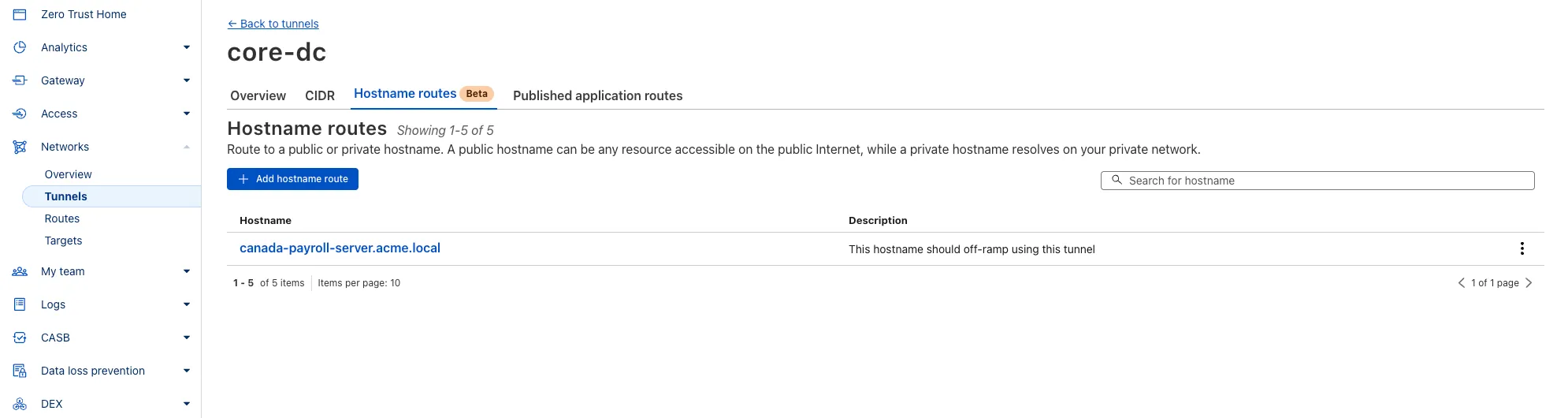
  1. You can now route private traffic to Cloudflare Tunnel based on a hostname or domain, moving beyond the limitations of IP-based routing. This new capability is free for all Cloudflare One customers.

    Previously, Tunnel routes could only be defined by IP address or CIDR range. This created a challenge for modern applications with dynamic or ephemeral IP addresses, often forcing administrators to maintain complex and brittle IP lists.

    Hostname-based routing in Cloudflare Tunnel

    What’s new:

    • Hostname & Domain Routing: Create routes for individual hostnames (e.g., payroll.acme.local) or entire domains (e.g., *.acme.local) and direct their traffic to a specific Tunnel.
    • Simplified Zero Trust Policies: Build resilient policies in Cloudflare Access and Gateway using stable hostnames, making it dramatically easier to apply per-resource authorization for your private applications.
    • Precise Egress Control: Route traffic for public hostnames (e.g., bank.example.com) through a specific Tunnel to enforce a dedicated source IP, solving the IP allowlist problem for third-party services.
    • No More IP Lists: This feature makes the workaround of maintaining dynamic IP Lists for Tunnel connections obsolete.

    Get started in the Tunnels section of the Zero Trust dashboard with your first private hostname or public hostname route.

    Learn more in our blog post.

  1. Magic WAN and WARP Connector users can now securely route their DNS traffic to the Gateway resolver without exposing traffic to the public Internet.

    Routing DNS traffic to the Gateway resolver allows DNS resolution and filtering for traffic coming from private networks while preserving source internal IP visibility. This ensures Magic WAN users have full integration with our Cloudflare One features, including Internal DNS and hostname-based policies.

    To configure DNS filtering, change your Magic WAN or WARP Connector DNS settings to use Cloudflare's shared resolver IPs, 172.64.36.1 and 172.64.36.2. Once you configure DNS resolution and filtering, you can use Source Internal IP as a traffic selector in your resolver policies for routing private DNS traffic to your Internal DNS.

  1. Now, Magic WAN customers can configure a custom IKE ID for their IPsec tunnels. Customers that are using Magic WAN and a VeloCloud SD-WAN device together can utilize this new feature to create a high availability configuration.

    This feature is available via API only. Customers can read the Magic WAN documentation to learn more about the Custom IKE ID feature and the API call to configure it.

  1. All bidirectional tunnel health check return packets are accepted by any Magic on-ramp.

    Previously, when a Magic tunnel had a bidirectional health check configured, the bidirectional health check would pass when the return packets came back to Cloudflare over the same tunnel that was traversed by the forward packets.

    There are SD-WAN devices, like VeloCloud, that do not offer controls to steer traffic over one tunnel versus another in a high availability tunnel configuration.

    Now, when a Magic tunnel has a bidirectional health check configured, the bidirectional health check will pass when the return packet traverses over any tunnel in a high availability configuration.

  1. Starting December 1, 2025, list endpoints for the Cloudflare Tunnel API and Zero Trust Networks API will no longer return deleted tunnels, routes, subnets and virtual networks by default. This change makes the API behavior more intuitive by only returning active resources unless otherwise specified.

    No action is required if you already explicitly set is_deleted=false or if you only need to list active resources.

    This change affects the following API endpoints:

    What is changing?

    The default behavior of the is_deleted query parameter will be updated.

    ScenarioPrevious behavior (before December 1, 2025)New behavior (from December 1, 2025)
    is_deleted parameter is omittedReturns active & deleted tunnels, routes, subnets and virtual networksReturns only active tunnels, routes, subnets and virtual networks

    Action required

    If you need to retrieve deleted (or all) resources, please update your API calls to explicitly include the is_deleted parameter before December 1, 2025.

    To get a list of only deleted resources, you must now explicitly add the is_deleted=true query parameter to your request:

    Terminal window
    # Example: Get ONLY deleted Tunnels
    curl "https://api.cloudflare.com/client/v4/accounts/$ACCOUNT_ID/tunnels?is_deleted=true" \
    -H "Authorization: Bearer $API_TOKEN"
    # Example: Get ONLY deleted Virtual Networks
    curl "https://api.cloudflare.com/client/v4/accounts/$ACCOUNT_ID/teamnet/virtual_networks?is_deleted=true" \
    -H "Authorization: Bearer $API_TOKEN"

    Following this change, retrieving a complete list of both active and deleted resources will require two separate API calls: one to get active items (by omitting the parameter or using is_deleted=false) and one to get deleted items (is_deleted=true).

    Why we’re making this change

    This update is based on user feedback and aims to:

    • Create a more intuitive default: Aligning with common API design principles where list operations return only active resources by default.
    • Reduce unexpected results: Prevents users from accidentally operating on deleted resources that were returned unexpectedly.
    • Improve performance: For most users, the default query result will now be smaller and more relevant.

    To learn more, please visit the Cloudflare Tunnel API and Zero Trust Networks API documentation.

  1. The Cloudflare Terraform provider resources for Cloudflare WAN tunnels and routes now support Terraform provider version 5. Customers using infrastructure-as-code workflows can manage their tunnel and route configuration with the latest provider version.

    For more information, refer to the Cloudflare Terraform provider documentation.

  1. Today, we are excited to announce that all Magic Transit and Magic WAN customers with CMB EU (Customer Metadata Boundary - Europe) enabled in their account will be able to access GRE, IPsec, and CNI health check and traffic volume data in the Cloudflare dashboard and via API.

    This ensures that all Magic Transit and Magic WAN customers with CMB EU enabled will be able to access all Magic Transit and Magic WAN features.

    Specifically, these two GraphQL endpoints are now compatible with CMB EU:

    • magicTransitTunnelHealthChecksAdaptiveGroups
    • magicTransitTunnelTrafficAdaptiveGroups
  1. The KVM-based virtual Cloudflare One Appliance is now in open beta with official support for Proxmox VE.

    Customers can deploy the virtual appliance on KVM hypervisors to connect branch or data center networks to Cloudflare WAN without dedicated hardware.

    For setup instructions, refer to Configure a virtual Cloudflare One Appliance.

  1. Your real-time applications running over Cloudflare Tunnel are now faster and more reliable. We've completely re-architected the way cloudflared proxies UDP traffic in order to isolate it from other traffic, ensuring latency-sensitive applications like private DNS are no longer slowed down by heavy TCP traffic (like file transfers) on the same Tunnel.

    This is a foundational improvement to Cloudflare Tunnel, delivered automatically to all customers. There are no settings to configure — your UDP traffic is already flowing faster and more reliably.

    What’s new:

    • Faster UDP performance: We've significantly reduced the latency for establishing new UDP sessions, making applications like private DNS much more responsive.
    • Greater reliability for mixed traffic: UDP packets are no longer affected by heavy TCP traffic, preventing timeouts and connection drops for your real-time services.

    Learn more about running TCP or UDP applications and private networks through Cloudflare Tunnel.

  1. Magic Transit customers can now configure AS prepending on their BYOIP prefixes advertised at the Cloudflare edge. This allows for smoother traffic migration and minimizes packet loss when changing providers.

    AS prepending makes the Cloudflare route less preferred by increasing the AS path length. You can use this to gradually shift traffic away from Cloudflare before withdrawing a prefix, avoiding abrupt routing changes.

    Prepending can be configured via the API or through BGP community values when peering with the Magic Transit routing table. For more information, refer to Advertise prefixes.

  1. Customers using Cloudflare Network Interconnect with the v1 dataplane can now subscribe to maintenance alert emails. These alerts notify you of planned maintenance windows that may affect your CNI circuits.

    For more information, refer to Monitoring and alerts.

  1. Custom Errors can now fetch and store assets and error pages from your origin even if they are served with a 4xx or 5xx HTTP status code — previously, only 200 OK responses were allowed.

    What’s new:

    • You can now upload error pages and error assets that return error status codes (for example, 403, 500, 502, 503, 504) when fetched.
    • These assets are stored and minified at the edge, so they can be reused across multiple Custom Error rules without triggering requests to the origin.

    This is especially useful for retrieving error content or downtime banners from your backend when you can’t override the origin status code.

    Learn more in the Custom Errors documentation.

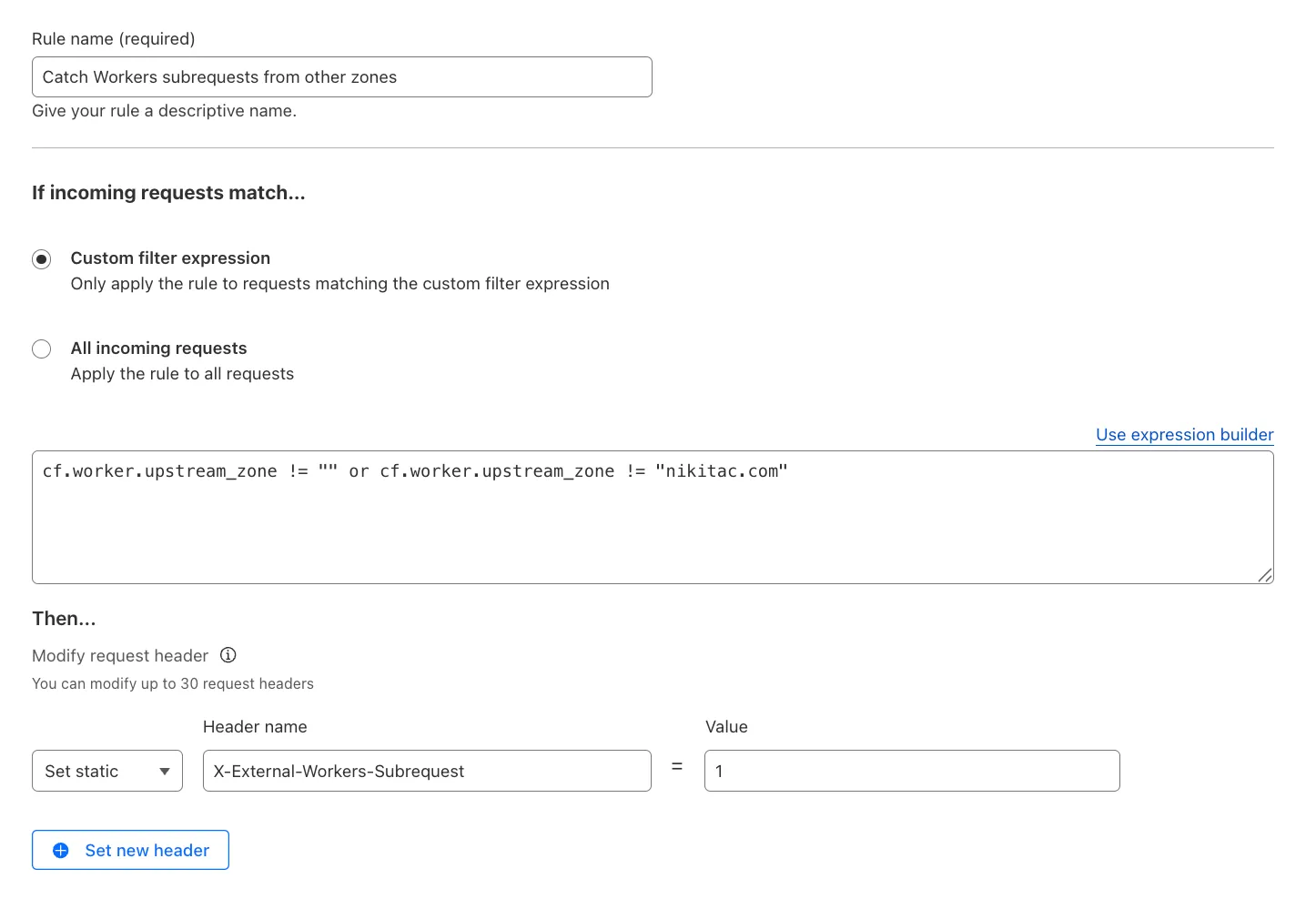
  1. You can now use the cf.worker.upstream_zone field in Transform Rules to control rule execution based on whether a request originates from Workers, including subrequests issued by Workers in other zones.

    Match Workers subrequests by upstream zone in Transform Rules

    What's new:

    • cf.worker.upstream_zone is now supported in Transform Rules expressions.
    • Skip or apply logic conditionally when handling Workers subrequests.

    For example, to add a header when the subrequest comes from another zone:

    Text in Expression Editor (replace myappexample.com with your domain):

    (cf.worker.upstream_zone != "" and cf.worker.upstream_zone != "myappexample.com")

    Selected operation under Modify request header: Set static

    Header name: X-External-Workers-Subrequest

    Value: 1
    This gives you more granular control in how you handle incoming requests for your zone.

    Learn more in the Transform Rules documentation and Rules language fields reference.

  1. You can now enable Polish with the webp format directly in Configuration Rules, allowing you to optimize image delivery for specific routes, user agents, or A/B tests — without applying changes zone-wide.

    What’s new:

    • WebP is now a supported value in the Polish setting for Configuration Rules.

    This gives you more precise control over how images are compressed and delivered, whether you're targeting modern browsers, running experiments, or tailoring performance by geography or device type.

    Learn more in the Polish and Configuration Rules documentation.

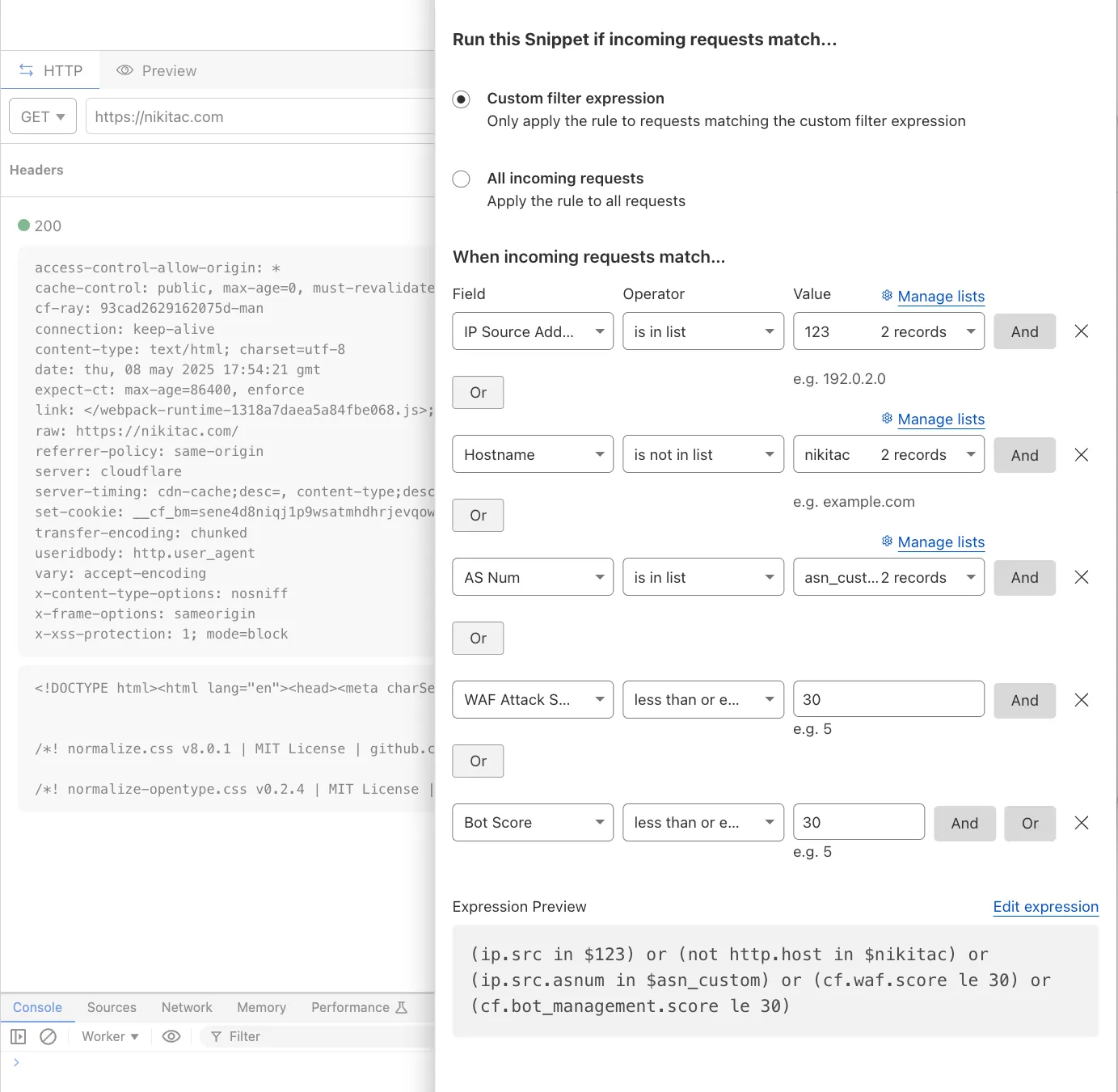
  1. You can now use IP, Autonomous System (AS), and Hostname custom lists to route traffic to Snippets and Cloud Connector, giving you greater precision and control over how you match and process requests at the edge.

    In Snippets, you can now also match on Bot Score and WAF Attack Score, unlocking smarter edge logic for everything from request filtering and mitigation to tarpitting and logging.

    What’s new:

    • Custom lists matching – Snippets and Cloud Connector now support user-created IP, AS, and Hostname lists via dashboard or Lists API. Great for shared logic across zones.
    • Bot Score and WAF Attack Score – Use Cloudflare’s intelligent traffic signals to detect bots or attacks and take advanced, tailored actions with just a few lines of code.
    New fields in Snippets

    These enhancements unlock new possibilities for building smarter traffic workflows with minimal code and maximum efficiency.

    Learn more in the Snippets and Cloud Connector documentation.