Changelog
New updates and improvements at Cloudflare.

Users can now access significant enhancements to Cloudflare Gateway analytics, providing you with unprecedented visibility into your organization's DNS queries, HTTP requests, and Network sessions. These powerful new dashboards enable you to go beyond raw logs and gain actionable insights into how your users are interacting with the Internet and your protected resources.
You can now visualize and explore:
- Patterns Over Time: Understand trends in traffic volume and blocked requests, helping you identify anomalies and plan for future capacity.
- Top Users & Destinations: Quickly pinpoint the most active users, enabling better policy enforcement and resource allocation.
- Actions Taken: See a clear breakdown of security actions applied by Gateway policies, such as blocks and allows, offering a comprehensive view of your security posture.
- Geographic Regions: Gain insight into the global distribution of your traffic.
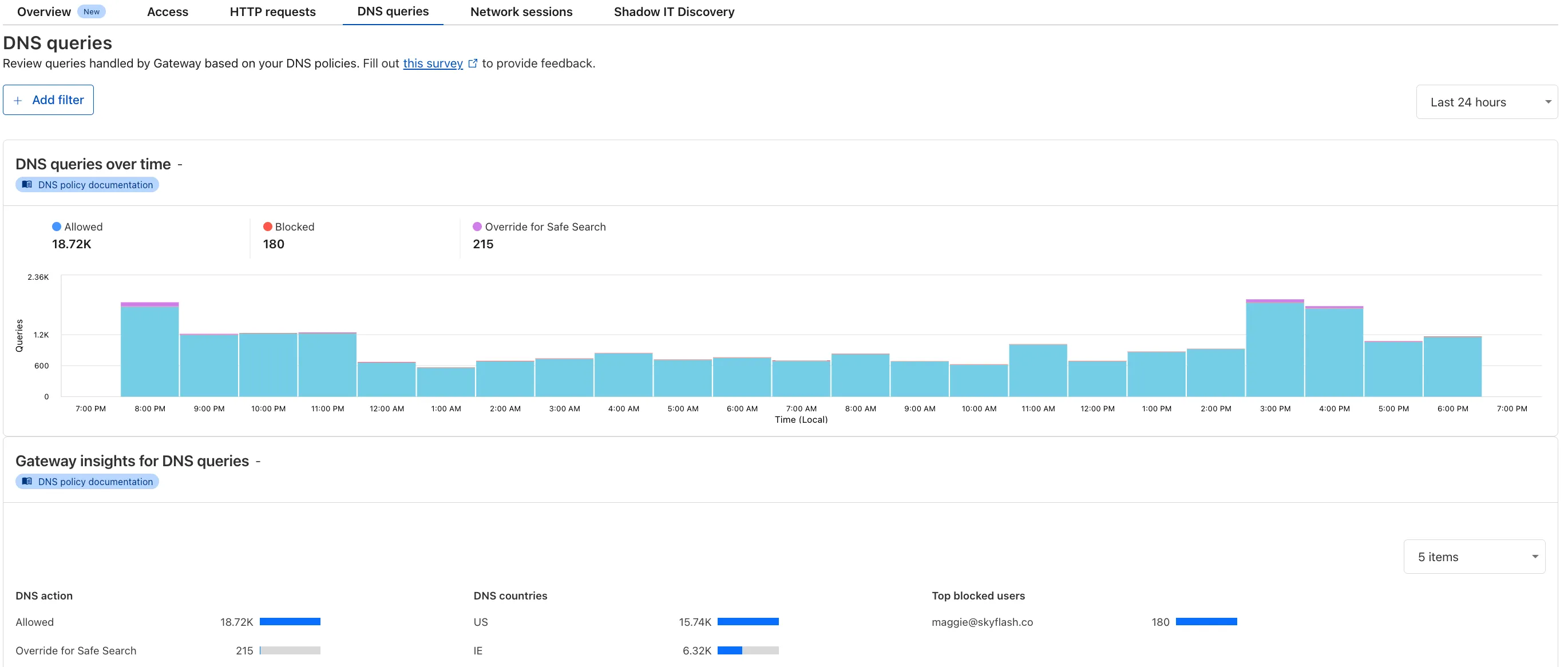
To access the new overview, log in to your Cloudflare Zero Trust dashboard ↗ and go to Analytics in the side navigation bar.
All Cloudflare One Gateway users can now use Protocol detection logging and filtering, including those on Pay-as-you-go and Free plans.
With Protocol Detection, admins can identify and enforce policies on traffic proxied through Gateway based on the underlying network protocol (for example, HTTP, TLS, or SSH), enabling more granular traffic control and security visibility no matter your plan tier.
This feature is available to enable in your account network settings for all accounts. For more information on using Protocol Detection, refer to the Protocol detection documentation.
42 new applications have been added for Zero Trust support within the Application Library and Gateway policy enforcement, giving you the ability to investigate or apply inline policies to these applications.
33 of the 42 applications are Artificial Intelligence applications. The others are Human Resources (2 applications), Development (2 applications), Productivity (2 applications), Sales & Marketing, Public Cloud, and Security.
To view all available applications, log in to your Cloudflare Zero Trust dashboard ↗, navigate to the App Library under My Team.
For more information on creating Gateway policies, see our Gateway policy documentation.
A new Access Analytics dashboard is now available to all Cloudflare One customers. Customers can apply and combine multiple filters to dive into specific slices of their Access metrics. These filters include:
- Logins granted and denied
- Access events by type (SSO, Login, Logout)
- Application name (Salesforce, Jira, Slack, etc.)
- Identity provider (Okta, Google, Microsoft, onetimepin, etc.)
- Users (
chris@cloudflare.com,sally@cloudflare.com,rachel@cloudflare.com, etc.) - Countries (US, CA, UK, FR, BR, CN, etc.)
- Source IP address
- App type (self-hosted, Infrastructure, RDP, etc.)
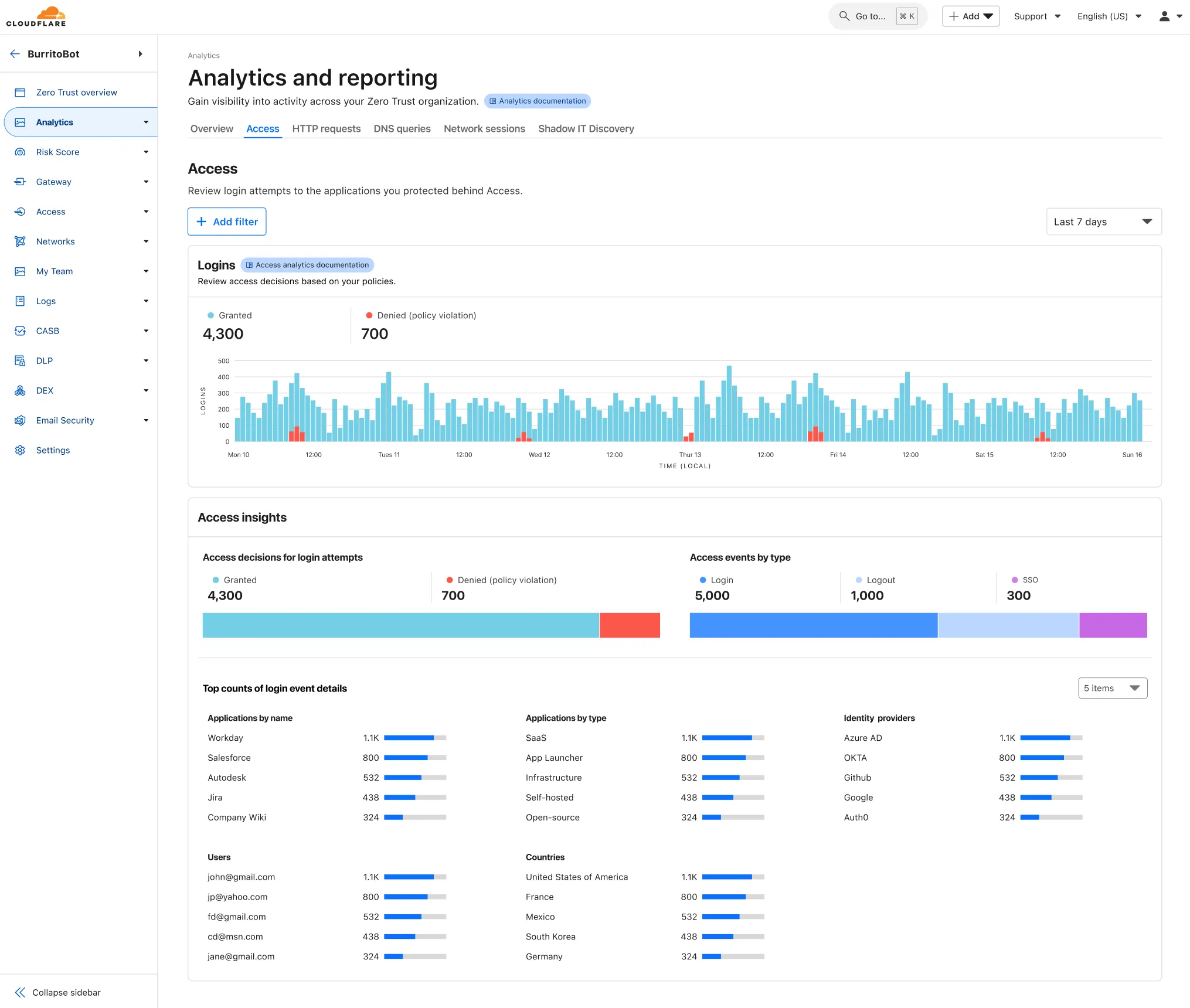
To access the new overview, log in to your Cloudflare Zero Trust dashboard ↗ and find Analytics in the side navigation bar.
You can now safely open email attachments to view and investigate them.
What this means is that messages now have a Attachments section. Here, you can view processed attachments and their classifications (for example, Malicious, Suspicious, Encrypted). Next to each attachment, a Browser Isolation icon allows your team to safely open the file in a clientless, isolated browser with no risk to the analyst or your environment.
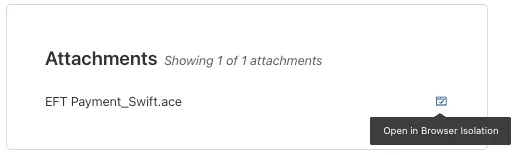
To use this feature, you must:
- Turn on Allow users to open a remote browser without the device client in your Zero Trust settings.
- Have Browser Isolation (BISO) seats assigned.
For more details, refer to our setup guide.
Some attachment types may not render in Browser Isolation. If there is a file type that you would like to be opened with Browser Isolation, reach out to your Cloudflare contact.
This feature is available across these Email security packages:
- Advantage
- Enterprise
- Enterprise + PhishGuard
New categories added
Parent ID Parent Name Category ID Category Name 1 Ads 66 Advertisements 3 Business & Economy 185 Personal Finance 3 Business & Economy 186 Brokerage & Investing 21 Security Threats 187 Compromised Domain 21 Security Threats 188 Potentially Unwanted Software 6 Education 189 Reference 9 Government & Politics 190 Charity and Non-profit Changes to existing categories
Original Name New Name Religion Religion & Spirituality Government Government/Legal Redirect URL Alias/Redirect Refer to Gateway domain categories to learn more.
Remote Browser Isolation (RBI) now supports SAML HTTP-POST bindings, enabling seamless authentication for SSO-enabled applications that rely on POST-based SAML responses from Identity Providers (IdPs) within a Remote Browser Isolation session. This update resolves a previous limitation that caused
405errors during login and improves compatibility with multi-factor authentication (MFA) flows.With expanded support for major IdPs like Okta and Azure AD, this enhancement delivers a more consistent and user-friendly experience across authentication workflows. Learn how to set up Remote Browser Isolation.
You can now create DNS policies to manage outbound traffic for an expanded list of applications. This update adds support for 273 new applications, giving you more control over your organization's outbound traffic.
With this update, you can:
- Create DNS policies for a wider range of applications
- Manage outbound traffic more effectively
- Improve your organization's security and compliance posture
For more information on creating DNS policies, see our DNS policy documentation.
You can now configure custom word lists to enforce case sensitivity. This setting supports flexibility where needed and aims to reduce false positives where letter casing is critical.
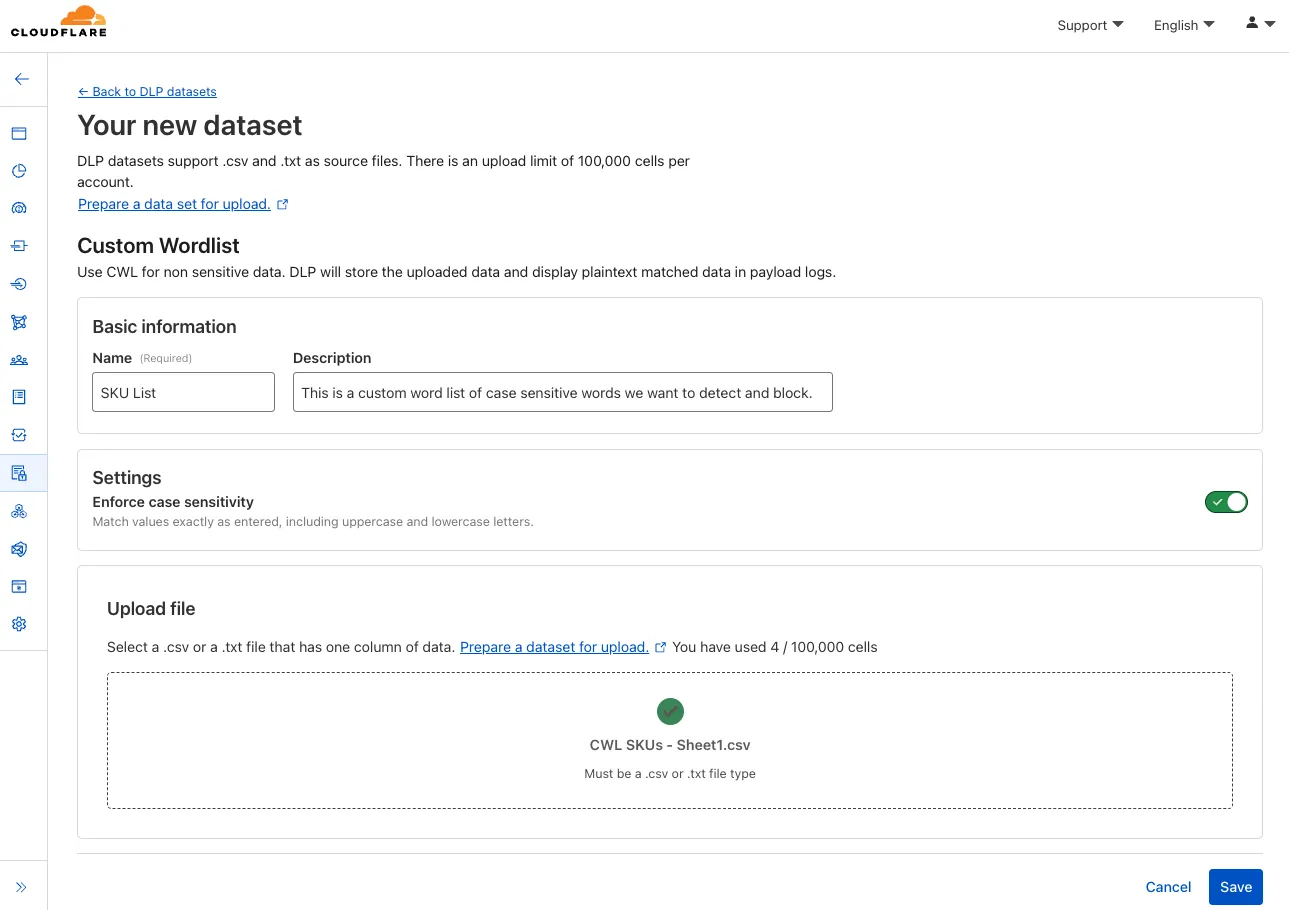
You can now safely open links in emails to view and investigate them.
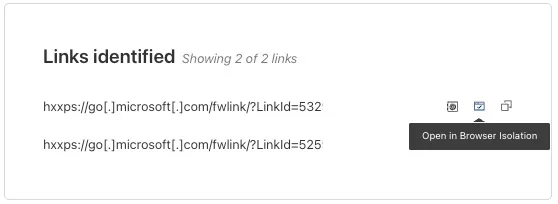
From Investigation, go to View details, and look for the Links identified section. Next to each link, the Cloudflare dashboard will display an Open in Browser Isolation icon which allows your team to safely open the link in a clientless, isolated browser with no risk to the analyst or your environment. Refer to Open links to learn more about this feature.
To use this feature, you must:
- Turn on Allow users to open a remote browser without the device client in your Zero Trust settings.
- Have Browser Isolation (RBI) seats assigned.
For more details, refer to our setup guide.
This feature is available across these Email security packages:
- Advantage
- Enterprise
- Enterprise + PhishGuard
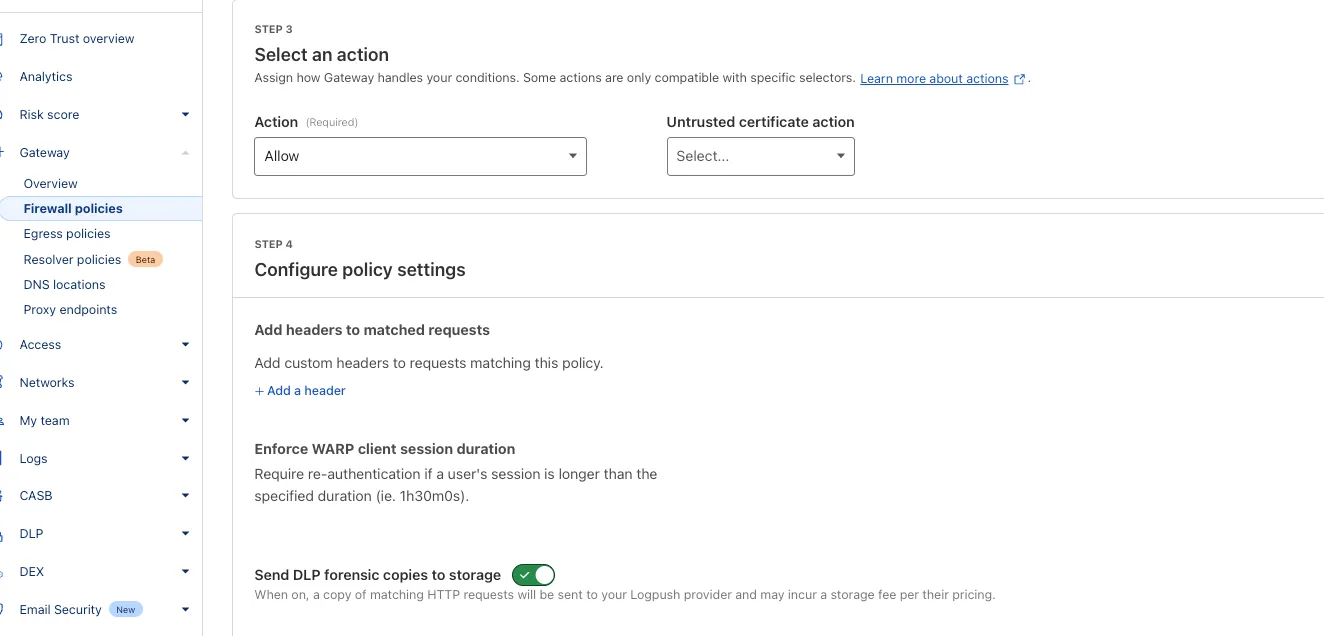
You can now send DLP forensic copies to third-party storage for any HTTP policy with an
AlloworBlockaction, without needing to include a DLP profile. This change increases flexibility for data handling and forensic investigation use cases.By default, Gateway will send all matched HTTP requests to your configured DLP Forensic Copy jobs.
Cloudflare Load Balancing now supports UDP (Layer 4) and ICMP (Layer 3) health monitors for private endpoints. This makes it simple to track the health and availability of internal services that don’t respond to HTTP, TCP, or other protocol probes.
- Set up ICMP ping monitors to check if your private endpoints are reachable.
- Use UDP monitors for lightweight health checks on non-TCP workloads, such as DNS, VoIP, or custom UDP-based services.
- Gain better visibility and uptime guarantees for services running behind Private Network Load Balancing, without requiring public IP addresses.
This enhancement is ideal for internal applications that rely on low-level protocols, especially when used in conjunction with Cloudflare Tunnel, WARP, and Magic WAN to create a secure and observable private network.
Learn more about Private Network Load Balancing or view the full list of supported health monitor protocols.
A new Browser Isolation Overview page is now available in the Cloudflare Zero Trust dashboard. This centralized view simplifies the management of Remote Browser Isolation (RBI) deployments, providing:
- Streamlined Onboarding: Easily set up and manage isolation policies from one location.
- Quick Testing: Validate clientless web application isolation with ease.
- Simplified Configuration: Configure isolated access applications and policies efficiently.
- Centralized Monitoring: Track aggregate usage and blocked actions.
This update consolidates previously disparate settings, accelerating deployment, improving visibility into isolation activity, and making it easier to ensure your protections are working effectively.
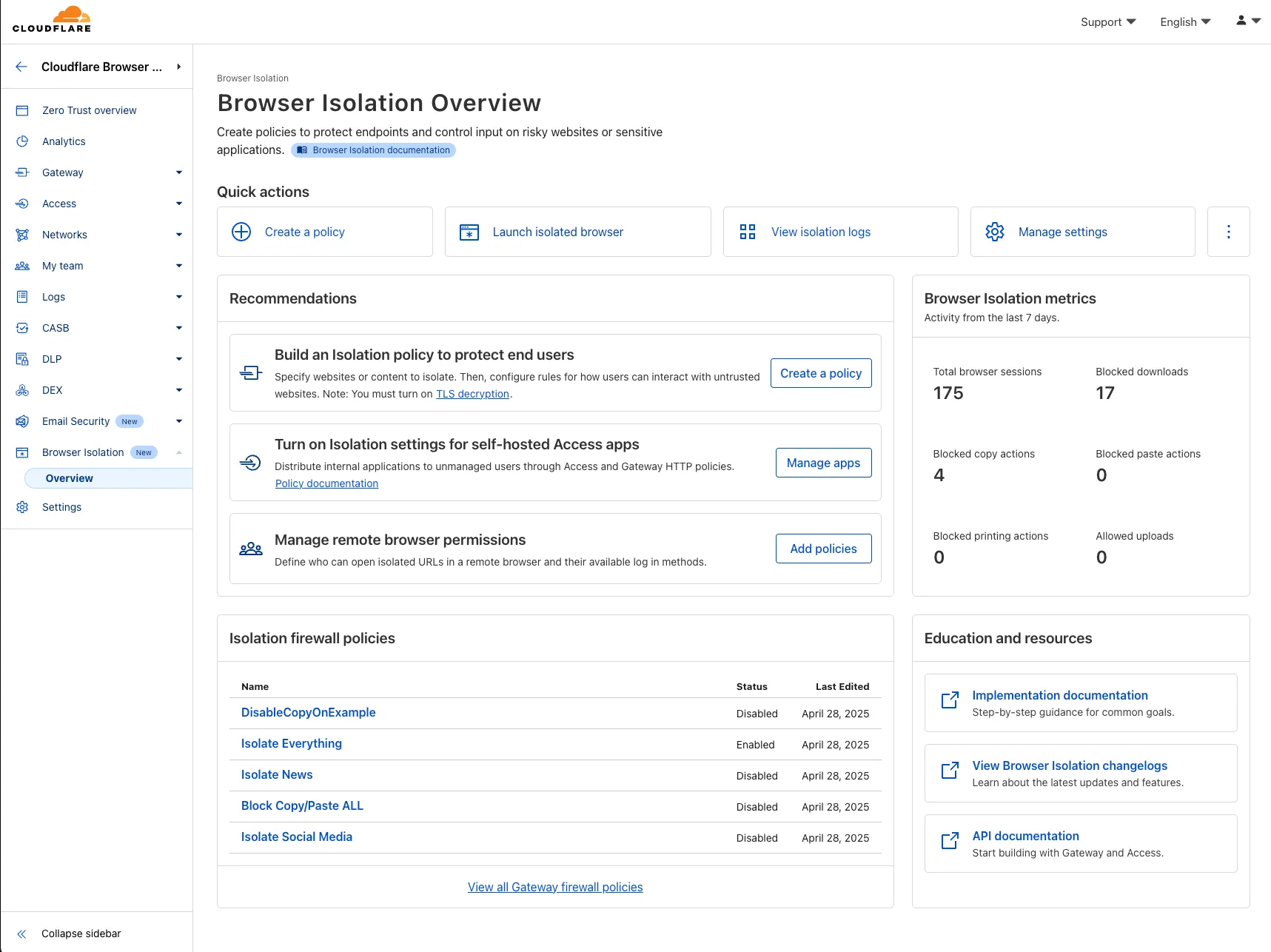
To access the new overview, log in to your Cloudflare Zero Trust dashboard ↗ and find Browser Isolation in the side navigation bar.
The Cloudflare Zero Trust dashboard ↗ now supports Cloudflare's native dark mode for all accounts and plan types.
Zero Trust Dashboard will automatically accept your user-level preferences for system settings, so if your Dashboard appearance is set to 'system' or 'dark', the Zero Trust dashboard will enter dark mode whenever the rest of your Cloudflare account does.
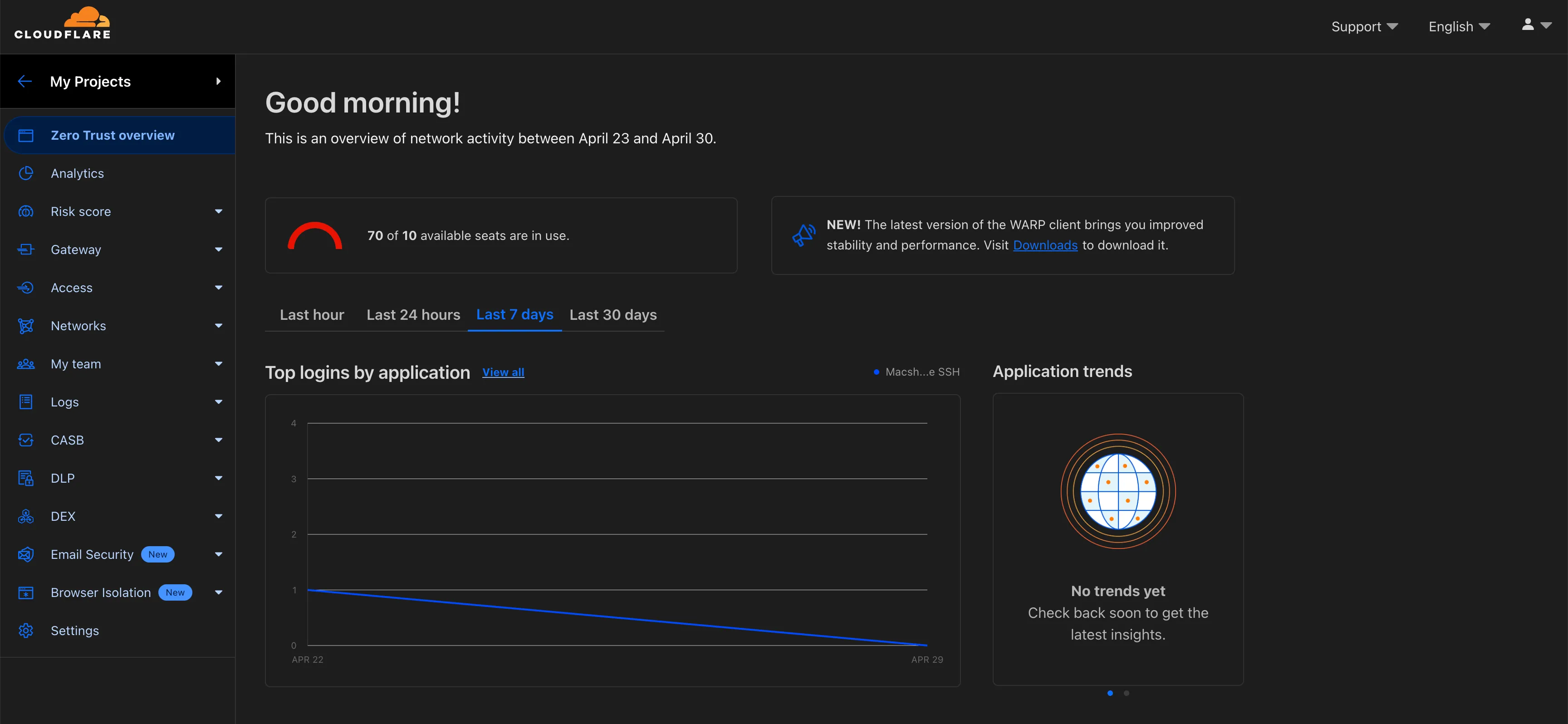
To update your view preference in the Zero Trust dashboard:
- Log into the Zero Trust dashboard ↗.
- Select your user icon.
- Select Dark Mode.
To update your view preference in the Core dashboard:
- Log into the Cloudflare dashboard ↗.
- Go to My Profile
- For Appearance, choose Dark.
Cloudflare One Appliance DHCP server settings now support specifying multiple DNS server IP addresses in the DHCP pool.
Previously, customers could only configure a single DNS server per DHCP pool. With this update, you can specify multiple DNS servers to provide redundancy for clients at branch locations.
For configuration details, refer to DHCP server.
Cloudflare One administrators can now control which egress IP is used based on a destination's fully qualified domain name (FDQN) within Gateway Egress policies.
- Host, Domain, Content Categories, and Application selectors are now available in the Gateway Egress policy builder in beta.
- During the beta period, you can use these selectors with traffic on-ramped to Gateway with the WARP client, proxy endpoints (commonly deployed with PAC files), or Cloudflare Browser Isolation.
- For WARP client support, additional configuration is required. For more information, refer to the WARP client configuration documentation.
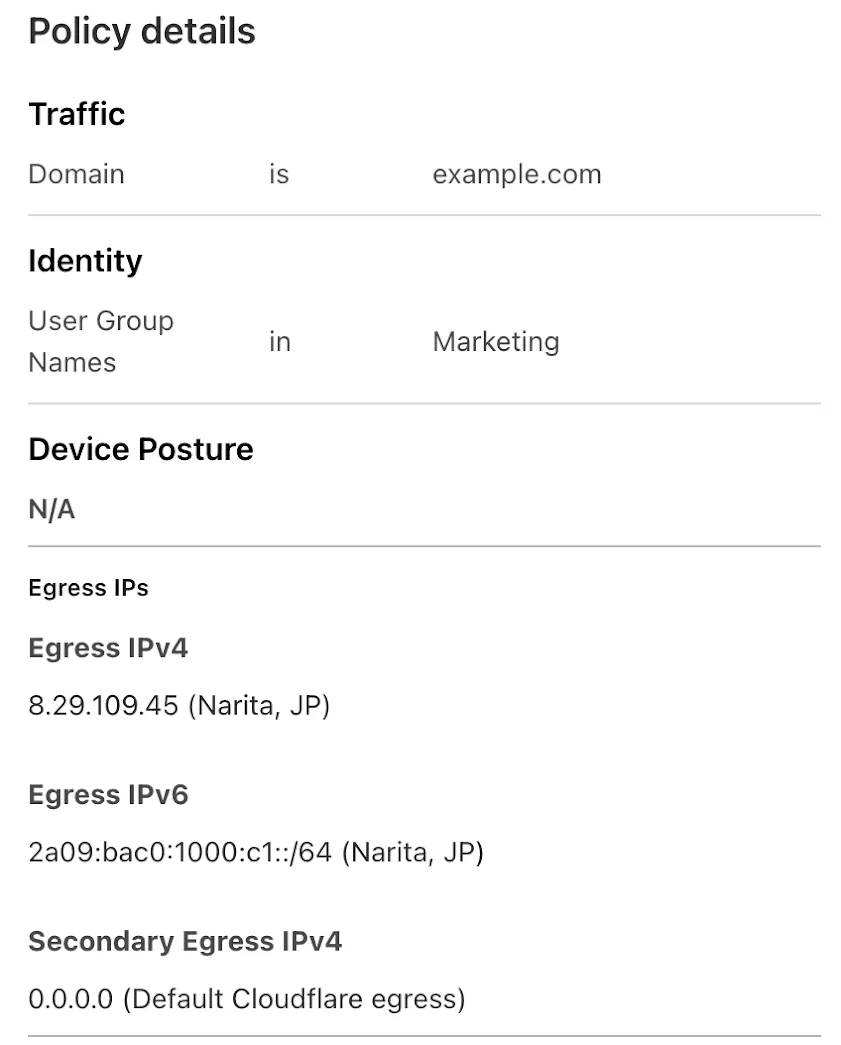
This will help apply egress IPs to your users' traffic when an upstream application or network requires it, while the rest of their traffic can take the most performant egress path.
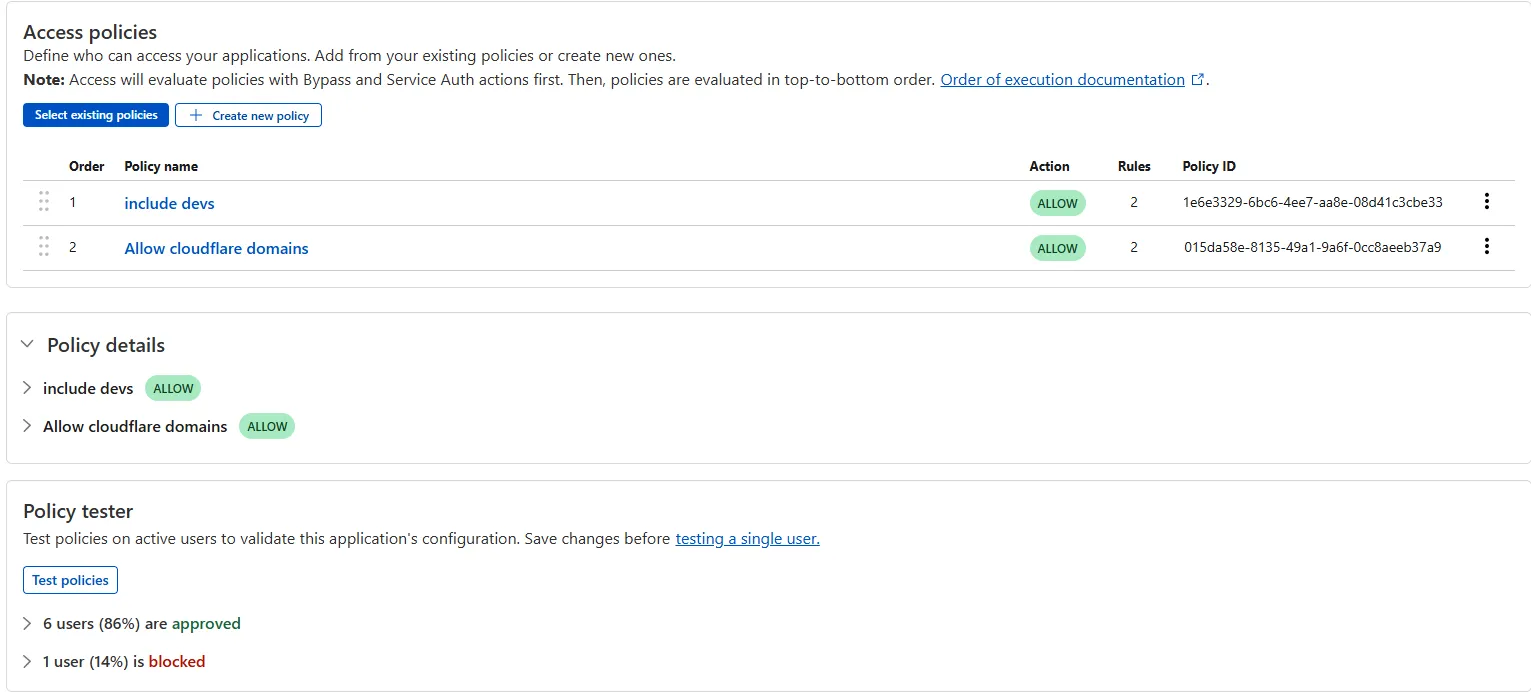
The Access bulk policy tester is now available in the Cloudflare Zero Trust dashboard. The bulk policy tester allows you to simulate Access policies against your entire user base before and after deploying any changes. The policy tester will simulate the configured policy against each user's last seen identity and device posture (if applicable).
You now have access to the World Health Organization (WHO) 2025 edition of the International Classification of Diseases 11th Revision (ICD-11) ↗ as a predefined detection entry. The new dataset can be found in the Health Information predefined profile.
ICD-10 dataset remains available for use.
You can now use more flexible redirect capabilities in Cloudflare One with Gateway.
- A new Redirect action is available in the HTTP policy builder, allowing admins to redirect users to any URL when their request matches a policy. You can choose to preserve the original URL and query string, and optionally include policy context via query parameters.
- For Block actions, admins can now configure a custom URL to display when access is denied. This block page redirect is set at the account level and can be overridden in DNS or HTTP policies. Policy context can also be passed along in the URL.
Learn more in our documentation for HTTP Redirect and Block page redirect.
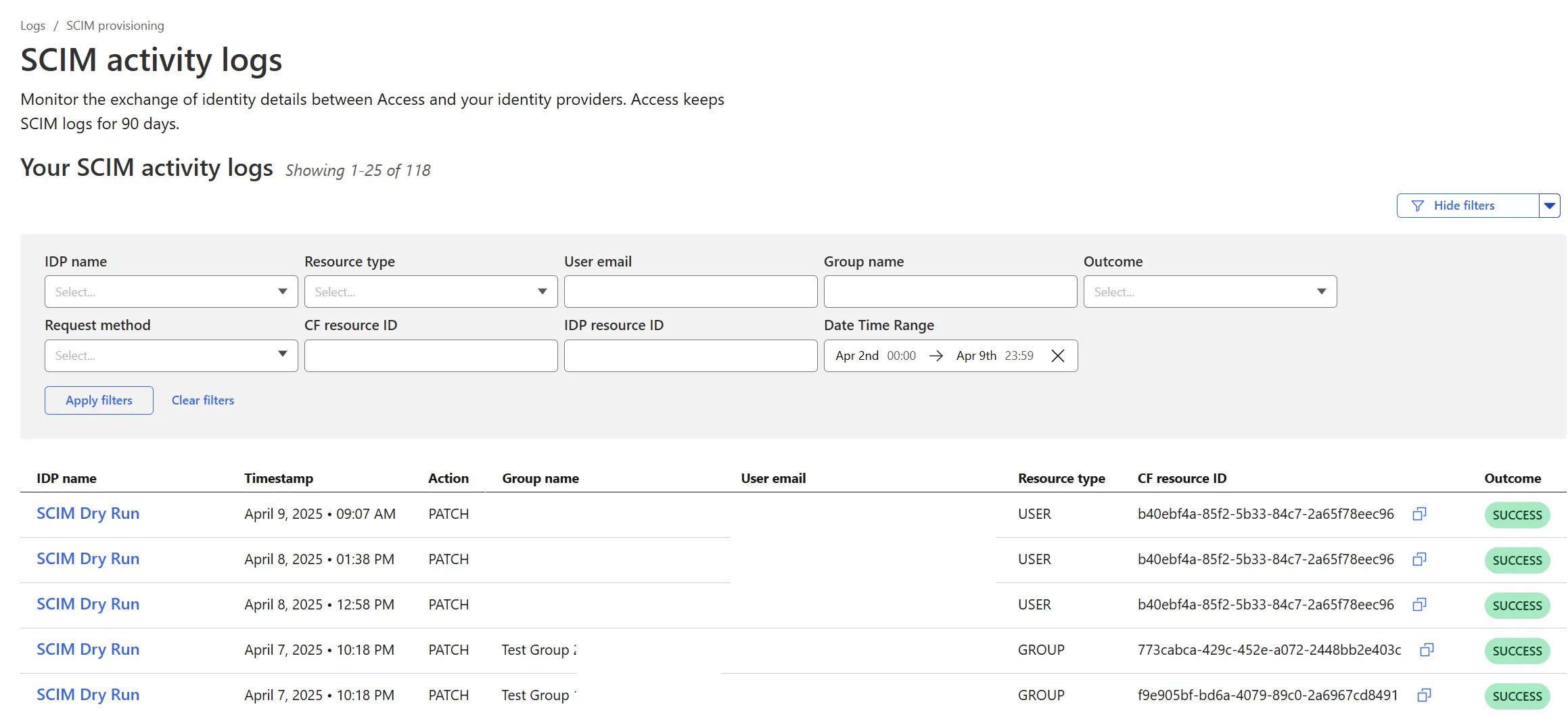
Cloudflare Zero Trust SCIM provisioning now has a full audit log of all create, update and delete event from any SCIM Enabled IdP. The SCIM logs support filtering by IdP, Event type, Result and many more fields. This will help with debugging user and group update issues and questions.
SCIM logs can be found on the Zero Trust Dashboard under Logs -> SCIM provisioning.
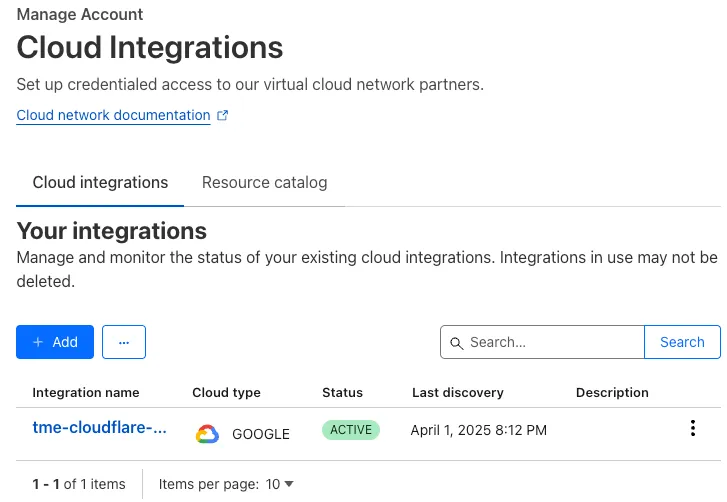
With Email security, you get two free CASB integrations.
Use one SaaS integration for Email security to sync with your directory of users, take actions on delivered emails, automatically provide EMLs for reclassification requests for clean emails, discover CASB findings and more.
With the other integration, you can have a separate SaaS integration for CASB findings for another SaaS provider.
Refer to Add an integration to learn more about this feature.
This feature is available across these Email security packages:
- Enterprise
- Enterprise + PhishGuard
We're excited to introduce the Cloudflare Zero Trust Secure DNS Locations Write role, designed to provide DNS filtering customers with granular control over third-party access when configuring their Protective DNS (PDNS) solutions.
Many DNS filtering customers rely on external service partners to manage their DNS location endpoints. This role allows you to grant access to external parties to administer DNS locations without overprovisioning their permissions.
Secure DNS Location Requirements:
-
Mandate usage of Bring your own DNS resolver IP addresses ↗ if available on the account.
-
Require source network filtering for IPv4/IPv6/DoT endpoints; token authentication or source network filtering for the DoH endpoint.
You can assign the new role via Cloudflare Dashboard (
Manage Accounts > Members) or via API. For more information, refer to the Secure DNS Locations documentation ↗.-
A new GA release for the Android Cloudflare One Agent is now available in the Google Play Store ↗. This release includes a new feature allowing team name insertion by URL during enrollment, as well as fixes and minor improvements.
Changes and improvements
- Improved in-app error messages.
- Improved mobile client login with support for team name insertion by URL.
- Fixed an issue preventing admin split tunnel settings taking priority for traffic from certain applications.
A new GA release for the iOS Cloudflare One Agent is now available in the iOS App Store ↗. This release includes a new feature allowing team name insertion by URL during enrollment, as well as fixes and minor improvements.
Changes and improvements
- Improved in-app error messages.
- Improved mobile client login with support for team name insertion by URL.
- Bug fixes and performance improvements.
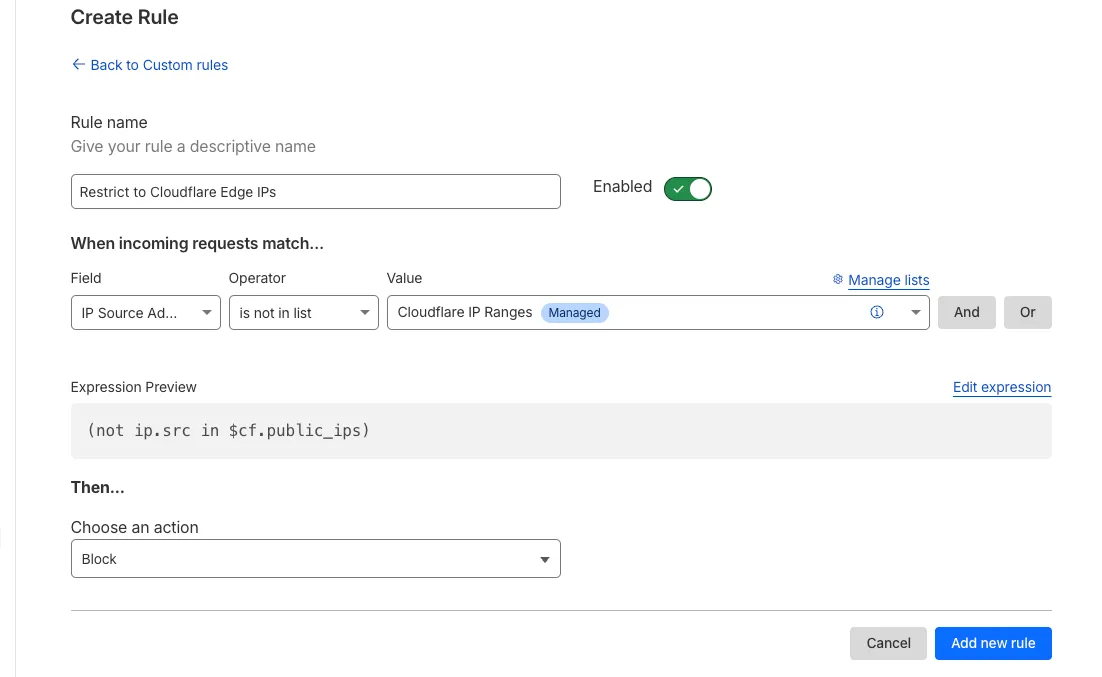
Magic Firewall now supports a new managed list of Cloudflare IP ranges. This list is available as an option when creating a Magic Firewall policy based on IP source/destination addresses. When selecting "is in list" or "is not in list", the option "Cloudflare IP Ranges" will appear in the dropdown menu.
This list is based on the IPs listed in the Cloudflare IP ranges ↗. Updates to this managed list are applied automatically.
Note: IP Lists require a Cloudflare Advanced Network Firewall subscription. For more details about Cloudflare Network Firewall plans, refer to Plans.