Changelog
New updates and improvements at Cloudflare.

Cloudflare Access now supports SAML assertion encryption for identity provider integrations. When turned on, your identity provider encrypts SAML assertions using a Cloudflare-managed certificate before sending them through the user's browser. Only Access can decrypt these assertions, protecting sensitive identity data even after TLS termination.
Without encryption, SAML assertions are transmitted in plaintext and could be visible to browser extensions or client-side malware.
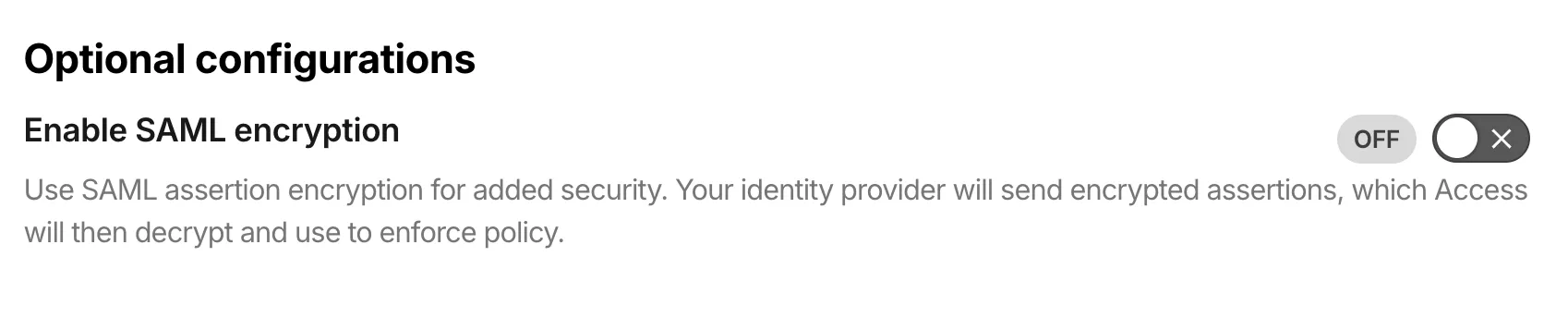
SAML encryption includes built-in certificate lifecycle management:
- Automatic certificate generation: Access generates an encryption certificate when you turn on SAML encryption for an identity provider.
- Certificate rotation: Rotate certificates without downtime. The previous certificate remains valid until expiration, giving you time to update your IdP.
- PEM export: Copy the certificate in PEM format for manual upload to your IdP, or point your IdP to the SAML metadata endpoint for automatic retrieval.
To get started, refer to Encrypt SAML assertions.
The Cisco IOS XE third-party integration guide for Cloudflare WAN has been updated to include:
- Post Quantum Cryptography (PQC)
- Policy-Based Routing (PBR)
- IP Service Level Agreement (IP SLA)
This link will take you directly to the updated Cisco IOS XE guide.
A new Beta release for the macOS Cloudflare One Client is now available on the beta releases downloads page.
This release introduces the new Cloudflare One Client UI for macOS! You can expect a cleaner and more intuitive design as well as easier access to common actions and information. Here are some of the many things we have found our users appreciate:
- Right click context menu to access the most common client actions quickly
- Built-in captive portal login experience
Additional Changes and improvements
- The client now applies DNS search suffixes configured in your device profile / network policy. Administrators can push a list of DNS search domains that the client appends to single-label queries, alongside any system-configured suffixes. See DNS search suffixes for details.
- Administrators can now control which virtual networks (VNETs) are available to which users via WARP device profile settings in the Zero Trust dashboard. Previously, every VNET in the organization was visible to every device; you can now scope the VNET picker per profile so users only see the networks relevant to them. See VNET availability for details.
- Added a local-file signal source for Emergency Disconnect. In addition to the existing HTTPS polling mechanism, administrators can now configure WARP to monitor for a file on disk; the presence of the file triggers an emergency disconnect even if both Cloudflare and your own infrastructure are unreachable. Either signal being asserted triggers disconnect; both must be cleared for normal operation to resume.
- Added new warp-cli debug commands for interactive connection diagnosis. See Extra debug logging for details.
- The local DNS proxy now supports DNSSEC passthrough. DNSSEC-signed responses are forwarded to the application intact (including DO/AD bits and RRSIG records), so applications that validate DNSSEC locally — including resolvers and the dig/drill tooling — work correctly through the client.
- Added a new MDM format for organization-wide settings, including a cleaner way to configure the compliance environment (e.g. FedRAMP). The previous per-configuration approach still works, but the new format is now recommended. See the updated Cloudflare One MDM documentation for details.
- Client Certificate device-posture checks now support template variables (e.g.
${serial_number},${device_uuid}) in the Subject Alternative Name field, matching what the documentation has always claimed. Previously only the Common Name field accepted variables, which broke posture rules that pinned identity to a SAN entry. - Fixed the in-client captive-portal browser rendering a blank "Success" page on some airline Wi-Fi networks (United inflight Wi-Fi was the reported case). The browser now reliably loads the airline's real portal page so users can complete sign-in from inside the client instead of having to open a separate browser.
- Fixed an issue in proxy mode where hostnames containing underscores (e.g. ai_app.com) were rejected, breaking apps that depend on such hostnames (notably ChatGPT sandbox apps). The local proxy now accepts underscore-containing hostnames in CONNECT requests.
Known issues
- Registration may hang at "Checking your organization configuration" due to IPC errors. A system reboot should resolve the error, allowing registration to proceed.
- Split tunnel list configuration is not available in the new UI. Management of split tunnel entries is currently only possible via
warp-cli tunnel ipandwarp-cli tunnel host. UI support will be added in a future release.
A new Beta release for the Windows Cloudflare One Client is now available on the beta releases downloads page.
This release introduces the new Cloudflare One Client UI for Windows! You can expect a cleaner and more intuitive design as well as easier access to common actions and information. Here are some of the many things we have found our users appreciate:
- Right click context menu to access the most common client actions quickly
- Built-in captive portal login experience
Additional Changes and improvements
- The client now applies DNS search suffixes configured in your device profile / network policy. Administrators can push a list of DNS search domains that the client appends to single-label queries, alongside any system-configured suffixes. See DNS search suffixes for details.
- Administrators can now control which virtual networks (VNETs) are available to which users via WARP device profile settings in the Zero Trust dashboard. Previously, every VNET in the organization was visible to every device; you can now scope the VNET picker per profile so users only see the networks relevant to them. See VNET availability for details.
- Added mandatory authentication. When enabled via MDM, the Cloudflare One Client blocks all Internet traffic from the moment the machine boots until the user authenticates, closing the visibility gap on newly deployed devices and during re-authentication. See the announcement blog and documentation for details.
- Added a local-file signal source for Emergency Disconnect. In addition to the existing HTTPS polling mechanism, administrators can now configure WARP to monitor for a file on disk; the presence of the file triggers an emergency disconnect even if both Cloudflare and your own infrastructure are unreachable. Either signal being asserted triggers disconnect; both must be cleared for normal operation to resume.
- Added new warp-cli debug commands for interactive connection diagnosis. See Extra debug logging for details.
- The local DNS proxy now supports DNSSEC passthrough. DNSSEC-signed responses are forwarded to the application intact (including DO/AD bits and RRSIG records), so applications that validate DNSSEC locally — including resolvers and the dig/drill tooling — work correctly through the client.
- Added a new MDM format for organization-wide settings, including a cleaner way to configure the compliance environment (e.g. FedRAMP). The previous per-configuration approach still works, but the new format is now recommended. See the updated Cloudflare One MDM documentation for details.
- Client Certificate device-posture checks now support template variables (e.g.
${serial_number},${device_uuid}) in the Subject Alternative Name field, matching what the documentation has always claimed. Previously only the Common Name field accepted variables, which broke posture rules that pinned identity to a SAN entry. - The UseWebView2 registry value (HKLM\SOFTWARE\Cloudflare\CloudflareWARP\UseWebView2 = y) is once again honored by the new GUI for authentication, so administrators who prefer the embedded WebView2 browser for sign-in can opt back in. This setting was effectively ignored in the previous release; the default browser was always used. This key is now also honored for re-authentications.
- Fixed a crash in the authentication browser when navigating to a site that prompts for browser permissions (microphone, camera, notifications, etc.). The same fix had previously landed for the captive-portal browser; this extends it to the auth browser.
- Fixed an issue in proxy mode where hostnames containing underscores (e.g. ai_app.com) were rejected, breaking apps that depend on such hostnames (notably ChatGPT sandbox apps). The local proxy now accepts underscore-containing hostnames in CONNECT requests.
Known issues
- An error indicating that Microsoft Edge can't read and write to its data directory may be displayed during captive portal login; this error is benign and can be dismissed.
- Registration may hang at "Checking your organization configuration" due to IPC errors. A system reboot should resolve the error, allowing registration to proceed.
- Split tunnel list configuration is not available in the new UI. Management of Split Tunnel entries is currently only possible via
warp-cli tunnel ipandwarp-cli tunnel host. UI support will be added in a future release. - Windows ARM may prompt the user to close running applications while trying to install this version. Simply click “Ok” with the default highlighted option.
- DNS resolution may be broken when the following conditions are all true:
- The client is in Secure Web Gateway without DNS filtering (tunnel-only) mode.
- A custom DNS server address is configured on the primary network adapter.
- The custom DNS server address on the primary network adapter is changed while the client is connected.
To work around this issue, please reconnect the client by selecting "disconnect" and then "connect" in the client user interface.
When you connect third-party MCP servers through MCP server portals, you have no control over how the server author named tools or wrote descriptions. Unclear names make it harder for AI agents to select the right tool and harder for users to understand what is available.
You can now rename tools and prompts and rewrite their descriptions directly on the portal, without modifying the upstream server. For example, a tool named
super_cool_toolcan becomesearch_customer_recordswith a description tailored to your organization.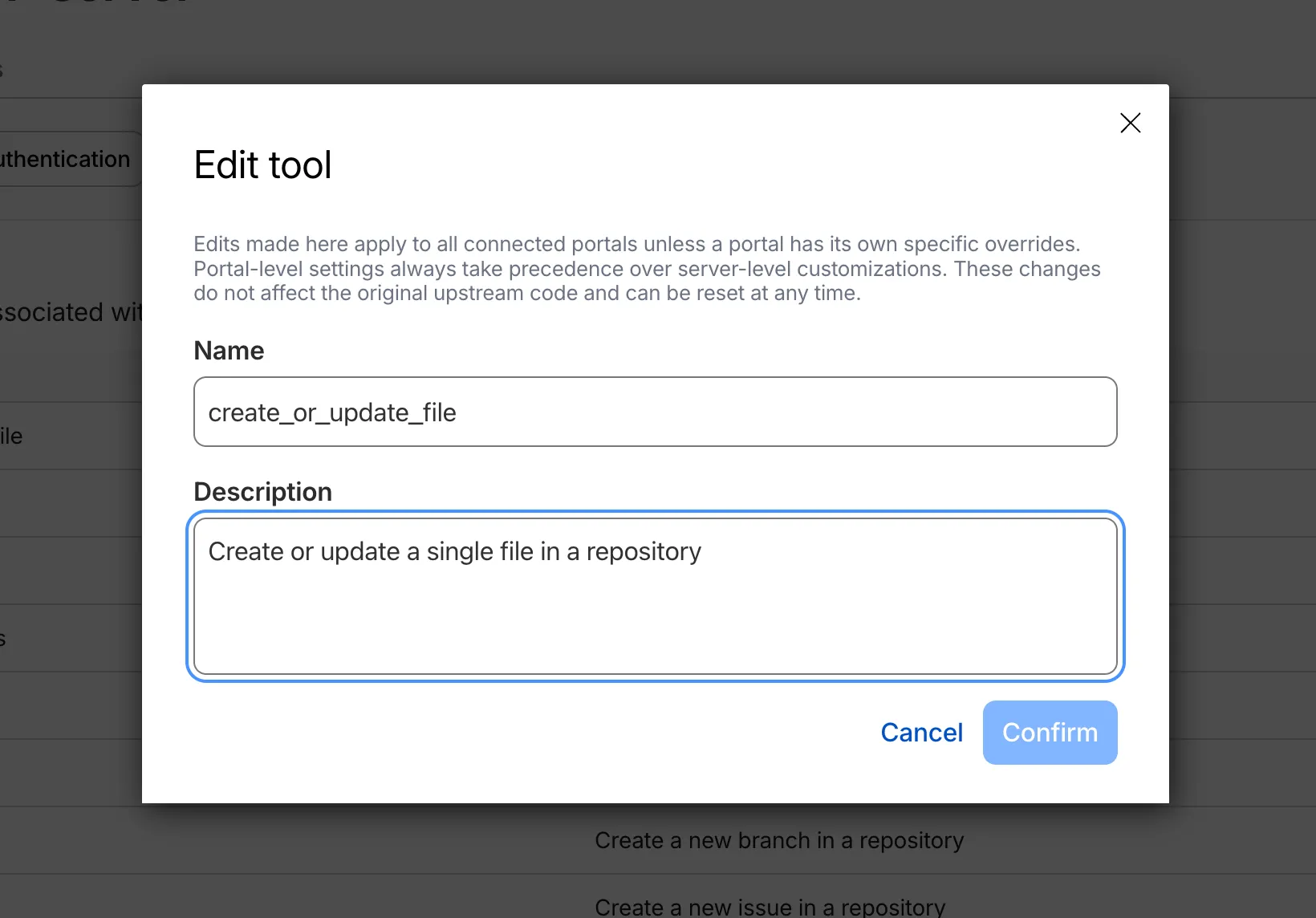
Modified tools display a Modified label in the tools list so administrators can see which tools have been customized at a glance.
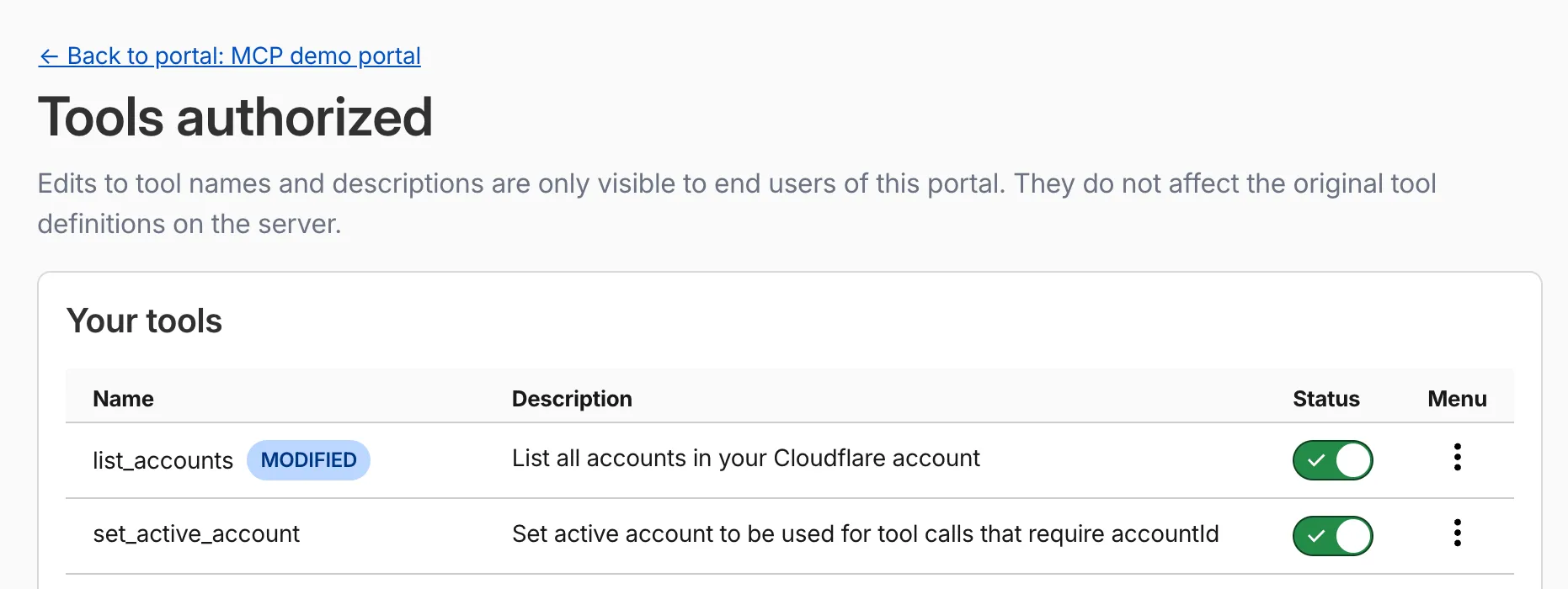
Aliases override the metadata that MCP clients receive. You can set them at two levels:
- Per portal: Applies only within a specific portal. Takes precedence over server-level aliases.
- Per server: Applies across all portals that use the server.
You can reset an alias at any time to restore the original upstream name.
For more information, refer to Tool and prompt aliases.
The Cloudflare Mesh dashboard now shows per-replica details for high availability nodes. You can see which replica is active, view each replica's Mesh IP and connection details, and manually trigger failover — all from the node detail page.

- Replica tabs on the node detail page — switch between replicas to see each one's Mesh IP, edge data center, origin IP, platform, version, and uptime.
- Active/passive badges identify which replica is currently routing traffic.
- Manual failover — promote a passive replica to active with a single click. The previous active replica switches to standby.
- HA badge in the overview table identifies nodes running multiple replicas.
- Active replica IP shown in the overview table — the dashboard now resolves which replica is active and displays the correct Mesh IP.
To manually promote a passive replica:
- In the Cloudflare dashboard ↗, go to Networking > Mesh.
- Select an HA-enabled node.
- Select the passive replica tab.
- Select Promote to active and confirm.
Traffic reroutes to the promoted replica immediately. Refer to High availability for details on failover behavior.
Cloudflare Gateway policy selectors which support regular expressions can now be authored in the dashboard using natural language. When building a policy with a regex-based selector (like
matches regex), you can describe what you want to match in plain English and the Cloudflare Agent will generate and validate a corresponding regular expression.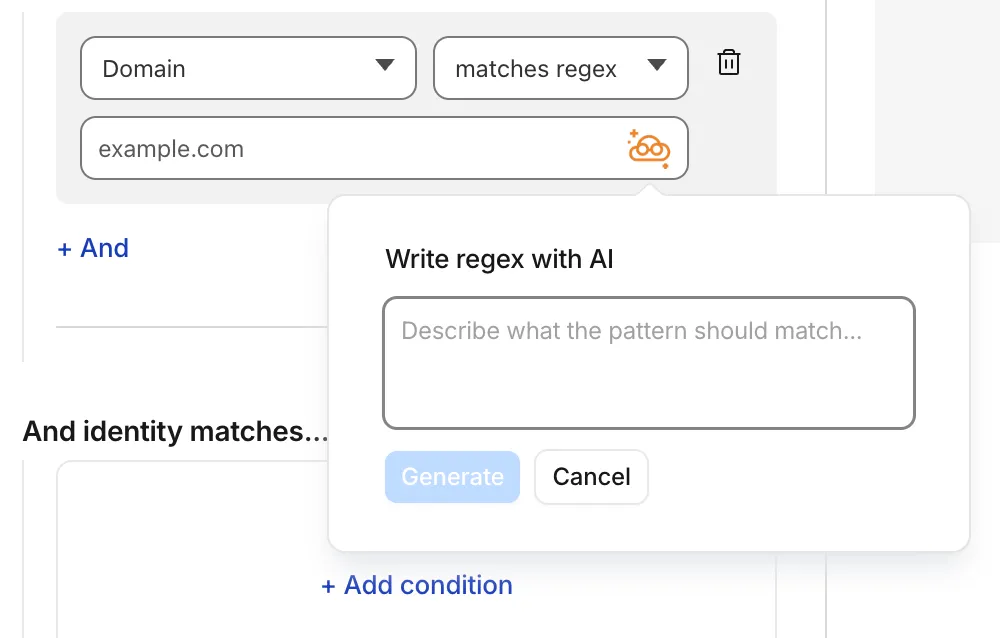
To get started, select a regex-compatible selector in the Gateway policy builder and select the icon. You'll see an input field for natural language, such as "any URL starting with /api/v1" or ".com, .net, and .app hosts which contain
goooglein the host."You can also use the tool to explain existing regular expressions. If a policy already contains a regex pattern, you can instantly generate a plain-language description.
A built-in feedback mechanism allows you to rate each interaction to help improve output quality over time.
For more information, refer to Cloudflare One firewall policies and expect to see the same functionality supported soon in Data loss prevention profiles.
Starting with
cloudflaredversion 2026.5.2 ↗, Cloudflare Tunnel automates the entire connectivity pre-checks workflow directly inside the binary. Previously, customers had to installdigandnetcatand run those commands by hand to verify their environment. Nowcloudflareddoes it natively at startup — and surfaces actionable remediation when something is blocked.
On every
cloudflared tunnel run(andcloudflared tunnel diag), the binary now natively checks:- DNS resolution —
region1.v2.argotunnel.comandregion2.v2.argotunnel.comresolve to valid Cloudflare IPs. - Transport connectivity — outbound
UDP (QUIC)andTCP (HTTP/2)on port7844. - Management API — outbound
TCP/443toapi.cloudflare.comfor software updates.
Results are printed in a scannable CLI table with three states:
- ✅ Pass — the check succeeded.
- ⚠️ Warn — a non-blocking issue, for example the Management API is unreachable so automatic updates will not work, but the tunnel will still come up.
- ❌ Fail — a blocking issue, with a specific remediation hint (for example,
Allow outbound UDP on port 7844).
If DNS is unresolvable, or both UDP and TCP fail on port 7844,
cloudflaredexits early with the failure rather than looping on opaquefailed to dialerrors.Pre-checks now run automatically on every start, which also catches regressions like overnight firewall policy changes — no need to remember to rerun the troubleshooting guide.
To get the new behavior, upgrade
cloudflaredto version2026.5.2or later. For more details, refer to the Connectivity pre-checks documentation.- DNS resolution —
A new GA release for the macOS Cloudflare One Client is now available on the stable releases downloads page.
This release introduces the new Cloudflare One Client UI for macOS! You can expect a cleaner and more intuitive design as well as easier access to common actions and information. Here are some of the many things we have found our users appreciate:
- Right click context menu to access the most common client actions quickly
- Built-in captive portal login experience
Additional Changes and improvements
- Added a new CLI command: warp-cli mdm refresh. This command executes an immediate refresh of the Mobile Device Management (MDM) configuration file.
- Fixed a proxy mode connection stall issue.
Known issues
- Registration may hang at "Checking your organization configuration" due to IPC errors. A system reboot should resolve the error, allowing registration to proceed.
- Split tunnel list configuration is not available in the new UI. Management of split tunnel entries is currently only possible via
warp-cli tunnel ipandwarp-cli tunnel host. UI support will be added in a future release.
A new GA release for the Windows Cloudflare One Client is now available on the stable releases downloads page.
This release introduces the new Cloudflare One Client UI for Windows! You can expect a cleaner and more intuitive design as well as easier access to common actions and information. Here are some of the many things we have found our users appreciate:
- Right click context menu to access the most common client actions quickly
- Built-in captive portal login experience
Additional Changes and improvements
- Added a new CLI command: warp-cli mdm refresh. This command executes an immediate refresh of the Mobile Device Management (MDM) configuration file.
- Fixed a proxy mode connection stall issue.
Known issues
- Registration authentication for devices via the integrated WebView2 browser is unavailable in this version as a temporary measure. As a result, the client will utilize the default browser on the device to complete the authentication process.
- An error indicating that Microsoft Edge can't read and write to its data directory may be displayed during captive portal login; this error is benign and can be dismissed.
- Registration may hang at "Checking your organization configuration" due to IPC errors. A system reboot should resolve the error, allowing registration to proceed.
- Split tunnel list configuration is not available in the new UI. Management of Split Tunnel entries is currently only possible via
warp-cli tunnel ipandwarp-cli tunnel host. UI support will be added in a future release. - Windows ARM may prompt the user to close running applications while trying to install this version. Simply click “Ok” with the default highlighted option.
- DNS resolution may be broken when the following conditions are all true:
- The client is in Secure Web Gateway without DNS filtering (tunnel-only) mode.
- A custom DNS server address is configured on the primary network adapter.
- The custom DNS server address on the primary network adapter is changed while the client is connected.
To work around this issue, please reconnect the client by selecting "disconnect" and then "connect" in the client user interface.
A new GA release for the Linux Cloudflare One Client is now available on the stable releases downloads page.
This release introduces the new Cloudflare One Client UI for Linux! You can expect a cleaner and more intuitive design as well as easier access to common actions and information. Here are some of the many things we have found our users appreciate:
- Right click context menu to access the most common client actions quickly
- Built-in captive portal login experience
Changes and improvements
- Added a new CLI command: warp-cli mdm refresh. This command executes an immediate refresh of the Mobile Device Management (MDM) configuration file.
- Official support for RHEL 9 has been added for Cloudflare Mesh nodes. To install the RHEL 9 package, the Extra Packages for Enterprise Linux (EPEL) repository must be active, as it contains dependencies required for the tray icon and captive portal webview.
- Fixed a proxy mode connection stall issue.
Known issues
- Registration may hang at "Checking your organization configuration" due to IPC errors. A system reboot should resolve the error, allowing registration to proceed.
- Split tunnel list configuration is not available in the new UI. Management of split tunnel entries is currently only possible via
warp-cli tunnel ipandwarp-cli tunnel host. UI support will be added in a future release.
You can now scope Cloudflare permissions to individual Cloudflare Tunnel instances and Cloudflare Mesh nodes. Administrators can delegate access to specific Tunnels or Mesh nodes without granting account-wide control over private networking.
When you add a member or create a permission policy, the resource picker now lists Cloudflare Tunnel instances and Cloudflare Mesh nodes as scopable resource types. You can:
- Grant a read-only role on a single Cloudflare Tunnel instance to a support operator for log streaming and diagnostics — without exposing other Tunnels or destructive actions.
- Grant a write role on a specific Cloudflare Mesh node to an application team — without giving them access to the rest of your private network.
- Scope a single policy to one or many Tunnels and Mesh nodes at once.
Granular permissions are a parallel layer to existing account-level roles — they do not replace them.
- Existing account-level roles continue to work. A member with
Cloudflare AccessorCloudflare Zero Trustretains write access to every Tunnel and Mesh node in the account. This ensures backward compatibility for existing automation and tokens. - Granular permissions are additive. For any API request on a specific Tunnel or Mesh node, access is granted if the principal has either the account-level role or a granular permission for that resource.
- Resource enumeration is authorization-aware. Listing endpoints (
GET /accounts/{id}/cfd_tunnel,GET /accounts/{id}/warp_connector) return only the resources the principal has at least read access to.
- Configure granular permissions for Cloudflare Tunnel.
- Configure granular permissions for Cloudflare Tunnel and Cloudflare Mesh in Cloudflare One.
- Review the resource-scoped roles on the Cloudflare role reference.
Cloudflare Access now supports using Cloudflare itself as an identity provider. If you publish an Access application and select Cloudflare as the login method, users can sign in with their existing Cloudflare account — no one-time PINs, no third-party IdP configuration, and no shared email inboxes. Authentication is backed by Cloudflare's own account security (including multi-factor authentication), making it both simpler to set up and more secure than OTP-based login for most use cases.
Cloudflare is now the default identity provider for all newly created Zero Trust accounts, replacing One-time PIN.
This also enables two new capabilities:
- Cloudflare Account Member selector — A new policy selector that matches users based on their membership in a Cloudflare account. You can target the current account or specify a different account ID for cross-account access scenarios.
- Restrict to account members — An identity provider configuration option that limits authentication to users who are members of your Cloudflare account.
To get started, add Cloudflare as an identity provider in your Zero Trust settings.
Cloudflare CASB now integrates with the Claude Compliance API ↗. This enhancement gives security teams visibility into Claude usage patterns, admin activity, and compliance-relevant events across their organization.
The Claude Compliance API provides structured access to audit logs and administrative actions within Claude Enterprise and Claude Platform. Cloudflare CASB ingests this data to surface security findings that help organizations enhance their security posture and enforce AI governance.
Starting today, security teams can scan for security findings across the following assets:
- Public projects — Projects set to public visibility
- Project attachment — Files and documents added to projects that violate DLP policies
- Chat files — User-uploaded and provider-generated files that violate DLP policies
- Chat messages — User prompts and provider responses that violate DLP policies
- Artifacts — Provider-generated documents and files that violate DLP policies
This integration is available to all Cloudflare One customers. New Cloudflare customers can sign up and start with their first two integrations for free. Existing customers can enable the integration directly in the dashboard. The integration begins scanning immediately and surfaces findings in the dashboard within minutes.
Network Analytics is now fully supported for accounts using Unified Routing mode. Traffic that traverses Unified Routing onramps and offramps is now visible in Network Analytics with the same dimensions and filters as traffic on the standard data plane.
This closes a parity gap for customers who had moved tunnels onto Unified Routing and lost visibility into their dataplane traffic in the Network Analytics dashboard. No configuration change is required — analytics data is collected automatically for all accounts with Unified Routing enabled.
For the remaining beta limitations, refer to Traffic steering beta limitations.
The Access login page and one-time password (OTP) page now feature a refreshed design that improves visual consistency, user trust, and mobile responsiveness.
Before:
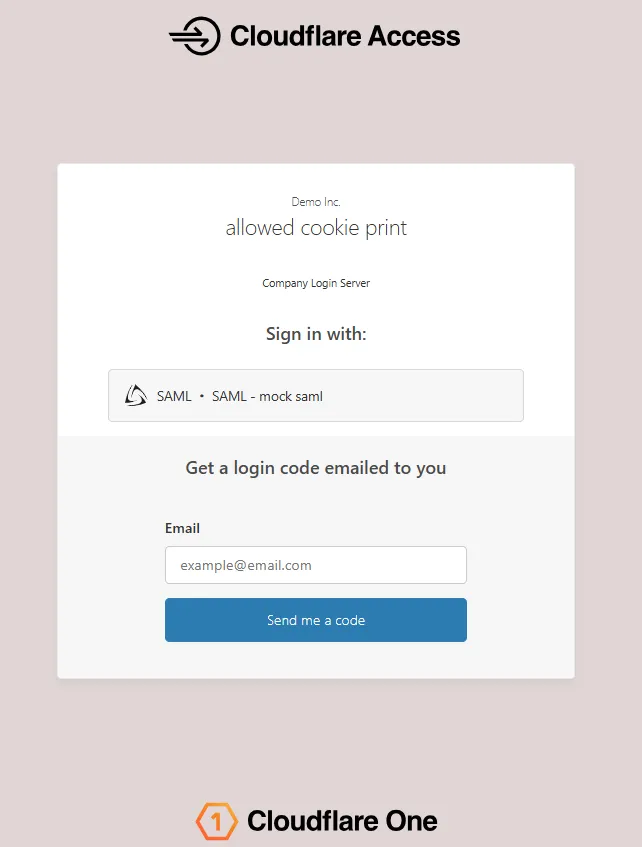
After:
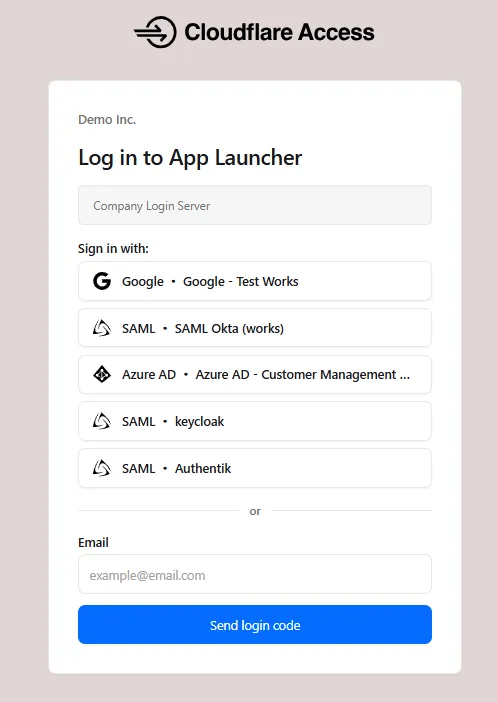
The updated login experience includes:
- Unified authentication card - All sign-in options (identity provider buttons, email input, OTP) now appear in a single card with consistent styling, replacing the previous multi-section layout.
- Consistent button styling - Identity provider buttons use a uniform size and layout for easier scanning and selection.
- Better mobile experience - Responsive layout improvements ensure the login page renders correctly on phones and tablets.
- Dark mode support - The login page now supports dark mode.
New Magic Transit and Cloudflare WAN accounts are now assigned a single IPv4 anycast address by default.
Cloudflare handles failures on its network automatically by advertising your endpoint IP from multiple nodes across many globally distributed data centers. To handle failures on your network, configure two tunnels from separate routers.
To request additional anycast IP addresses for your account, contact your account team.
For tunnel configuration guidance, refer to Configure tunnel endpoints for Cloudflare WAN or Configure tunnel endpoints for Magic Transit.
Cloudflare Gateway now supports natural language policy creation for DNS, HTTP, and Network firewall policies. Administrators can describe the outcome they want in plain language, and Cloudflare will generate a complete policy rule that populates the policy builder form.
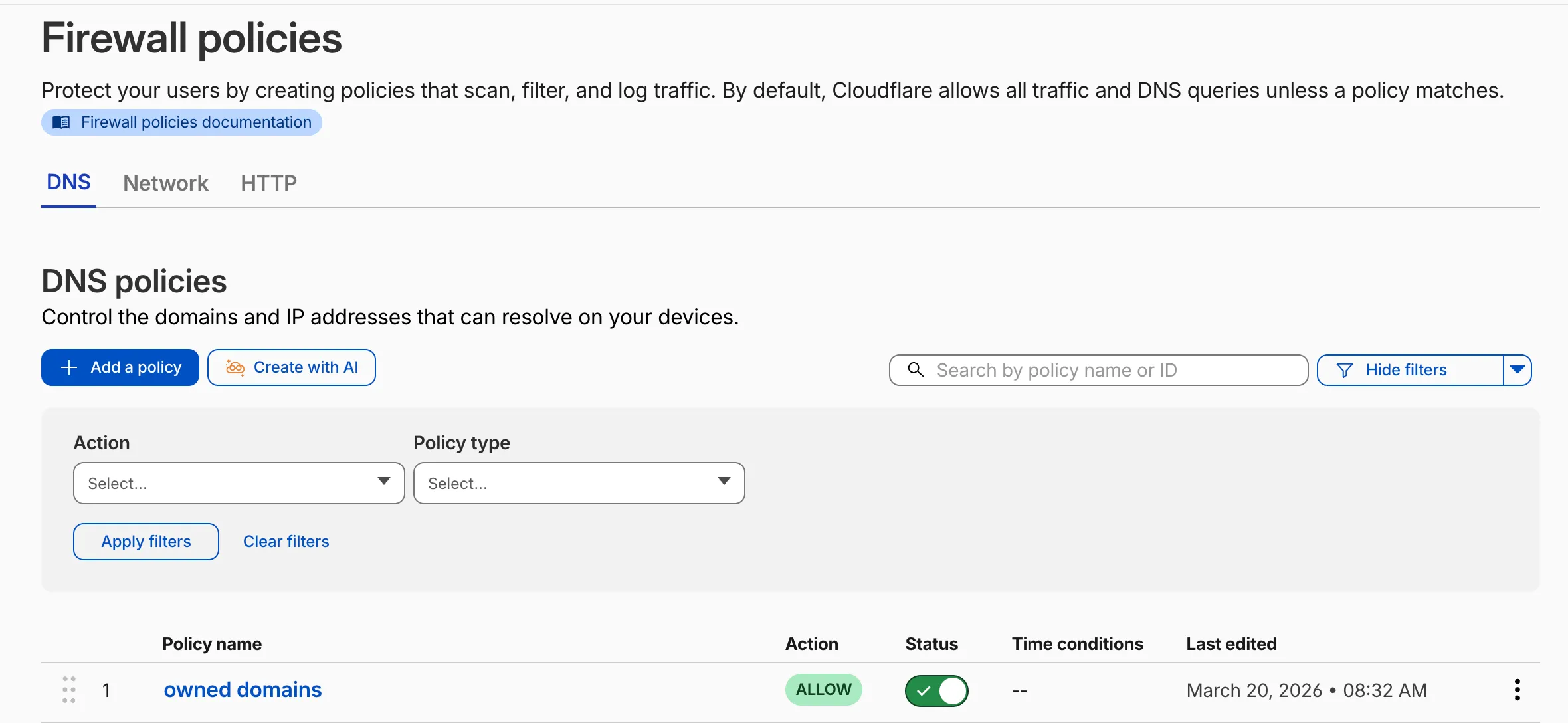
To create a policy with natural language, select Create with AI on any Gateway firewall policy tab. Choose a policy type, describe what the policy should do, and a fully configured rule will appear in the policy builder for review. You can edit any field before saving, or re-generate with a different prompt.
The generated policy incorporates your account context - including lists, DLP profiles, applications, and device posture checks - so that references to your existing resources resolve automatically.
A built-in feedback mechanism allows you to rate each generated policy and provide optional comments, which Cloudflare uses to improve output quality over time.
For more information, refer to Gateway firewall policies.
A new GA release for the Windows Cloudflare One Client is now available on the stable releases downloads page.
This release introduces the new Cloudflare One Client UI for Windows! You can expect a cleaner and more intuitive design as well as easier access to common actions and information. Here are some of the many things we have found our users appreciate:
- Right click context menu to access the most common client actions quickly
- Built-in captive portal login experience
Additional Changes and improvements
- Added a new CLI command: warp-cli mdm refresh. This command executes an immediate refresh of the Mobile Device Management (MDM) configuration file.
Known issues
- Registration authentication for devices via the integrated WebView2 browser is unavailable in this version as a temporary measure. As a result, the client will utilize the default browser on the device to complete the authentication process.
- An error indicating that Microsoft Edge can't read and write to its data directory may be displayed during captive portal login; this error is benign and can be dismissed.
- Registration may hang at "Checking your organization configuration" due to IPC errors. A system reboot should resolve the error, allowing registration to proceed.
- Split tunnel list configuration is not available in the new UI. Management of Split Tunnel entries is currently only possible via
warp-cli tunnel ipandwarp-cli tunnel host. UI support will be added in a future release. - Windows ARM may prompt the user to close running applications while trying to install this version. Simply click “Ok” with the default highlighted option.
- DNS resolution may be broken when the following conditions are all true:
- The client is in Secure Web Gateway without DNS filtering (tunnel-only) mode.
- A custom DNS server address is configured on the primary network adapter.
- The custom DNS server address on the primary network adapter is changed while the client is connected.
To work around this issue, please reconnect the client by selecting "disconnect" and then "connect" in the client user interface.
A new GA release for the macOS Cloudflare One Client is now available on the stable releases downloads page.
This release introduces the new Cloudflare One Client UI for macOS! You can expect a cleaner and more intuitive design as well as easier access to common actions and information. Here are some of the many things we have found our users appreciate:
- Right click context menu to access the most common client actions quickly
- Built-in captive portal login experience
Additional Changes and improvements
- Added a new CLI command: warp-cli mdm refresh. This command executes an immediate refresh of the Mobile Device Management (MDM) configuration file.
Known issues
- Registration may hang at "Checking your organization configuration" due to IPC errors. A system reboot should resolve the error, allowing registration to proceed.
- Split tunnel list configuration is not available in the new UI. Management of split tunnel entries is currently only possible via
warp-cli tunnel ipandwarp-cli tunnel host. UI support will be added in a future release.
A new GA release for the Linux Cloudflare One Client is now available on the stable releases downloads page.
This release introduces the new Cloudflare One Client UI for Linux! You can expect a cleaner and more intuitive design as well as easier access to common actions and information. Here are some of the many things we have found our users appreciate:
- Right click context menu to access the most common client actions quickly
- Built-in captive portal login experience
Changes and improvements
- Added a new CLI command: warp-cli mdm refresh. This command executes an immediate refresh of the Mobile Device Management (MDM) configuration file.
- Official support for RHEL 9 has been added for Cloudflare Mesh nodes. To install the RHEL 9 package, the Extra Packages for Enterprise Linux (EPEL) repository must be active, as it contains dependencies required for the tray icon and captive portal webview.
Known issues
- Registration may hang at "Checking your organization configuration" due to IPC errors. A system reboot should resolve the error, allowing registration to proceed.
- Split tunnel list configuration is not available in the new UI. Management of split tunnel entries is currently only possible via
warp-cli tunnel ipandwarp-cli tunnel host. UI support will be added in a future release.
Cloudflare IPsec now supports the standard NAT traversal (NAT-T) flow, where IKE begins on UDP port
500and switches to UDP port4500after NAT is detected.Previously, devices behind NAT had to be configured to initiate IKE on UDP port
4500directly. Devices that started on UDP port500could not complete the IKE handshake when NAT was in the path. This required custom configuration on devices such as VeloCloud SD-WAN edges, Cisco IOS-XE routers, and Juniper SRX firewalls, and was not possible on every platform.What changed:
- Devices behind NAT can now initiate IKE on either UDP port
500or UDP port4500. - Devices that start IKE on UDP port
500and switch to UDP port4500after NAT detection now complete the handshake successfully. - No configuration change is required on Cloudflare. The change is available for all IPsec tunnels on Cloudflare WAN and Magic Transit.
This change does not affect existing tunnels:
- Tunnels using UDP port
500with no NAT detected continue to operate as before. - Tunnels configured to start IKE on UDP port
4500continue to operate as before. - NAT detection logic is unchanged.
For configuration details, refer to GRE and IPsec tunnels.
- Devices behind NAT can now initiate IKE on either UDP port
When the Cloudflare One Appliance is acting as the DHCP server for a LAN, you can now configure custom DHCP options on the leases it issues. This unlocks workflows such as PXE / iPXE boot, VoIP phone provisioning, and vendor-specific client configuration.
Each option is defined by
option_number,value, and one of four value types:text,integer,hex, orip. Configurations are validated on the appliance before being applied — invalid configurations are rejected and the underlying error is returned to the API caller, so a bad option will not disrupt the live DHCP service.For details, refer to DHCP server options.
Breakout and traffic prioritization rules on the Cloudflare One Appliance can now match by source in addition to destination application. You can pin breakout or priority behavior to:
- A source LAN interface — VLANs attached to that LAN are included automatically.
- A source IP address, range, or CIDR block.
This is the natural way to break out a guest VLAN to the local Internet, or to prioritize traffic from a specific subnet, without enumerating destination applications.
For details, refer to Breakout traffic.
You can now create, rotate, and delete Cloudflare One Virtual Appliance instances and their license keys directly via the API and Terraform.
- Create a virtual appliance and receive a license key:
POST /accounts/{account_id}/magic/connectorswithdevice.provision_license: true. - Rotate the license key for an existing virtual appliance:
PATCH /accounts/{account_id}/magic/connectors/{connector_id}withprovision_license: true. The previous key is immediately and irrevocably revoked. - Delete a virtual appliance to release the associated licensed device.
The license key is returned in the response only once, at create or rotate time. Copy and store it securely.
For details, refer to Configure a Cloudflare One Virtual Appliance.
- Create a virtual appliance and receive a license key: