Changelog
New updates and improvements at Cloudflare.

PhishNet users can now access Cloudy summaries directly within the email investigation experience. When reviewing a message in PhishNet, users will see an AI-generated summary that provides additional context and key details about the email.
These summaries help users quickly understand the nature of a message without needing to manually parse through headers, body content, and detection signals. Cloudy surfaces the most relevant information so users can make faster, more informed decisions about suspicious emails.
These summaries are not trained on customer data. They are generated using the outputs of our existing detection models and analysis systems.
This feature is available for PhishNet with Office 365. Support for Gmail will be available by the end of the quarter.
Cloudflare Mesh nodes now support IPv6 CIDR routes. You can advertise both IPv4 and IPv6 subnets through your Mesh nodes, making IPv6-only or dual-stack private networks reachable from any enrolled device.
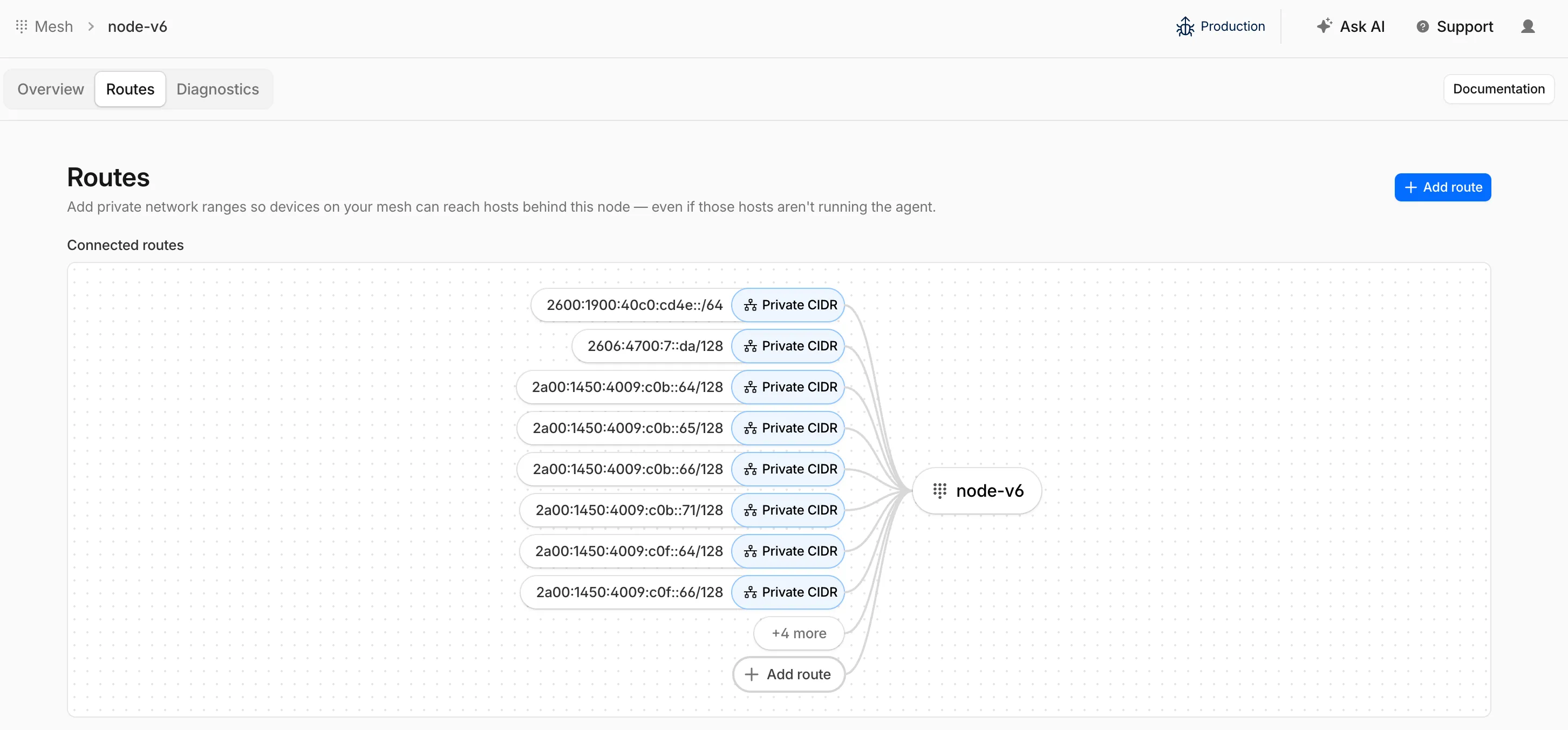
To add an IPv6 route, follow the same steps as adding an IPv4 route — enter the IPv6 CIDR (for example,
fd00::/64) when configuring the route in the dashboard ↗ or via the API.
Cloudflare IPsec now supports post-quantum key agreement with compatible third-party devices. Cisco ↗ and Fortinet ↗ are the first third-party vendors validated to interoperate with Cloudflare IPsec using ML-KEM (Module-Lattice-Based Key-Encapsulation Mechanism).
Post-quantum IPsec uses RFC 9370 ↗ and draft-ietf-ipsecme-ikev2-mlkem ↗ to negotiate hybrid key agreement during the IKEv2
IKE_INTERMEDIATEphase. This combines classical Diffie-Hellman (Group 20) with ML-KEM-768 or ML-KEM-1024 to protect against harvest-now, decrypt-later ↗ attacks.Key details:
- Compatible with Cisco 8000 Series Secure Routers with IOS XR Release 26.1.1 and Fortinet FortiOS 7.6.6 and later.
- Uses ML-KEM-768 or ML-KEM-1024 as an additional Key Exchange to DH Group 20.
- Follows RFC 9370 and draft-ietf-ipsecme-ikev2-mlkem standards.
- No additional licensing required.
Post-quantum IPsec with third-party devices is now generally available with confirmed interoperability for the platforms listed above. Cloudflare intends to support interoperability with more vendors as they build out support for draft-ietf-ipsecme-ikev2-mlkem. Contact your account team to discuss support for additional vendors.
For supported key exchange methods and the list of validated platforms, refer to GRE and IPsec tunnels.
Cloudflare DLP now includes Data Classification, which lets administrators organize and label sensitive content using labels, templates, and reusable data classes.
With Data Classification, administrators can define labels such as sensitivity schemas and levels, and data tag groups and tags. Administrators can also build from Cloudflare-managed templates and create reusable data classes that combine detection entries, other data classes, sensitivity levels, and data tags.
You can then use those classifications in custom DLP profiles to identify the severity of sensitive content, understand where it exists, and apply that logic consistently across DLP profiles.
For more information, refer to Data Classification.
Cloudflare DLP now includes new predefined detection entries.
The expanded catalog includes detections for specific credential types, webhooks, addresses, tax identifiers, national IDs, financial data, and crypto wallets.
Examples include
GitHub PAT,OpenAI API Key,Slack Webhook,Discord Webhook,US Physical Address, andBitcoin Wallet.For the full list, refer to Predefined detection entries.
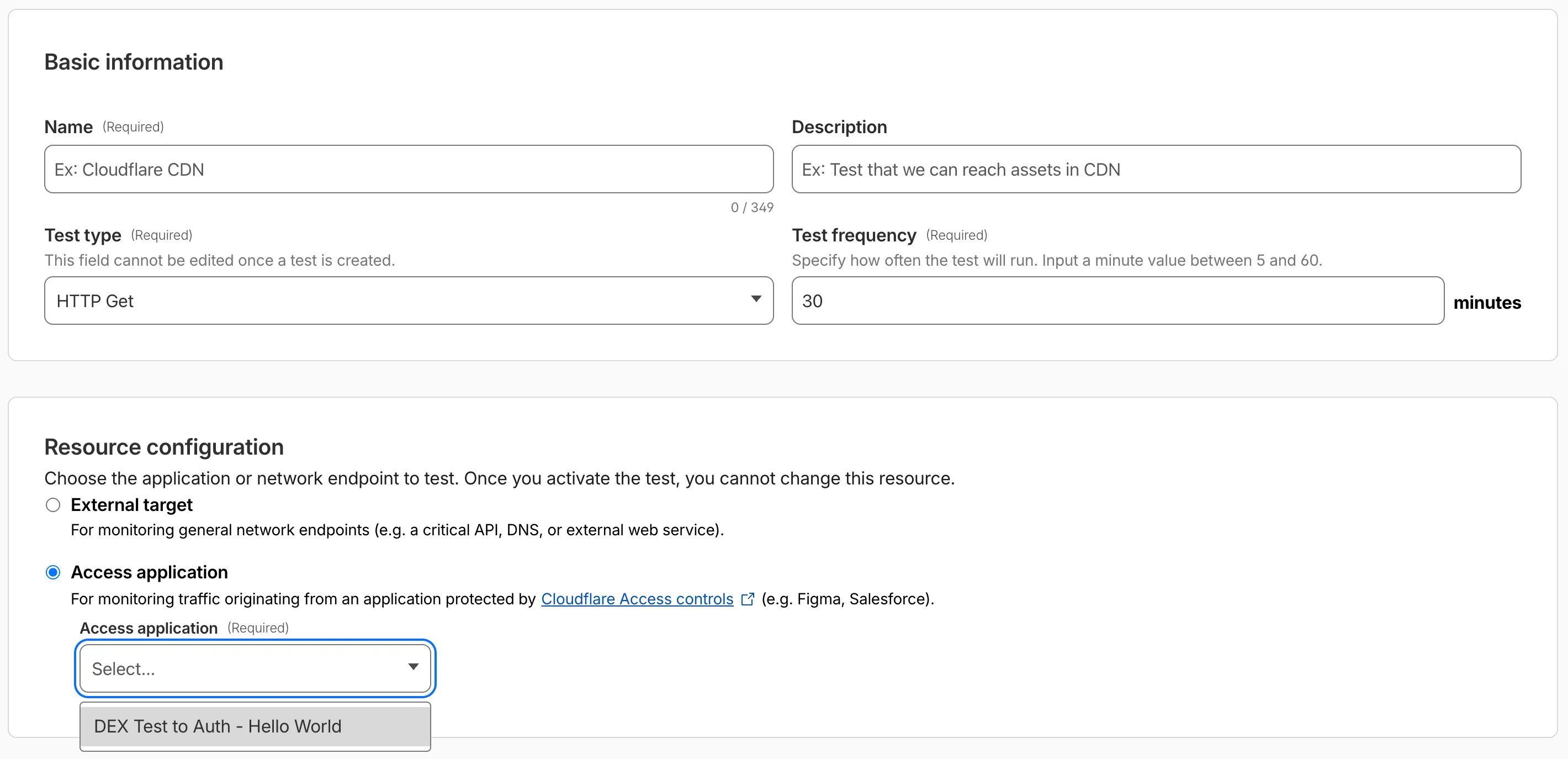
Digital experience tests now support testing applications protected by Cloudflare Access or third-party authentication. All authentication secrets are managed via Cloudflare Secret Store.
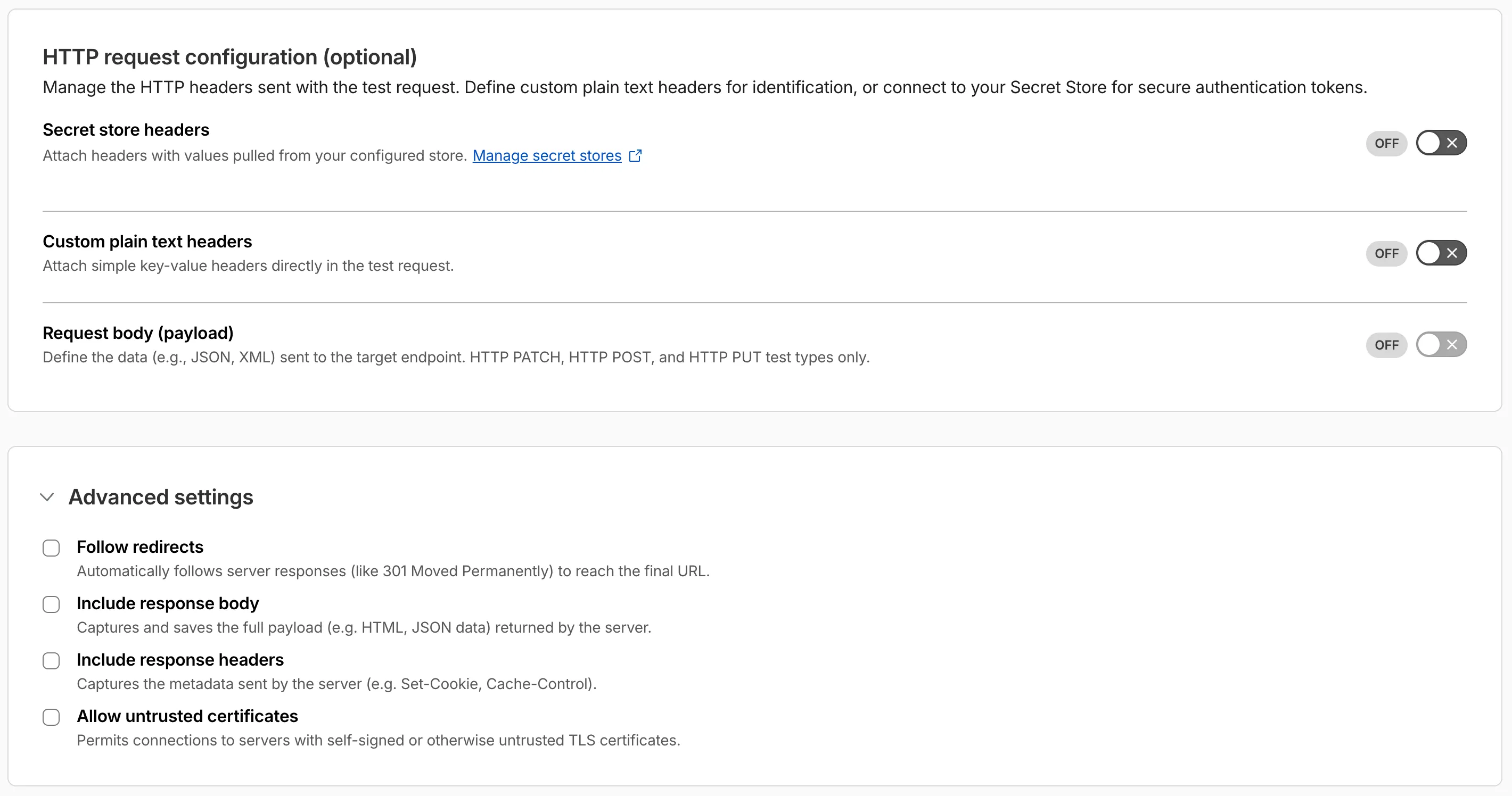
Digital experience tests also have enhanced configuration options including:
- New HTTP methods (DELETE, PATCH, POST, PUT)
- Secret Store headers, custom plain text headers, and custom request bodies
- Advanced settings: follow redirects, response bodies, response headers, and allow untrusted certificates
The Gateway Authorization Proxy and hosted PAC files are now generally available for all plan types.
Authorization proxy endpoints add an identity-aware option alongside the existing source IP proxy endpoints, using Cloudflare Access authentication to verify who a user is before applying Gateway filtering — without installing the Cloudflare One Client. Cloudflare-hosted PAC files let you create and distribute PAC files directly from Cloudflare One on Cloudflare's global network.
These features are ideal for environments where deploying a device client is not an option, such as virtual desktops (VDI) or compliance-restricted endpoints.
To get started, refer to the proxy endpoints documentation.
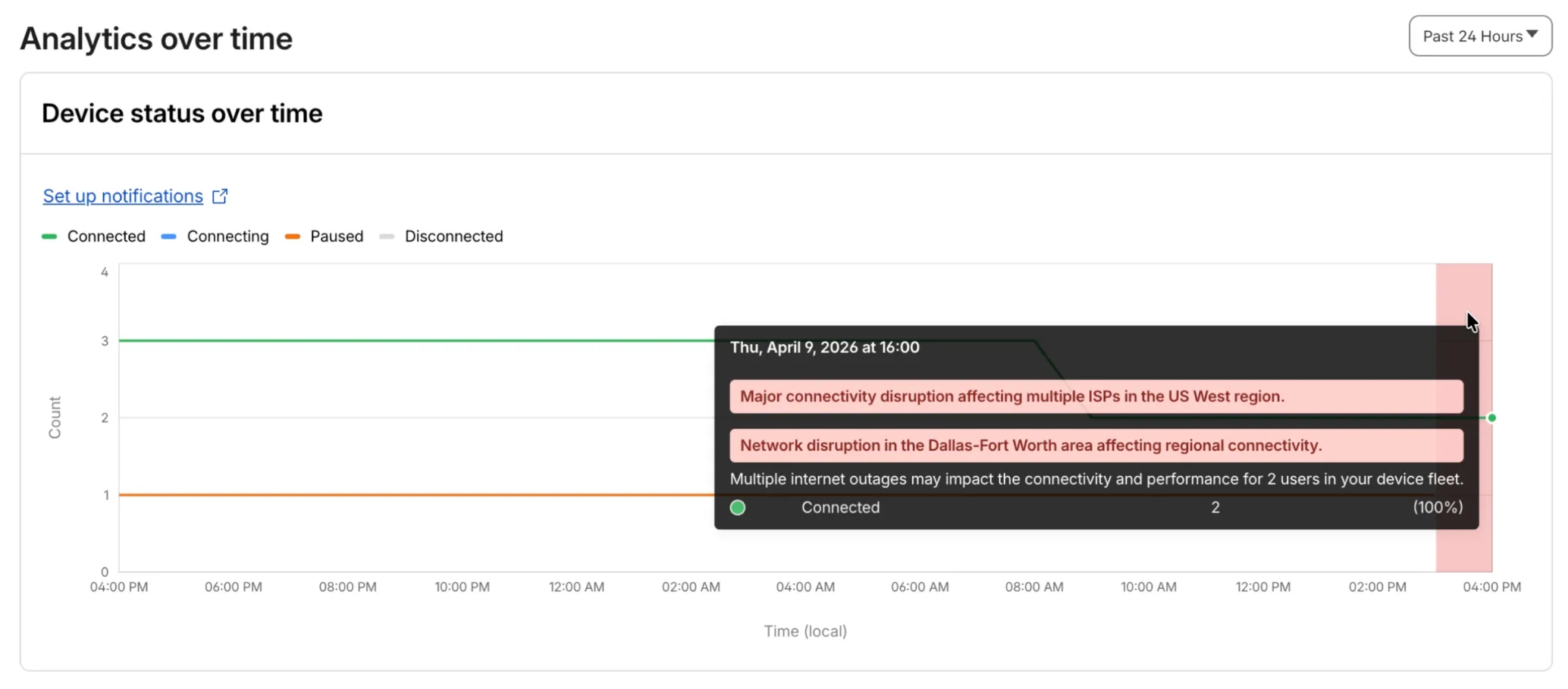
Digital Experience will display a dashboard notification when an Internet outage or traffic anomaly may impact a Cloudflare One Client device based on its geographic location or network connection.
This Internet outage and traffic anomaly data is pulled from Cloudflare Radar ↗. All Internet outage and traffic anomaly observations can be viewed in the Radar Outage Center ↗.

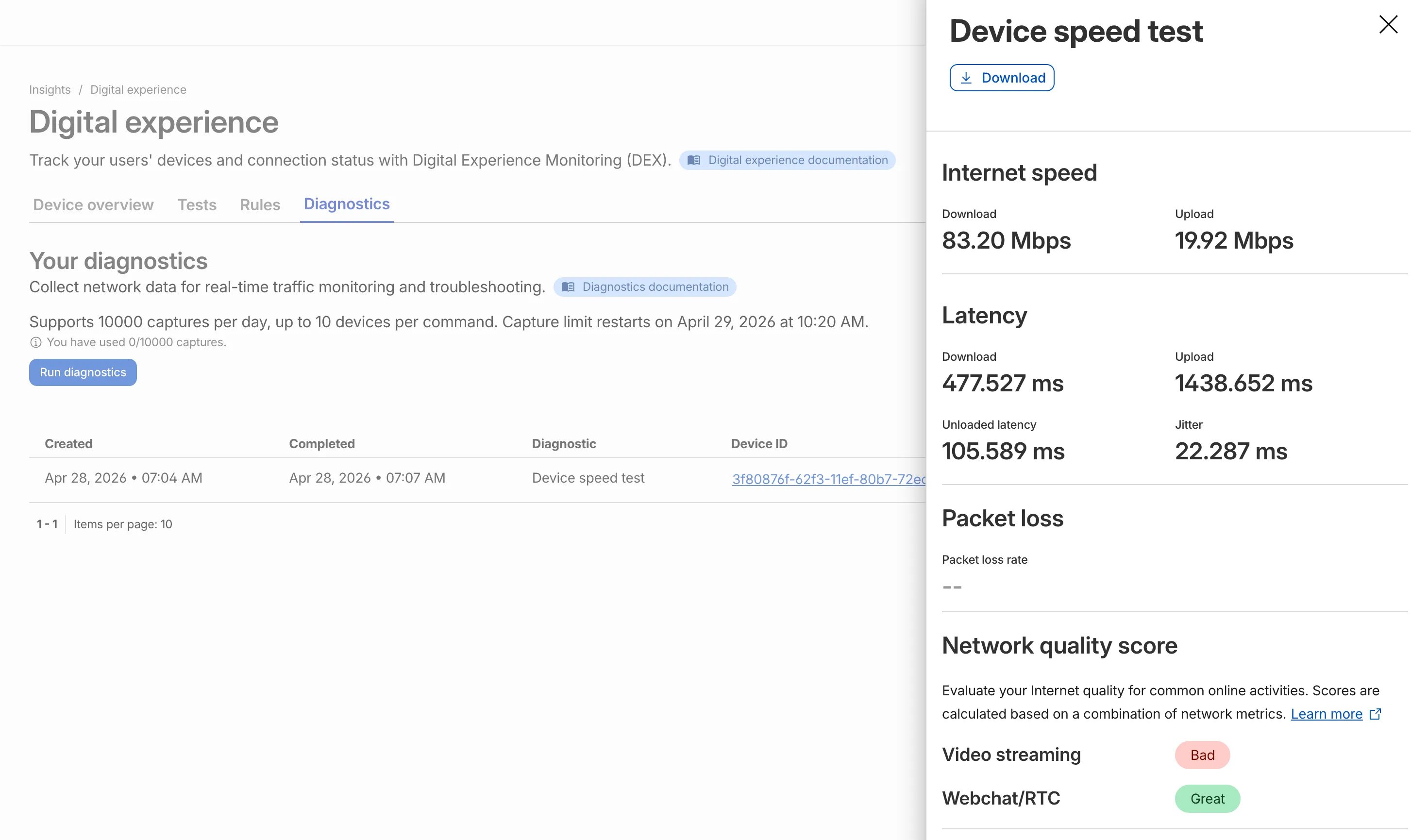
IT teams can now remotely run speed tests from the Cloudflare One Client to Cloudflare's network edge.
Each speed test includes the following metrics:
- Internet speed: download and upload throughput
- Latency: download, upload, unloaded latency, and jitter
- Network quality score: video streaming, webchat/real-time communication (RTC)
In the Cloudflare dashboard ↗, go to Zero Trust > Insights > Digital experience > Diagnostics and select Run diagnostics to use the feature today.
You can now create, view, and manage DLP detection entries outside of profiles.
Detection entries are no longer hidden inside individual profiles. Administrators can manage detection entries directly from the Detection entries section and use them in custom DLP profiles.
For more information, refer to Configure detection entries.
Cloudflare DLP now includes a new predefined profile designed to detect PII records that contain multiple types of personal data: Personally Identifiable Information (PII) Record.
Most predefined and custom DLP profiles match when any enabled detection entry matches. The Personally Identifiable Information (PII) Record profile is different. It only matches when at least three unique detection entries are found in close proximity, which reduces false positives from standalone values that may not represent a real PII record.
Detection entries included in the profile:
- AU Passport Number
- American Express Card Number
- Diners Club Card Number
- US Driver's License Number
- Email Address
- Full Name
- US Mailing Address
- Mastercard Card Number
- US Individual Tax Identification Number (ITIN)
- US Passport Number
- US Phone Number
- Union Pay Card Number
- United States SSN Numeric Detection
- Visa Card Number
For more information, refer to predefined DLP profiles.
Zero Trust Network Session Logs are now generated for all traffic proxied through Cloudflare Gateway, regardless of on-ramp type. This includes traffic from proxy endpoints (PAC files) and Browser Isolation egress — on-ramps that previously did not generate session logs.
Customers who already consume the
zero_trust_network_sessionsdataset via Logpush or Log Explorer may see increased log volume if they use these on-ramps.For field definitions, refer to Zero Trust Network Session Logs. For traffic analysis, refer to Network session analytics.
Independent MFA in Cloudflare Access now supports two additional organization-level controls:
- Restrict authenticators by AAGUID — Limit enrollment to a specific set of WebAuthn authenticators using their AAGUID ↗. This is useful for organizations that require FIPS-validated security keys or company-issued hardware. AAGUIDs are managed through a new List type.
- AMR matching — Skip the independent MFA prompt when the identity provider has already performed an equivalent MFA. Access reads the
amrclaim defined in RFC 8176 ↗ and matches supported values such ashwk,otp, andfptto the authenticator types allowed on the application or policy. This prevents users from having to complete MFA twice when their identity provider already enforces it.
To get started, refer to Independent MFA.
Cloudflare Advanced Network Firewall Country rules are now supported for accounts using Unified Routing mode. This feature requires a Cloudflare Advanced Network Firewall subscription.
You can create firewall rules that match traffic based on source or destination country to enforce geographic access policies across your network.
This is the first of the Cloudflare Advanced Network Firewall features to become available in Unified Routing. Support for additional features - IP Lists, ASN Lists, Threat Intel Lists, IDS, Rate Limiting, SIP, and Managed Rulesets - is planned.
For the full list of current beta limitations, refer to Traffic steering beta limitations.
The new Network session analytics dashboard is now available in Cloudflare One. This dashboard provides visibility into your network traffic patterns, helping you understand how traffic flows through your Cloudflare One infrastructure.
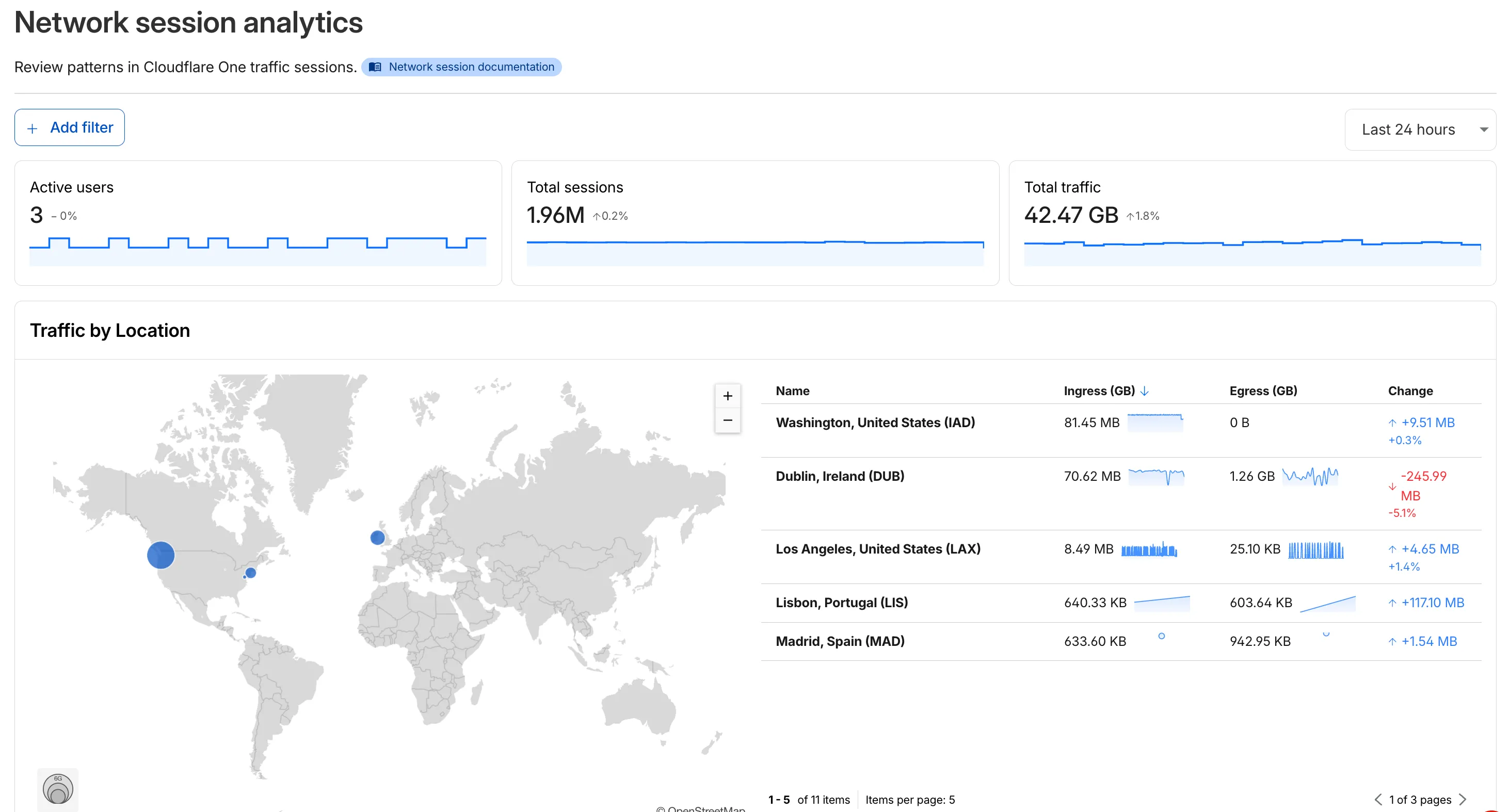
- Analyze geographic distribution: View a world map showing where your network traffic originates, with a list of top locations by session count.
- Monitor key metrics: Track session count, total bytes transferred, and unique users.
- Identify connection issues: Analyze connection close reasons to troubleshoot network problems.
- Review protocol usage: See which network protocols (TCP, UDP, ICMP) are most used.
- Summary metrics: Session count, bytes total, and unique users
- Traffic by location: World map visualization and location list with top traffic sources
- Top protocols: Breakdown of TCP, UDP, ICMP, and ICMPv6 traffic
- Connection close reasons: Insights into why sessions terminated (client closed, origin closed, timeouts, errors)
- Log in to Cloudflare One ↗.
- Go to Zero Trust > Insights > Dashboards.
- Select Network session analytics.
For more information, refer to the Network session analytics documentation.
MCP server portals display a homepage when users visit the portal domain in a browser.
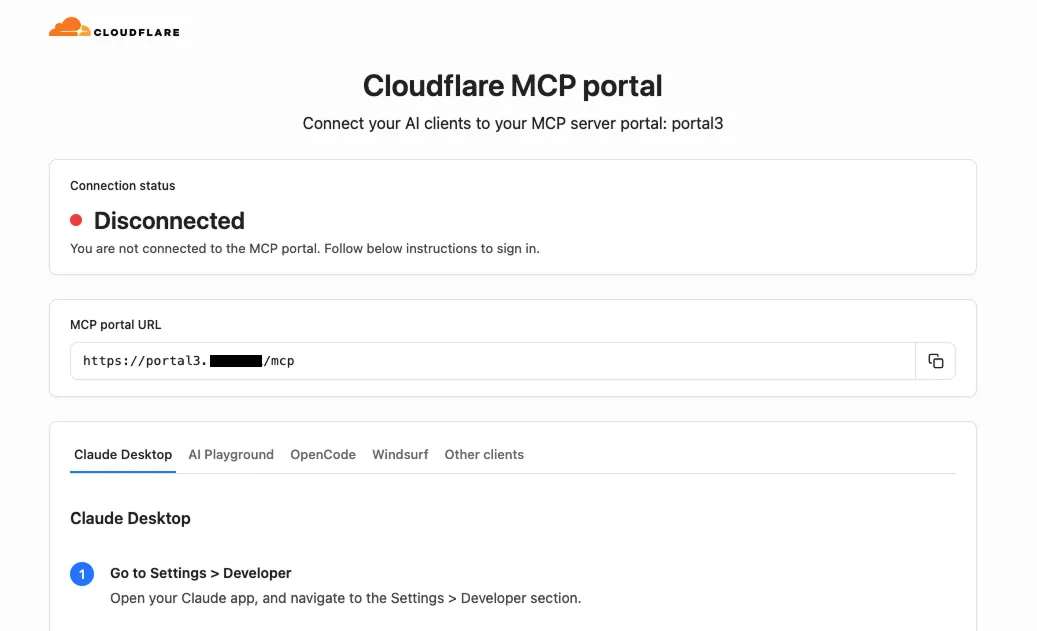
The homepage shows:
- The portal name and organization branding
- The MCP endpoint URL with a copy button
- Per-client connection instructions for Claude Desktop, Workers AI Playground, OpenCode, Windsurf, and other MCP clients
Authenticated users see their email address and a Sign out button. Selecting Sign out revokes all portal-level OAuth grants, deletes upstream server OAuth states, and redirects through Cloudflare Access logout. A confirmation page shows a summary of the revoked sessions.
For more information, refer to MCP server portals.
Cloudflare Access now supports independent multi-factor authentication (MFA), allowing you to enforce MFA requirements without relying on your identity provider (IdP). With per-application and per-policy configuration, you can enforce stricter authentication methods like hardware security keys on sensitive applications without requiring them across your entire organization. This reduces the risk of MFA fatigue for your broader user population while adding additional security where it matters most.
This feature also addresses common gaps in IdP-based MFA, such as inconsistent MFA policies across different identity providers or the need for additional security layers beyond what the IdP provides.
Independent MFA supports the following authenticator types:
- Authenticator application — Time-based one-time passwords (TOTP) using apps like Google Authenticator, Microsoft Authenticator, or Authy.
- Security key — Hardware security keys such as YubiKeys.
- Biometrics — Built-in device authenticators including Apple Touch ID, Apple Face ID, and Windows Hello.
You can configure MFA requirements at three levels:
Level Description Organization Enforce MFA by default for all applications in your account. Application Require or turn off MFA for a specific application. Policy Require or turn off MFA for users who match a specific policy. Settings at lower levels (policy) override settings at higher levels (organization), giving you granular control over MFA enforcement.
Users enroll their authenticators through the App Launcher. To help with onboarding, administrators can share a direct enrollment link:
<your-team-name>.cloudflareaccess.com/AddMfaDevice.To get started with Independent MFA, refer to Independent MFA.
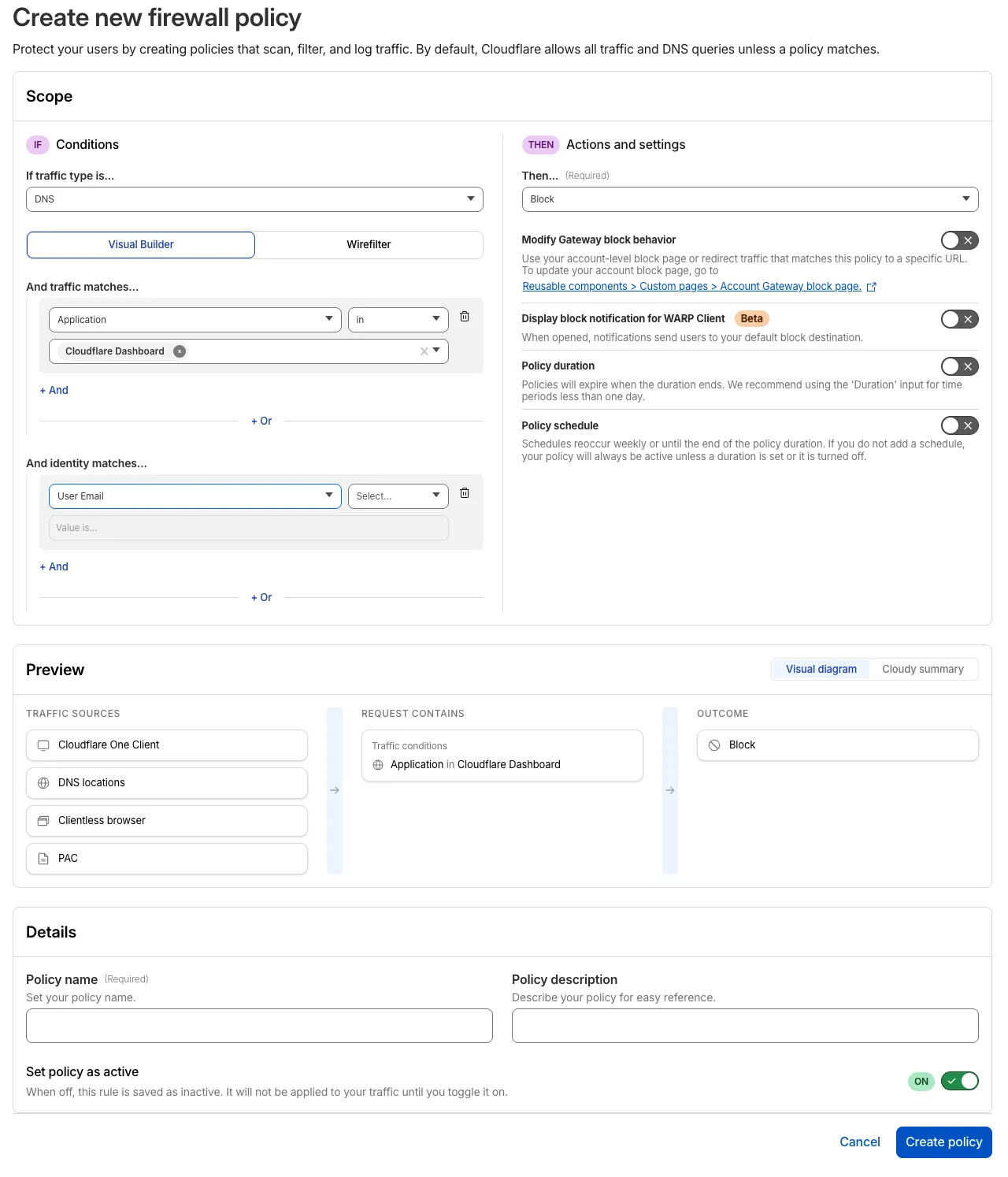
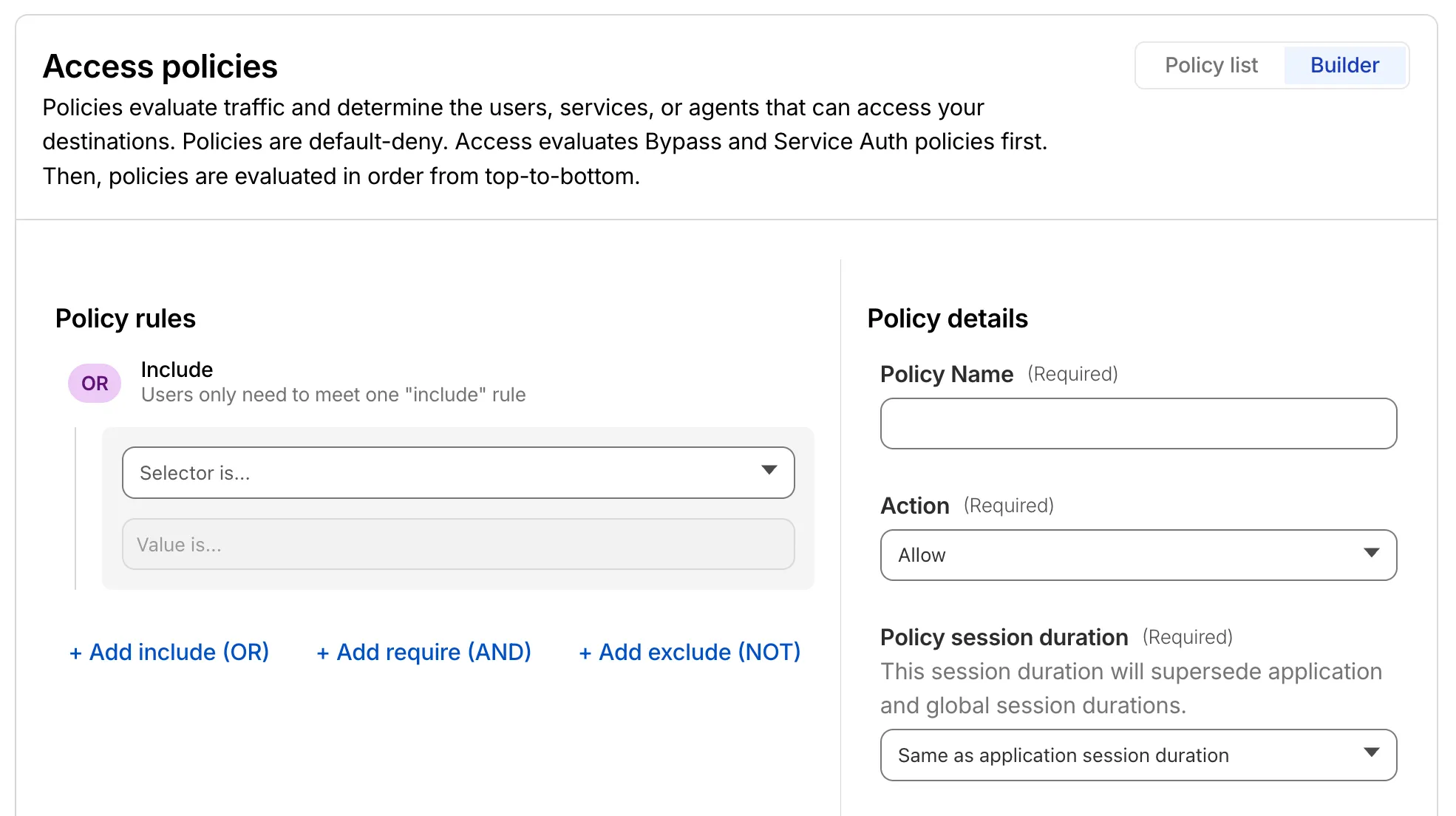
The Cloudflare One dashboard now features redesigned builders for two core workflows: creating Gateway policies and configuring self-hosted Access applications.
The Gateway rule builder now features a redesigned user experience, bringing it in line with the Access policy builder experience. Improvements include:
- Streamlined UX with clearer states and improved user interactions
- Wirefilter editing for viewing and editing Gateway rules directly from wirefilter expressions
- Preview state to review the impact of your policy in a simple graphic
For more information, refer to Traffic policies.
The self-hosted Access application builder now offers a simplified creation workflow with fewer steps from setup to save. Improvements include:
- New application selection experience that makes choosing the right application type before you begin easier.
- Streamlined creation flow with fewer clicks to build and save an application
- Inline policy creation for building Access policies directly within the application creation flow
- Preview state to understand how your policies enforce user access before saving
For more information, refer to self-hosted applications.
The last seen timestamp for Cloudflare One Client devices is now more consistent across the dashboard. IT teams will see more consistent information about the most recent client event between a device and Cloudflare's network.
Account-level DLP settings are now available in Cloudflare One. You can now configure advanced DLP settings at the account level, including OCR, AI context analysis, and payload masking. This provides consistent enforcement across all DLP profiles and simplifies configuration management.
Key changes:
- Consistent enforcement: Settings configured at the account level apply to all DLP profiles
- Simplified migration: Settings enabled on any profile are automatically migrated to account level
- Deprecation notice: Profile-level advanced settings will be deprecated in a future release
Migration details:
During the migration period, if a setting is enabled on any profile, it will automatically be enabled at the account level. This means profiles that previously had a setting disabled may now have it enabled if another profile in the account had it enabled.
Settings are evaluated using OR logic - a setting is enabled if it is turned on at either the account level or the profile level. However, profile-level settings cannot be enabled when the account-level setting is off.
For more details, refer to the DLP settings documentation.
Cloudflare Mesh is now available (blog post ↗). Mesh connects your services and devices with post-quantum encrypted networking, allowing you to route traffic privately between servers, laptops, and phones over TCP, UDP, and ICMP.

- Assigns a private Mesh IP to every enrolled device and node.
- Enables any participant to reach any other participant by IP — including client-to-client, without deploying any infrastructure.
- Supports CIDR routes for subnet routing through Mesh nodes.
- Supports high availability with active-passive replicas for nodes with routes.
- All traffic flows through Cloudflare, so Gateway network policies, device posture checks, and access rules apply to every connection.
- WARP Connector is now Cloudflare Mesh. Existing WARP Connectors are now called mesh nodes. All existing deployments continue to work — no migration required.
- Peer-to-peer connectivity is now called Mesh connectivity and is part of the Cloudflare Mesh documentation.
- Mesh node limit increased from 10 to 50 per account.
- New dashboard experience ↗ at Networking > Mesh with an interactive network map, node management, route configuration, diagnostics, and a setup wizard.
Refer to the Cloudflare Mesh documentation to set up your first Mesh network.
The Credentials and Secrets DLP profile now includes three new predefined entries for detecting Cloudflare API credentials:
Entry name Token prefix Detects Cloudflare User API Key cfk_User-scoped API keys Cloudflare User API Token cfut_User-scoped API tokens Cloudflare Account Owned API Token cfat_Account-scoped API tokens These detections target the new Cloudflare API credential format, which uses a structured prefix and a CRC32 checksum suffix. The identifiable prefix makes it possible to detect leaked credentials with high confidence and low false positive rates — no surrounding context such as
Authorization: Bearerheaders is required.Credentials generated before this format change will not be matched by these entries.
- In the Cloudflare dashboard ↗, go to Zero Trust > DLP > DLP Profiles.
- Select the Credentials and Secrets profile.
- Turn on one or more of the new Cloudflare API token entries.
- Use the profile in a Gateway HTTP policy to log or block traffic containing these credentials.
Example policy:
Selector Operator Value Action DLP Profile in Credentials and Secrets Block You can also enable individual entries to scope detection to specific credential types — for example, enabling Account Owned API Token detection without enabling User API Key detection.
For more information, refer to predefined DLP profiles.
You can now configure how sensitive data matches are displayed in your DLP payload match logs — giving your incident response team the context they need to validate alerts without compromising your security posture.
To get started, go to the Cloudflare dashboard ↗, select Zero Trust > Data loss prevention > DLP settings and find the Payload log masking card.
Previously, all DLP payload logs used a single masking mode that obscured matched data entirely and hid the original character count, making it difficult to distinguish true positives from false positives. This update introduces three options:
- Full Mask (default): Masks the match while preserving character count and visual formatting (for example,
***-**-****for a Social Security Number). This is an improvement over the previous default, which did not preserve character count. - Partial Mask: Reveals 25% of the matched content while masking the remainder (for example,
***-**-6789). - Clear Text: Stores the full, unmasked violation for deep investigation (for example,
123-45-6789).
Important: The masking level you select is applied at detection time, before the payload is encrypted. This means the chosen format is what your team will see after decrypting the log with your private key — the existing encryption workflow is unchanged.
Applies to all enabled detections: When a masking level other than Full Mask is selected, it applies to all sensitive data matches found within a payload window — not just the match that triggered the policy. Any data matched by your enabled DLP detection entries will be masked at the selected level.
For more information, refer to DLP logging options.
- Full Mask (default): Masks the match while preserving character count and visual formatting (for example,
Remote Browser Isolation now supports Canvas Remoting, improving performance for HTML5 Canvas applications by sending vector draw commands instead of rasterized bitmaps.
- 10x bandwidth reduction: Microsoft Word and other Office apps use 90% less bandwidth
- Smooth performance: Google Sheets maintains consistent 30fps rendering
- Responsive terminals: Web-based development environments and AI notebooks work in real-time
- Zero configuration: Enabled by default for all Browser Isolation customers
Instead of sending rasterized bitmaps for every Canvas update, Browser Isolation now:
- Captures Canvas draw commands at the source
- Converts them to lightweight vector instructions
- Renders Canvas content on the client
This reduces bandwidth from hundreds of kilobytes per second to tens of kilobytes per second.
To temporarily disable for troubleshooting:
- Right-click the isolated webpage background
- Select Disable Canvas Remoting
- Re-enable the same way by selecting Enable Canvas Remoting
Currently supports 2D Canvas contexts only. WebGL and 3D graphics applications continue using bitmap rendering. For more information, refer to Canvas Remoting.
You can now use CASB webhooks in Cloudflare One to send posture finding instances to external systems such as chat platforms, ticketing systems, SIEMs, SOAR tools, and custom automation services.
This gives security teams a simple way to route CASB posture findings into the tools and workflows they already use for triage and response.
To get started, go to Integrations > Webhooks in the Cloudflare One dashboard to create a webhook destination. After you configure a webhook, open a posture finding instance and select Send webhook to send it.
- Flexible authentication — Configure destinations using None, Basic Auth, Bearer Auth, Static Headers, or HMAC-Signing.
- Built-in testing — Use Test delivery to send a test request before sending a live finding instance.
- Posture finding workflows — Send posture finding instances directly from the finding details workflow in Cloud & SaaS findings.
- HTTPS destinations — Configure webhook destinations with public
https://URLs.
- Configure CASB webhooks in Cloudflare.
- Learn how to manage findings in Cloudflare.
CASB webhooks are now available in Cloudflare One.