Changelog
New updates and improvements at Cloudflare.

Admins can now create scheduled DNS policies directly from the Zero Trust dashboard, without using the API. You can configure policies to be active during specific, recurring times, such as blocking social media during business hours or gaming sites on school nights.
- Preset Schedules: Use built-in templates for common scenarios like Business Hours, School Days, Weekends, and more.
- Custom Schedules: Define your own schedule with specific days and up to three non-overlapping time ranges per day.
- Timezone Control: Choose to enforce a schedule in a specific timezone (for example, US Eastern) or based on the local time of each user.
- Combined with Duration: Policies can have both a schedule and a duration. If both are set, the duration's expiration takes precedence.
You can see the flow in the demo GIF:

This update makes time-based DNS policies accessible to all Gateway customers, removing the technical barrier of the API.
You can now generate on-demand security reports directly from the Cloudflare dashboard. This new feature provides a comprehensive overview of your email security posture, making it easier than ever to demonstrate the value of Cloudflare’s Email security to executives and other decision makers.
These reports offer several key benefits:
- Executive Summary: Quickly view the performance of Email security with a high-level executive summary.
- Actionable Insights: Dive deep into trend data, breakdowns of threat types, and analysis of top targets to identify and address vulnerabilities.
- Configuration Transparency: Gain a clear view of your policy, submission, and domain configurations to ensure optimal setup.
- Account Takeover Risks: Get a snapshot of your M365 risky users (requires a Microsoft Entra ID P2 license and M365 SaaS integration ↗).
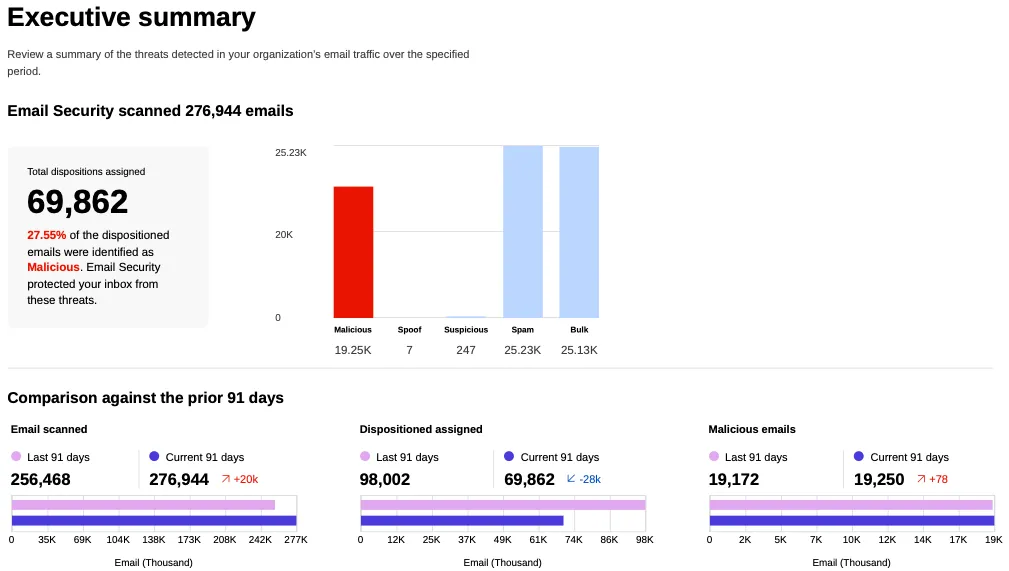
This feature is available across the following Email security packages:
- Advantage
- Enterprise
- Enterprise + PhishGuard
A new Beta release for the Windows WARP client is now available on the beta releases downloads page.
This release contains minor fixes, improvements, and new features including Path Maximum Transmission Unit Discovery (PMTUD). With PMTUD enabled, the client will dynamically adjust packet sizing to optimize connection performance. There is also a new connection status message in the GUI to inform users that the local network connection may be unstable. This will make it easier to debug connectivity issues.
Changes and improvements
- Improvements for Windows multi-user to maintain the Global WARP override state when switching between users.
- The GUI now displays the health of the tunnel and DNS connections by showing a connection status message when the network may be unstable. This will make it easier to debug connectivity issues.
- Deleting registrations no longer returns an error when succeeding.
- Path Maximum Transmission Unit Discovery (PMTUD) is now used to discover the effective MTU of the connection. This allows the client to improve connection performance optimized for the current network.
Known issues
For Windows 11 24H2 users, Microsoft has confirmed a regression that may lead to performance issues like mouse lag, audio cracking, or other slowdowns. Cloudflare recommends users experiencing these issues upgrade to a minimum Windows 11 24H2 KB5062553 or higher for resolution.
Devices using WARP client 2025.4.929.0 and up may experience Local Domain Fallback failures if a fallback server has not been configured. To configure a fallback server, refer to Route traffic to fallback server.
Devices with KB5055523 installed may receive a warning about
Win32/ClickFix.ABAbeing present in the installer. To resolve this false positive, update Microsoft Security Intelligence to version 1.429.19.0 or later.DNS resolution may be broken when the following conditions are all true:
- WARP is in Secure Web Gateway without DNS filtering (tunnel-only) mode.
- A custom DNS server address is configured on the primary network adapter.
- The custom DNS server address on the primary network adapter is changed while WARP is connected.
To work around this issue, reconnect the WARP client by toggling off and back on.
A new Beta release for the macOS WARP client is now available on the beta releases downloads page.
This release contains minor fixes, improvements, and new features including Path Maximum Transmission Unit Discovery (PMTUD). With PMTUD enabled, the client will dynamically adjust packet sizing to optimize connection performance. There is also a new connection status message in the GUI to inform users that the local network connection may be unstable. This will make it easier to debug connectivity issues.
Changes and improvements
- The GUI now displays the health of the tunnel and DNS connections by showing a connection status message when the network may be unstable. This will make it easier to debug connectivity issues.
- Deleting registrations no longer returns an error when succeeding.
- Path Maximum Transmission Unit Discovery (PMTUD) is now used to discover the effective MTU of the connection. This allows the client to improve connection performance optimized for the current network.
Known issues
- macOS Sequoia: Due to changes Apple introduced in macOS 15.0.x, the WARP client may not behave as expected. Cloudflare recommends the use of macOS 15.4 or later.
- Devices using WARP client 2025.4.929.0 and up may experience Local Domain Fallback failures if a fallback server has not been configured. To configure a fallback server, refer to Route traffic to fallback server.
Cloudflare Load Balancing now supports Monitor Groups, a powerful new way to combine multiple health monitors into a single, logical group. This allows you to create sophisticated health checks that more accurately reflect the true availability of your applications by assessing multiple services at once.
With Monitor Groups, you can ensure that all critical components of an application are healthy before sending traffic to an origin pool, enabling smarter failover decisions and greater resilience. This feature is now available via the API for customers with an Enterprise Load Balancing subscription.
- Combine Multiple Monitors: Group different health monitors (for example, HTTP, TCP) that check various application components, like a primary API gateway and a specific
/loginservice. - Isolate Monitors for Observation: Mark a monitor as "monitoring only" to receive alerts and data without it affecting a pool's health status or traffic steering. This is perfect for testing new checks or observing non-critical dependencies.
- Improve Steering Intelligence: Latency for Dynamic Steering is automatically averaged across all active monitors in a group, providing a more holistic view of an origin's performance.
This enhancement is ideal for complex, multi-service applications where the health of one component depends on another. By aggregating health signals, Monitor Groups provide a more accurate and comprehensive assessment of your application's true status.
For detailed information and API configuration guides, please visit our developer documentation for Monitor Groups.
- Combine Multiple Monitors: Group different health monitors (for example, HTTP, TCP) that check various application components, like a primary API gateway and a specific
We have added three new domain categories under the Technology parent category, to better reflect online content and improve DNS filtering.
New categories added
Parent ID Parent Name Category ID Category Name 26 Technology 194 Keep Awake Software 26 Technology 192 Remote Access 26 Technology 193 Shareware/Freeware Refer to Gateway domain categories to learn more.
A new GA release for the Linux WARP client is now available on the stable releases downloads page.
This release contains significant fixes and improvements including an updated public key for Linux packages. The public key must be updated if it was installed before September 12, 2025 to ensure the repository remains functional after December 4, 2025. Instructions to make this update are available at pkg.cloudflareclient.com.
Changes and improvements
Proxy mode has been enhanced for even faster resolution. Proxy mode now supports SOCKS4, SOCK5, and HTTP CONNECT over an L4 tunnel with custom congestion control optimizations instead of the previous L3 tunnel to Cloudflare's network. This has more than doubled Proxy mode throughput in lab speed testing, by an order of magnitude in some cases.
The MASQUE protocol is now the only protocol that can use Proxy mode. If you previously configured a device profile to use Proxy mode with Wireguard, you will need to select a new WARP mode or switch to the MASQUE protocol. Otherwise, all devices matching the profile will lose connectivity.
Known issues
- Devices using WARP client 2025.4.929.0 and up may experience Local Domain Fallback failures if a fallback server has not been configured. To configure a fallback server, refer to Route traffic to fallback server.
A new GA release for the Windows WARP client is now available on the stable releases downloads page.
This release contains significant fixes and improvements.
Changes and improvements
Proxy mode has been enhanced for even faster resolution. Proxy mode now supports SOCKS4, SOCK5, and HTTP CONNECT over an L4 tunnel with custom congestion control optimizations instead of the previous L3 tunnel to Cloudflare's network. This has more than doubled Proxy mode throughput in lab speed testing, by an order of magnitude in some cases.
The MASQUE protocol is now the only protocol that can use Proxy mode. If you previously configured a device profile to use Proxy mode with Wireguard, you will need to select a new WARP mode or switch to the MASQUE protocol. Otherwise, all devices matching the profile will lose connectivity.
Known issues
For Windows 11 24H2 users, Microsoft has confirmed a regression that may lead to performance issues like mouse lag, audio cracking, or other slowdowns. Cloudflare recommends users experiencing these issues upgrade to a minimum Windows 11 24H2 KB5062553 or higher for resolution.
Devices using WARP client 2025.4.929.0 and up may experience Local Domain Fallback failures if a fallback server has not been configured. To configure a fallback server, refer to Route traffic to fallback server.
Devices with KB5055523 installed may receive a warning about
Win32/ClickFix.ABAbeing present in the installer. To resolve this false positive, update Microsoft Security Intelligence to version 1.429.19.0 or later.DNS resolution may be broken when the following conditions are all true:
- WARP is in Secure Web Gateway without DNS filtering (tunnel-only) mode.
- A custom DNS server address is configured on the primary network adapter.
- The custom DNS server address on the primary network adapter is changed while WARP is connected.
To work around this issue, reconnect the WARP client by toggling off and back on.
A new GA release for the macOS WARP client is now available on the stable releases downloads page.
This release contains significant fixes and improvements.
Changes and improvements
Proxy mode has been enhanced for even faster resolution. Proxy mode now supports SOCKS4, SOCK5, and HTTP CONNECT over an L4 tunnel with custom congestion control optimizations instead of the previous L3 tunnel to Cloudflare's network. This has more than doubled Proxy mode throughput in lab speed testing, by an order of magnitude in some cases.
The MASQUE protocol is now the only protocol that can use Proxy mode. If you previously configured a device profile to use Proxy mode with Wireguard, you will need to select a new WARP mode or switch to the MASQUE protocol. Otherwise, all devices matching the profile will lose connectivity.
Known issues
macOS Sequoia: Due to changes Apple introduced in macOS 15.0.x, the WARP client may not behave as expected. Cloudflare recommends the use of macOS 15.4 or later.
Devices using WARP client 2025.4.929.0 and up may experience Local Domain Fallback failures if a fallback server has not been configured. To configure a fallback server, refer to Route traffic to fallback server.
Fine-grained permissions for Access Applications, Identity Providers (IdPs), and Targets is now available in Public Beta. This expands our RBAC model beyond account & zone-scoped roles, enabling administrators to grant permissions scoped to individual resources.
- Access Applications ↗: Grant admin permissions to specific Access Applications.
- Identity Providers ↗: Grant admin permissions to individual Identity Providers.
- Targets ↗: Grant admin rights to specific Targets
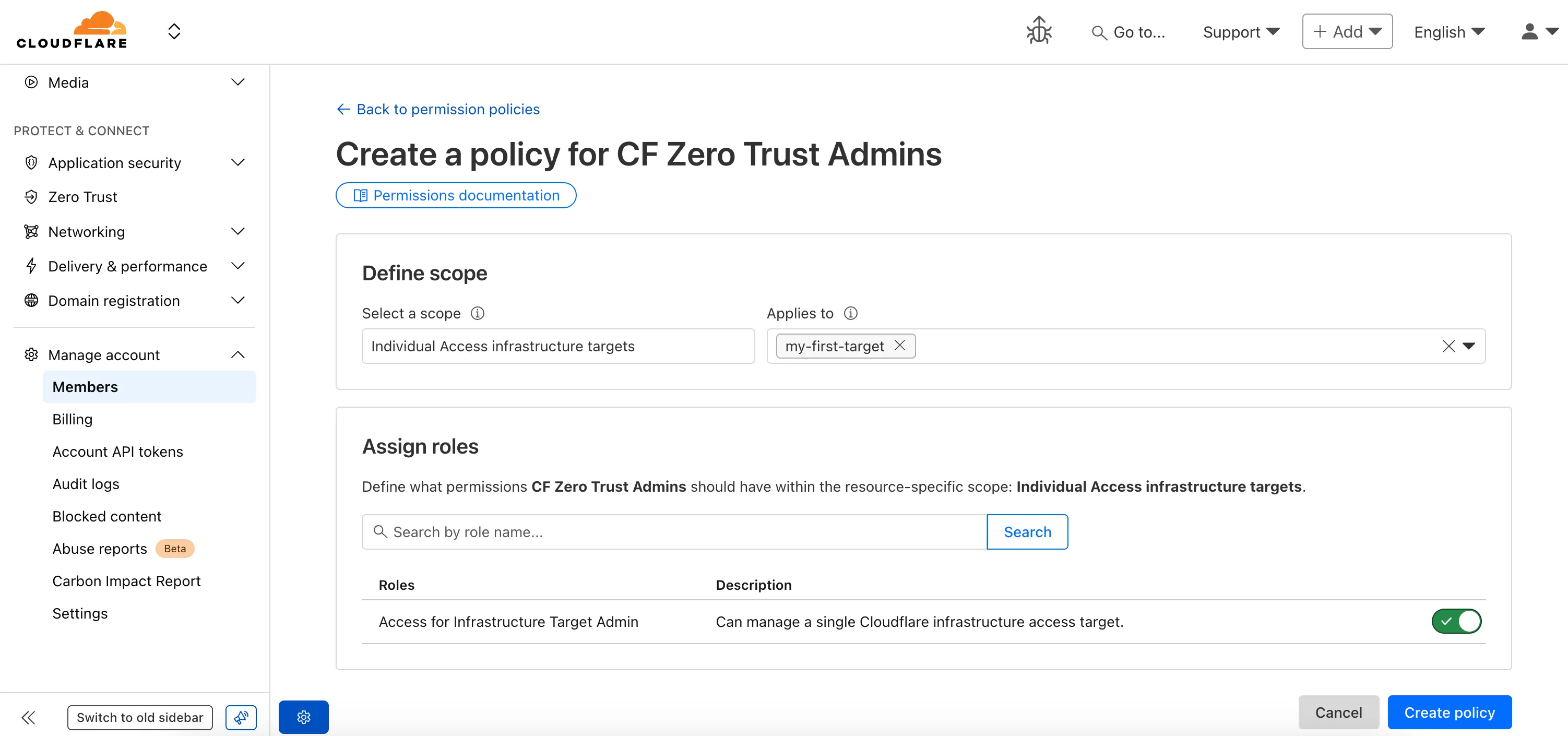
For more info:
You can now enhance your security posture by blocking additional application installer and disk image file types with Cloudflare Gateway. Preventing the download of unauthorized software packages is a critical step in securing endpoints from malware and unwanted applications.
We have expanded Gateway's file type controls to include:
- Apple Disk Image (dmg)
- Microsoft Software Installer (msix, appx)
- Apple Software Package (pkg)
You can find these new options within the Upload File Types and Download File Types selectors when creating or editing an HTTP policy. The file types are categorized as follows:
- System: Apple Disk Image (dmg)
- Executable: Microsoft Software Installer (msix), Microsoft Software Installer (appx), Apple Software Package (pkg)
To ensure these file types are blocked effectively, please note the following behaviors:
- DMG: Due to their file structure, DMG files are blocked at the very end of the transfer. A user's download may appear to progress but will fail at the last moment, preventing the browser from saving the file.
- MSIX: To comprehensively block Microsoft Software Installers, you should also include the file type Unscannable. MSIX files larger than 100 MB are identified as Unscannable ZIP files during inspection.
To get started, go to your HTTP policies in Zero Trust. For a full list of file types, refer to supported file types.
A new GA release for the Windows WARP client is now available on the stable releases downloads page.
This release contains minor fixes and improvements.
Changes and improvements
- MASQUE is now the default tunnel protocol for all new WARP device profiles.
- Improvement to limit idle connections in Gateway with DoH mode to avoid unnecessary resource usage that can lead to DoH requests not resolving.
- Improvement to maintain TCP connections to reduce interruptions in long-lived connections such as RDP or SSH.
- Improvements to maintain Global WARP override settings when switching between organizations.
- Improvements to maintain client connectivity during network changes.
Known issues
For Windows 11 24H2 users, Microsoft has confirmed a regression that may lead to performance issues like mouse lag, audio cracking, or other slowdowns. Cloudflare recommends users experiencing these issues upgrade to a minimum Windows 11 24H2 KB5062553 or higher for resolution.
Devices using WARP client 2025.4.929.0 and up may experience Local Domain Fallback failures if a fallback server has not been configured. To configure a fallback server, refer to Route traffic to fallback server.
Devices with KB5055523 installed may receive a warning about
Win32/ClickFix.ABAbeing present in the installer. To resolve this false positive, update Microsoft Security Intelligence to version 1.429.19.0 or later.DNS resolution may be broken when the following conditions are all true:
- WARP is in Secure Web Gateway without DNS filtering (tunnel-only) mode.
- A custom DNS server address is configured on the primary network adapter.
- The custom DNS server address on the primary network adapter is changed while WARP is connected.
To work around this issue, reconnect the WARP client by toggling off and back on.
A new GA release for the macOS WARP client is now available on the stable releases downloads page.
This release contains minor fixes and improvements.
Changes and improvements
- Fixed a bug preventing the
warp-diag captive-portalcommand from running successfully due to the client not parsing SSID on macOS. - Improvements to maintain Global WARP override settings when switching between organizations.
- MASQUE is now the default tunnel protocol for all new WARP device profiles.
- Improvement to limit idle connections in Gateway with DoH mode to avoid unnecessary resource usage that can lead to DoH requests not resolving.
- Improvements to maintain client connectivity during network changes.
- The WARP client now supports macOS Tahoe (version 26.0).
Known issues
macOS Sequoia: Due to changes Apple introduced in macOS 15.0.x, the WARP client may not behave as expected. Cloudflare recommends the use of macOS 15.4 or later.
Devices using WARP client 2025.4.929.0 and up may experience Local Domain Fallback failures if a fallback server has not been configured. To configure a fallback server, refer to Route traffic to fallback server.
- Fixed a bug preventing the
A new GA release for the Linux WARP client is now available on the stable releases downloads page.
This release contains minor fixes and improvements including an updated public key for Linux packages. The public key must be updated if it was installed before September 12, 2025 to ensure the repository remains functional after December 4, 2025. Instructions to make this update are available at pkg.cloudflareclient.com.
Changes and improvements
- MASQUE is now the default tunnel protocol for all new WARP device profiles.
- Improvement to limit idle connections in Gateway with DoH mode to avoid unnecessary resource usage that can lead to DoH requests not resolving.
- Improvements to maintain Global WARP override settings when switching between organizations.
- Improvements to maintain client connectivity during network changes.
Known issues
- Devices using WARP client 2025.4.929.0 and up may experience Local Domain Fallback failures if a fallback server has not been configured. To configure a fallback server, refer to Route traffic to fallback server.
Gateway users can now apply granular controls to their file sharing and AI chat applications through HTTP policies.
The new feature offers two methods of controlling SaaS applications:
- Application Controls are curated groupings of Operations which provide an easy way for users to achieve a specific outcome. Application Controls may include Upload, Download, Prompt, Voice, and Share depending on the application.
- Operations are controls aligned to the most granular action a user can take. This provides a fine-grained approach to enforcing policy and generally aligns to the SaaS providers API specifications in naming and function.
Get started using Application Granular Controls and refer to the list of supported applications.
You can now more precisely control your HTTP DLP policies by specifying whether to scan the request or response body, helping to reduce false positives and target specific data flows.
In the Gateway HTTP policy builder, you will find a new selector called Body Phase. This allows you to define the direction of traffic the DLP engine will inspect:
- Request Body: Scans data sent from a user's machine to an upstream service. This is ideal for monitoring data uploads, form submissions, or other user-initiated data exfiltration attempts.
- Response Body: Scans data sent to a user's machine from an upstream service. Use this to inspect file downloads and website content for sensitive data.
For example, consider a policy that blocks Social Security Numbers (SSNs). Previously, this policy might trigger when a user visits a website that contains example SSNs in its content (the response body). Now, by setting the Body Phase to Request Body, the policy will only trigger if the user attempts to upload or submit an SSN, ignoring the content of the web page itself.
All policies without this selector will continue to scan both request and response bodies to ensure continued protection.
For more information, refer to Gateway HTTP policy selectors.
Email security relies on your submissions to continuously improve our detection models. However, we often receive submissions in formats that cannot be ingested, such as incomplete EMLs, screenshots, or text files.
To ensure all customer feedback is actionable, we have launched two new features to manage invalid submissions sent to our team and user submission aliases:
- Email Notifications: We now automatically notify users by email when they provide an invalid submission, educating them on the correct format. To disable notifications, go to Settings ↗ > Invalid submission emails and turn the feature off.

- Invalid Submission dashboard: You can quickly identify which users need education to provide valid submissions so Cloudflare can provide continuous protection.
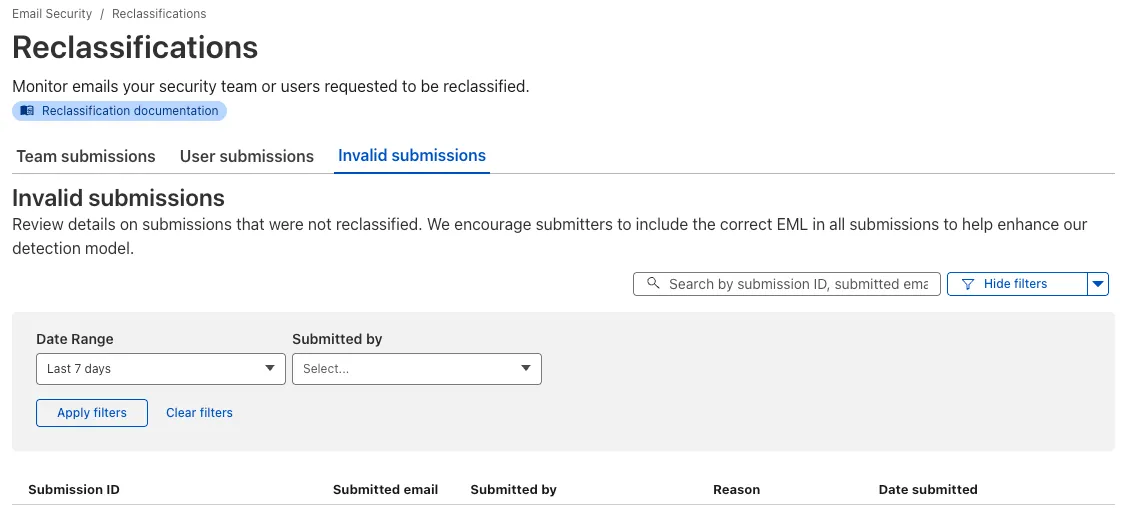
Learn more about this feature on invalid submissions.
This feature is available across these Email security packages:
- Advantage
- Enterprise
- Enterprise + PhishGuard
Browser-based RDP with Cloudflare Access is now generally available for all Cloudflare customers. It enables secure, remote Windows server access without VPNs or RDP clients.
Since we announced our open beta, we've made a few improvements:
- Support for targets with IPv6.
- Support for Magic WAN and WARP Connector as on-ramps.
- More robust error messaging on the login page to help you if you encounter an issue.
- Worldwide keyboard support. Whether your day-to-day is in Portuguese, Chinese, or something in between, your browser-based RDP experience will look and feel exactly like you are using a desktop RDP client.
- Cleaned up some other miscellaneous issues, including but not limited to enhanced support for Entra ID accounts and support for usernames with spaces, quotes, and special characters.
As a refresher, here are some benefits browser-based RDP provides:
- Control how users authenticate to internal RDP resources with single sign-on (SSO), multi-factor authentication (MFA), and granular access policies.
- Record who is accessing which servers and when to support regulatory compliance requirements and to gain greater visibility in the event of a security event.
- Eliminate the need to install and manage software on user devices. You will only need a web browser.
- Reduce your attack surface by keeping your RDP servers off the public Internet and protecting them from common threats like credential stuffing or brute-force attacks.
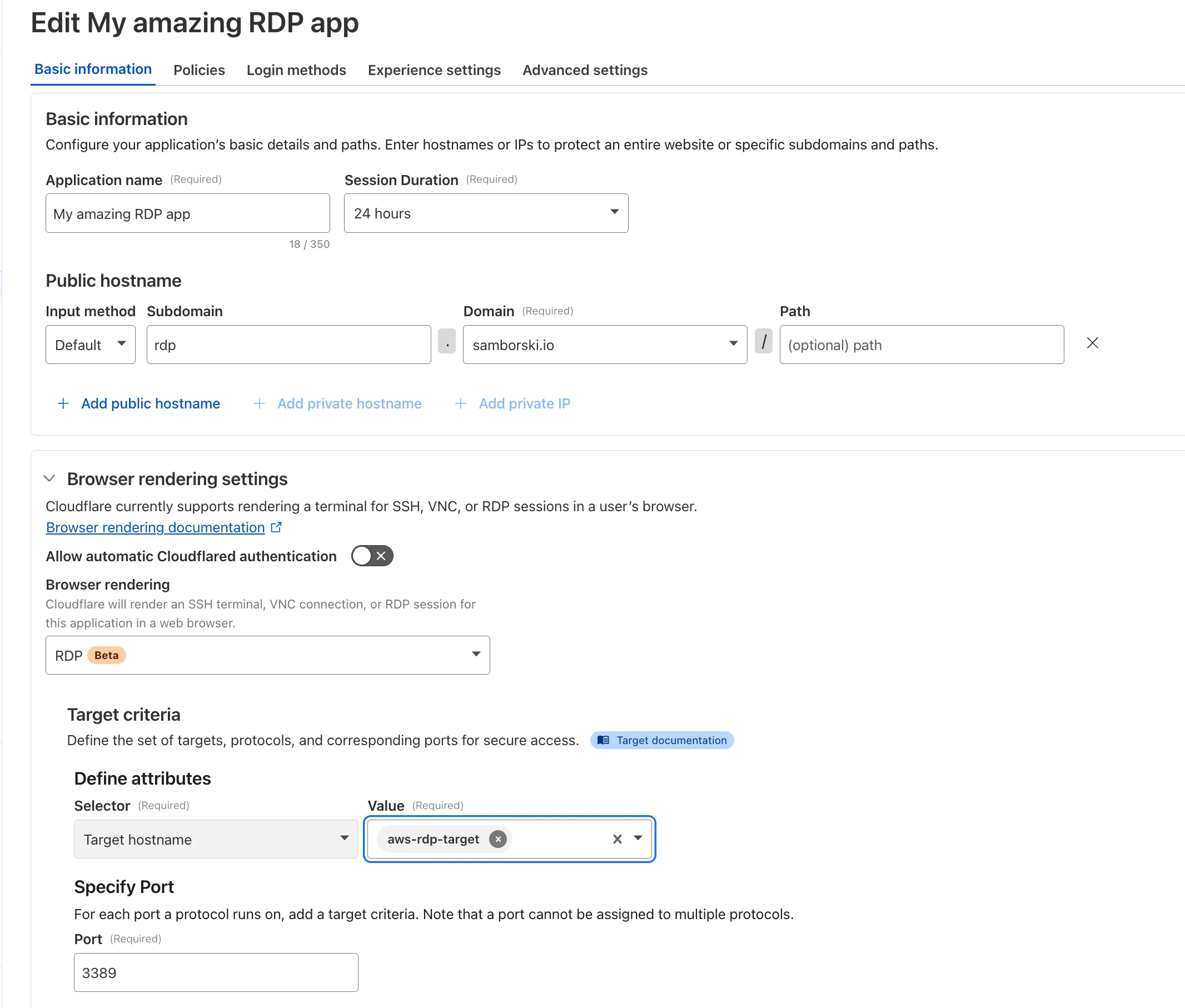
To get started, refer to Connect to RDP in a browser.
You can now route private traffic to Cloudflare Tunnel based on a hostname or domain, moving beyond the limitations of IP-based routing. This new capability is free for all Cloudflare One customers.
Previously, Tunnel routes could only be defined by IP address or CIDR range. This created a challenge for modern applications with dynamic or ephemeral IP addresses, often forcing administrators to maintain complex and brittle IP lists.
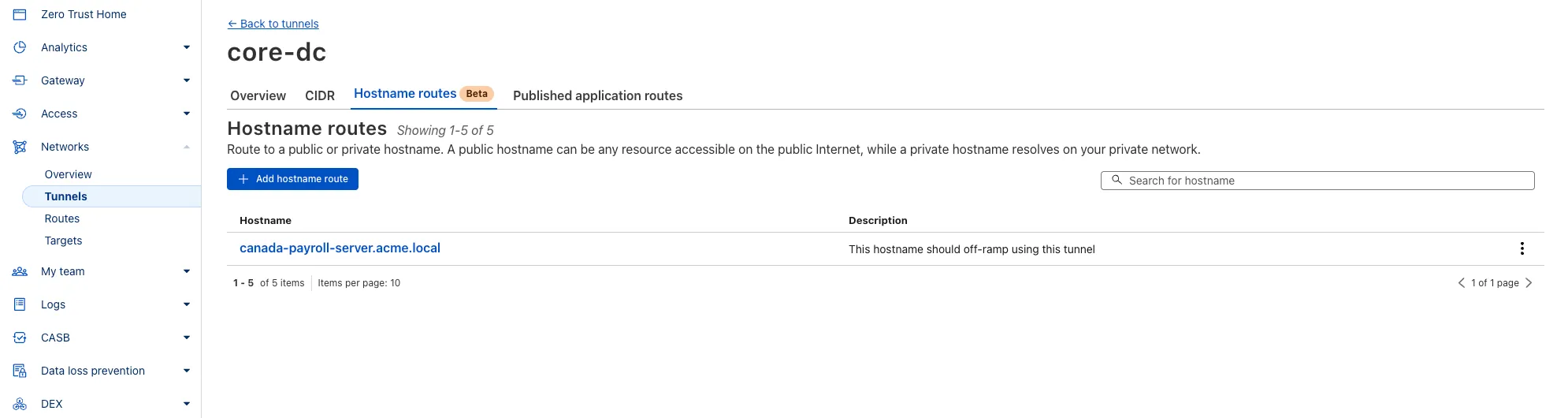
What’s new:
- Hostname & Domain Routing: Create routes for individual hostnames (e.g.,
payroll.acme.local) or entire domains (e.g.,*.acme.local) and direct their traffic to a specific Tunnel. - Simplified Zero Trust Policies: Build resilient policies in Cloudflare Access and Gateway using stable hostnames, making it dramatically easier to apply per-resource authorization for your private applications.
- Precise Egress Control: Route traffic for public hostnames (e.g.,
bank.example.com) through a specific Tunnel to enforce a dedicated source IP, solving the IP allowlist problem for third-party services. - No More IP Lists: This feature makes the workaround of maintaining dynamic IP Lists for Tunnel connections obsolete.
Get started in the Tunnels section of the Zero Trust dashboard with your first private hostname or public hostname route.
Learn more in our blog post ↗.
- Hostname & Domain Routing: Create routes for individual hostnames (e.g.,
Zero Trust Dashboard has a brand new, AI-powered search functionality. You can search your account by resources (applications, policies, device profiles, settings, etc.), pages, products, and more.
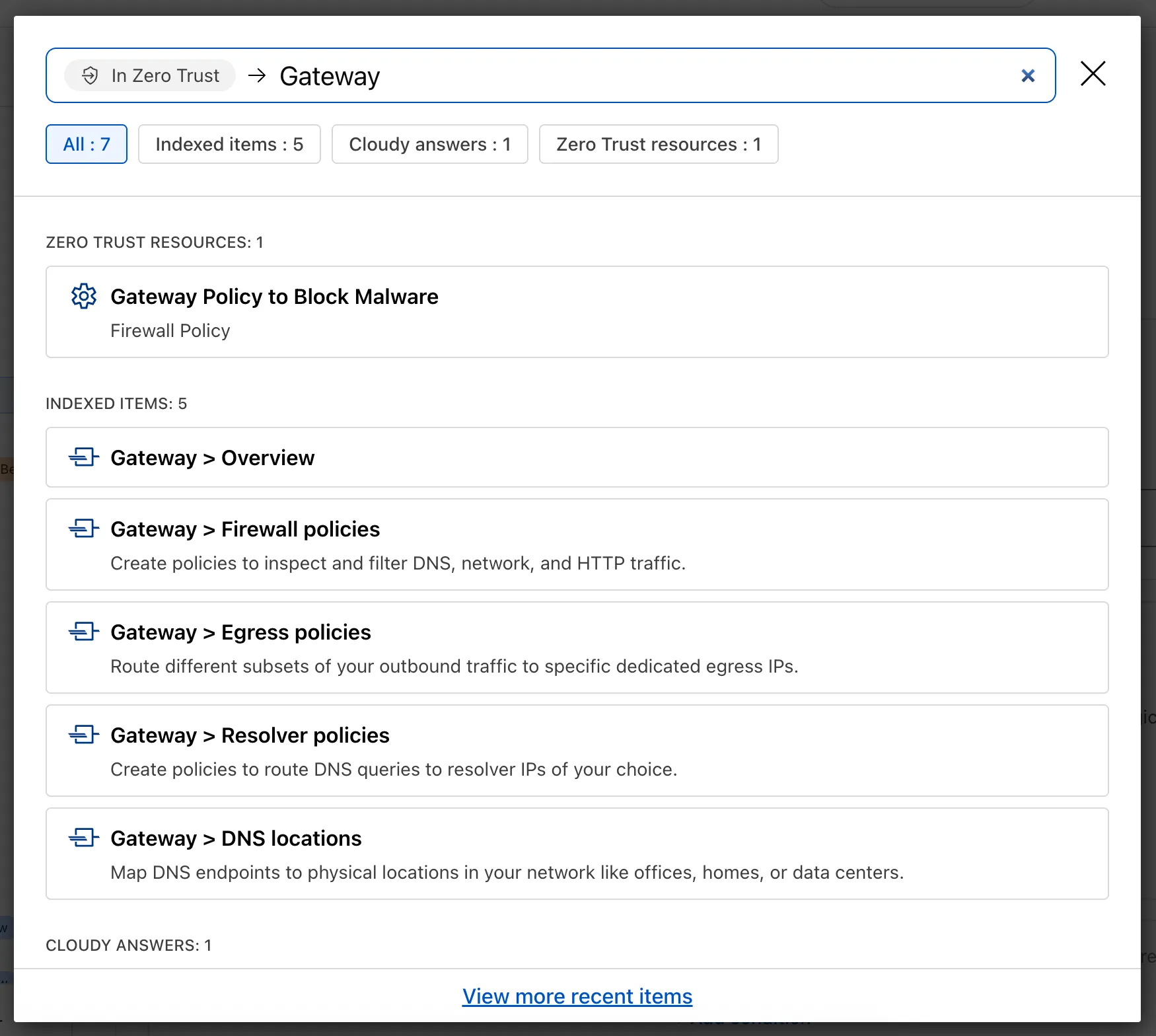
Ask Cloudy — You can also ask Cloudy, our AI agent, questions about Cloudflare Zero Trust. Cloudy is trained on our developer documentation and implementation guides, so it can tell you how to configure functionality, best practices, and can make recommendations.
Cloudy can then stay open with you as you move between pages to build configuration or answer more questions.
Find Recents — Recent searches and Cloudy questions also have a new tab under Zero Trust Overview.
We’re excited to announce that Email security customers can now choose their preferred mail processing location directly from the UI when onboarding a domain. This feature is available for the following onboarding methods: MX, BCC, and Journaling.
Customers can now select where their email is processed. The following regions are supported:
- Germany
- India
- Australia
Global processing remains the default option, providing flexibility to meet both compliance requirements or operational preferences.
When onboarding a domain with MX, BCC, or Journaling:
- Select the desired processing location (Germany, India, or Australia).
- The UI will display updated processing addresses specific to that region.
- For MX onboarding, if your domain is managed by Cloudflare, you can automatically update MX records directly from the UI.
This feature is available across these Email security packages:
- Advantage
- Enterprise
- Enterprise + PhishGuard
We’re expanding the list of processing locations to match our Data Localization Suite (DLS) footprint, giving customers the broadest set of regional options in the market without the complexity of self-hosting.
Magic WAN and WARP Connector users can now securely route their DNS traffic to the Gateway resolver without exposing traffic to the public Internet.
Routing DNS traffic to the Gateway resolver allows DNS resolution and filtering for traffic coming from private networks while preserving source internal IP visibility. This ensures Magic WAN users have full integration with our Cloudflare One features, including Internal DNS and hostname-based policies.
To configure DNS filtering, change your Magic WAN or WARP Connector DNS settings to use Cloudflare's shared resolver IPs,
172.64.36.1and172.64.36.2. Once you configure DNS resolution and filtering, you can use Source Internal IP as a traffic selector in your resolver policies for routing private DNS traffic to your Internal DNS.
A new Beta release for the Windows WARP client is now available on the beta releases downloads page.
This release contains minor fixes and improvements including enhancements to Proxy mode for even faster resolution. The MASQUE protocol is now the only protocol that can use Proxy mode. If you previously configured a device profile to use Proxy mode with Wireguard, you will need to select a new WARP mode or all devices matching the profile will lose connectivity.
Changes and improvements
- Enhancements to Proxy mode for even faster resolution. The MASQUE protocol is now the only protocol that can use Proxy mode. If you previously configured a device profile to use Proxy mode with Wireguard, you will need to select a new WARP mode or all devices matching the profile will lose connectivity.
- Improvement to keep TCP connections up the first time WARP connects on devices so that remote desktop sessions (such as RDP or SSH) continue to work.
- Improvements to maintain Global WARP Override settings when switching between organization configurations.
- The MASQUE protocol is now the default protocol for all new WARP device profiles.
- Improvement to limit idle connections in DoH mode to avoid unnecessary resource usage that can lead to DoH requests not resolving.
Known issues
For Windows 11 24H2 users, Microsoft has confirmed a regression that may lead to performance issues like mouse lag, audio cracking, or other slowdowns. Cloudflare recommends users experiencing these issues upgrade to a minimum Windows 11 24H2 KB5062553 or higher for resolution.
Devices using WARP client 2025.4.929.0 and up may experience Local Domain Fallback failures if a fallback server has not been configured. To configure a fallback server, refer to Route traffic to fallback server.
Devices with KB5055523 installed may receive a warning about Win32/ClickFix.ABA being present in the installer. To resolve this false positive, update Microsoft Security Intelligence to version 1.429.19.0 or later.
DNS resolution may be broken when the following conditions are all true:
- WARP is in Secure Web Gateway without DNS filtering (tunnel-only) mode.
- A custom DNS server address is configured on the primary network adapter.
- The custom DNS server address on the primary network adapter is changed while WARP is connected.
To work around this issue, reconnect the WARP client by toggling off and back on.
A new Beta release for the macOS WARP client is now available on the beta releases downloads page.
This release contains minor fixes and improvements including enhancements to Proxy mode for even faster resolution. The MASQUE protocol is now the only protocol that can use Proxy mode. If you previously configured a device profile to use Proxy mode with Wireguard, you will need to select a new WARP mode or all devices matching the profile will lose connectivity.
Changes and improvements
- Enhancements to Proxy mode for even faster resolution. The MASQUE protocol is now the only protocol that can use Proxy mode. If you previously configured a device profile to use Proxy mode with Wireguard, you will need to select a new WARP mode or all devices matching the profile will lose connectivity.
- Fixed a bug preventing the
warp-diag captive-portalcommand from running successfully due to the client not parsing SSID on macOS. - Improvements to maintain Global WARP Override settings when switching between organization configurations.
- The MASQUE protocol is now the default protocol for all new WARP device profiles.
- Improvement to limit idle connections in DoH mode to avoid unnecessary resource usage that can lead to DoH requests not resolving.
Known issues
- macOS Sequoia: Due to changes Apple introduced in macOS 15.0.x, the WARP client may not behave as expected. Cloudflare recommends the use of macOS 15.4 or later.
- Devices using WARP client 2025.4.929.0 and up may experience Local Domain Fallback failures if a fallback server has not been configured. To configure a fallback server, refer to Route traffic to fallback server.
Now, Magic WAN customers can configure a custom IKE ID for their IPsec tunnels. Customers that are using Magic WAN and a VeloCloud SD-WAN device together can utilize this new feature to create a high availability configuration.
This feature is available via API only. Customers can read the Magic WAN documentation to learn more about the Custom IKE ID feature and the API call to configure it.