Changelog
New updates and improvements at Cloudflare.

Cloudflare now exposes four new fields in the Transform Rules phase that encode client certificate data in RFC 9440 ↗ format. Previously, forwarding client certificate information to your origin required custom parsing of PEM-encoded fields or non-standard HTTP header formats. These new fields produce output in the standardized
Client-CertandClient-Cert-Chainheader format defined by RFC 9440, so your origin can consume them directly without any additional decoding logic.Each certificate is DER-encoded, Base64-encoded, and wrapped in colons. For example,
:MIIDsT...Vw==:. A chain of intermediates is expressed as a comma-separated list of such values.Field Type Description cf.tls_client_auth.cert_rfc9440String The client leaf certificate in RFC 9440 format. Empty if no client certificate was presented. cf.tls_client_auth.cert_rfc9440_too_largeBoolean trueif the leaf certificate exceeded 10 KB and was omitted. In practice this will almost always befalse.cf.tls_client_auth.cert_chain_rfc9440String The intermediate certificate chain in RFC 9440 format as a comma-separated list. Empty if no intermediate certificates were sent or if the chain exceeded 16 KB. cf.tls_client_auth.cert_chain_rfc9440_too_largeBoolean trueif the intermediate chain exceeded 16 KB and was omitted.The chain encoding follows the same ordering as the TLS handshake: the certificate closest to the leaf appears first, working up toward the trust anchor. The root certificate is not included.
Add a request header transform rule to set the
Client-CertandClient-Cert-Chainheaders on requests forwarded to your origin server. For example, to forward headers for verified, non-revoked certificates:Rule expression:
cf.tls_client_auth.cert_verified and not cf.tls_client_auth.cert_revokedHeader modifications:
Operation Header name Value Set Client-Certcf.tls_client_auth.cert_rfc9440Set Client-Cert-Chaincf.tls_client_auth.cert_chain_rfc9440To get the most out of these fields, upload your client CA certificate to Cloudflare so that Cloudflare validates the client certificate at the edge and populates
cf.tls_client_auth.cert_verifiedandcf.tls_client_auth.cert_revoked.For more information, refer to Mutual TLS authentication, Request Header Transform Rules, and the fields reference.
Two new fields are now available in the
httpRequestsAdaptiveandhttpRequestsAdaptiveGroupsGraphQL Analytics API datasets:webAssetsOperationId— the ID of the saved endpoint that matched the incoming request.webAssetsLabelsManaged— the managed labels mapped to the matched operation at the time of the request (for example,cf-llm,cf-log-in). At most 10 labels are returned per request.
Both fields are empty when no operation matched.
webAssetsLabelsManagedis also empty when no managed labels are assigned to the matched operation.These fields allow you to determine, per request, which Web Assets operation was matched and which managed labels were active. This is useful for troubleshooting downstream security detection verdicts — for example, understanding why AI Security for Apps did or did not flag a request.
Refer to Endpoint labeling service for GraphQL query examples.
This week's release focuses on new improvements to enhance coverage.
Key Findings
- Existing rule enhancements have been deployed to improve detection resilience against broad classes of web attacks and strengthen behavioral coverage.
Ruleset Rule ID Legacy Rule ID Description Previous Action New Action Comments Cloudflare Managed Ruleset N/A Command Injection - Generic 9 - URI Vector Log Disabled This is a new detection. Cloudflare Managed Ruleset N/A Command Injection - Generic 9 - Header Vector Log Disabled This is a new detection. Cloudflare Managed Ruleset N/A Command Injection - Generic 9 - Body Vector Log Disabled This is a new detection. Cloudflare Managed Ruleset N/A PHP, vBulletin, jQuery File Upload - Code Injection, Dangerous File Upload - CVE:CVE-2018-9206, CVE:CVE-2019-17132 (beta) Log Block This rule has been merged into the original rule "PHP, vBulletin, jQuery File Upload - Code Injection, Dangerous File Upload - CVE:CVE-2018-9206, CVE:CVE-2019-17132" (ID:
In the Cloudflare One dashboard, the overview page for a specific Cloudflare Tunnel now shows all replicas of that tunnel and supports streaming logs from multiple replicas at once.

Previously, you could only stream logs from one replica at a time. With this update:
- Replicas on the tunnel overview — All active replicas for the selected tunnel now appear on that tunnel's overview page under Connectors. Select any replica to stream its logs.
- Multi-connector log streaming — Stream logs from multiple replicas simultaneously, making it easier to correlate events across your infrastructure during debugging or incident response. To try it out, log in to Cloudflare One ↗ and go to Networks > Connectors > Cloudflare Tunnels. Select View logs next to the tunnel you want to monitor.
For more information, refer to Tunnel log streams and Deploy replicas.
You can now manage Cloudflare Tunnels directly from Wrangler, the CLI for the Cloudflare Developer Platform. The new
wrangler tunnelcommands let you create, run, and manage tunnels without leaving your terminal.
Available commands:
wrangler tunnel create— Create a new remotely managed tunnel.wrangler tunnel list— List all tunnels in your account.wrangler tunnel info— Display details about a specific tunnel.wrangler tunnel delete— Delete a tunnel.wrangler tunnel run— Run a tunnel using the cloudflared daemon.wrangler tunnel quick-start— Start a free, temporary tunnel without an account using Quick Tunnels.
Wrangler handles downloading and managing the cloudflared binary automatically. On first use, you will be prompted to download
cloudflaredto a local cache directory.These commands are currently experimental and may change without notice.
To get started, refer to the Wrangler tunnel commands documentation.
The
cf.timings.worker_msecfield is now available in the Ruleset Engine. This field reports the wall-clock time that a Cloudflare Worker spent handling a request, measured in milliseconds.You can use this field to identify slow Worker executions, detect performance regressions, or build rules that respond differently based on Worker processing time, such as logging requests that exceed a latency threshold.
Field Type Description cf.timings.worker_msecInteger The time spent executing a Cloudflare Worker in milliseconds. Returns 0if no Worker was invoked.Example filter expression:
cf.timings.worker_msec > 500For more information, refer to the Fields reference.
We are introducing Logo Match Preview, bringing the same pre-save visibility to visual assets that was previously only available for string-based queries. This update allows you to fine-tune your brand detection strategy before committing to a live monitor.
- Upload your brand logo and immediately see a sample of potential matches from recently detected sites before finalizing the query
- Adjust your similarity score (from 75% to 100%) and watch the results refresh in real-time to find the balance between broad detection and noise reduction
- Review the specific logos triggered by your current settings to ensure your query is capturing the right level of brand infringement
If you are ready to test your brand assets, go to the Brand Protection dashboard ↗ to try the new preview tool.
The Security Overview has been updated to provide Application Security customers with more actionable insights and a clearer view of their security posture.
Key improvements include:
- Criticality for all Insights: Every insight now includes a criticality rating, allowing you to prioritize the most impactful security action items first.
- Detection Tools Section: A new section displays the security detection tools available to you, indicating which are currently enabled and which can be activated to strengthen your defenses.
- Industry Peer Comparison (Enterprise customers): A new module from Security Reports benchmarks your security posture against industry peers, highlighting relative strengths and areas for improvement.
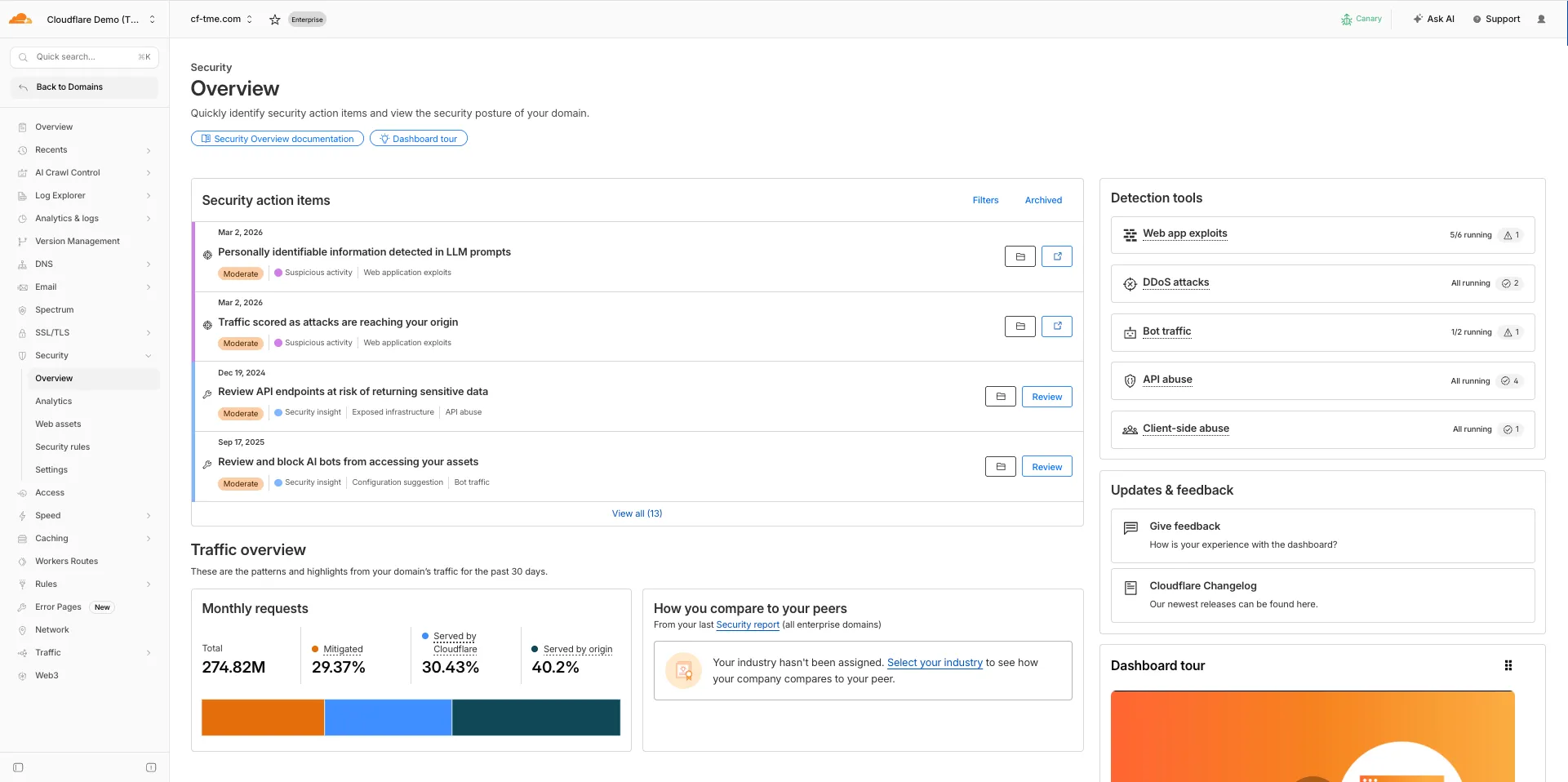
For more information, refer to Security Overview.
This week's release introduces new detections for vulnerabilities in Ivanti Endpoint Manager Mobile (CVE-2026-1281 and CVE-2026-1340), alongside a new generic detection rule designed to identify and block Cross-Site Scripting (XSS) injection attempts within the
Content-Security-Policy(CSP) HTTP request header.Key Findings
- CVE-2026-1281 & CVE-2026-1340: Ivanti Endpoint Manager Mobile processes HTTP requests through Apache RevwriteMap directives that pass user-controlled input to Bash scripts (
/mi/bin/map-appstore-urland/mi/bin/map-aft-store-url). Bash scripts do not sanitize user input and are vulnerable to shell arithmetic expansion thereby allowing attackers to achieve unauthenticated remote code execution. - Generic XSS in CSP Header: This rule identifies malicious payloads embedded within the request's
Content-Security-Policyheader. It specifically targets scenarios where web frameworks or applications trust and extract values directly from the CSP header in the incoming request without sufficient validation. Attackers can provide crafted header values to inject scripts or malicious directives that are subsequently processed by the server.
Impact
Successful exploitation of Ivanti EPMM vulnerability allows unauthenticated remote code execution and generic XSS in CSP header allows attackers to inject malicious scripts during page rendering. In environments using server-side caching, this poisoned XSS content can subsequently be cached and automatically served to all visitors.
Ruleset Rule ID Legacy Rule ID Description Previous Action New Action Comments Cloudflare Managed Ruleset N/A Ivanti EPMM - Code Injection - CVE:CVE-2026-1281 CVE:CVE-2026-1340 Log Block This is a new detection. Cloudflare Managed Ruleset N/A Anomaly:Header:Content-Security-Policy N/A Block This is a new detection. - CVE-2026-1281 & CVE-2026-1340: Ivanti Endpoint Manager Mobile processes HTTP requests through Apache RevwriteMap directives that pass user-controlled input to Bash scripts (
Introducing Cloudflare's Web and API Vulnerability Scanner (Open Beta)
Cloudflare is launching the Open Beta of the Web and API Vulnerability Scanner ↗ for all API Shield customers. This new, stateful Dynamic Application Security Testing (DAST) platform helps teams proactively find logic flaws in their APIs.
The initial release focuses on detecting Broken Object Level Authorization (BOLA) vulnerabilities by building API call graphs to simulate attacker and owner contexts, then testing these contexts by sending real HTTP requests to your APIs.
The scanner is now available via the Cloudflare API. To scan, set up your target environment, owner and attacker credentials, and upload your OpenAPI file with response schemas. The scanner will be available in the Cloudflare dashboard in a future release.
Access: This feature is only available to API Shield subscribers via the Cloudflare API. We hope you will use the API for programmatic integration into your CI/CD pipelines and security dashboards.
Documentation: Refer to the developer documentation to start scanning your endpoints today.
We have introduced new triage controls to help you manage your Brand Protection results more efficiently. You can now clear out the noise by dismissing matches while maintaining full visibility into your historical decisions.
- Dismiss matches: Users can now mark specific results as dismissed if they are determined to be benign or false positives, removing them from the primary triage view.
- Show/Hide toggle: A new visibility control allows you to instantly switch between viewing only active matches and including previously dismissed ones.
- Persistent review states: Dismissed status is saved across sessions, ensuring that your workspace remains organized and focused on new or high-priority threats.
- Reduce alert fatigue by hiding known-safe results, allowing your team to focus exclusively on unreviewed or high-risk infringements.
- Auditability and recovery through the visibility toggle, ensuring that no match is ever truly "lost" and can be re-evaluated if a site's content changes.
- Improved collaboration as your team members can see which matches have already been vetted and dismissed by others.
Ready to clean up your match queue? Learn more in our Brand Protection documentation.
This week's release introduces new detections for vulnerabilities in SmarterTools SmarterMail (CVE-2025-52691 and CVE-2026-23760), alongside improvements to an existing Command Injection (nslookup) detection to enhance coverage.
Key Findings
- CVE-2025-52691: SmarterTools SmarterMail mail server is vulnerable to Arbitrary File Upload, allowing an unauthenticated attacker to upload files to any location on the mail server, potentially enabling remote code execution.
- CVE-2026-23760: SmarterTools SmarterMail versions prior to build 9511 contain an authentication bypass vulnerability in the password reset API permitting unaunthenticated to reset system administrator accounts failing to verify existing password or reset token.
Impact
Successful exploitation of these SmarterMail vulnerabilities could lead to full system compromise or unauthorized administrative access to mail servers. Administrators are strongly encouraged to apply vendor patches without delay.
Ruleset Rule ID Legacy Rule ID Description Previous Action New Action Comments Cloudflare Managed Ruleset N/A SmarterMail - Arbitrary File Upload - CVE-2025-52691 Log Block This is a new detection. Cloudflare Managed Ruleset N/A SmarterMail - Authentication Bypass - CVE-2026-23760 Log Block This is a new detection. Cloudflare Managed Ruleset N/A Command Injection - Nslookup - Beta Log Block This rule is merged into the original rule "Command Injection - Nslookup" (ID:
TL;DR: You can now create and save custom configurations of the Threat Events dashboard, allowing you to instantly return to specific filtered views — such as industry-specific attacks or regional Sankey flows — without manual reconfiguration.
Threat intelligence is most effective when it is personalized. Previously, analysts had to manually re-apply complex filters (like combining specific industry datasets with geographic origins) every time they logged in. This update provides material value by:
- Analysts can now jump straight into "Known Ransomware Infrastructure" or "Retail Sector Targets" views with a single click, eliminating repetitive setup tasks
- Teams can ensure everyone is looking at the same data subsets by using standardized saved views, reducing the risk of missing critical patterns due to inconsistent filtering.
Cloudforce One subscribers can start saving their custom views now in Application Security > Threat Intelligence > Threat Events ↗.
Cloudflare Tunnel is now available in the main Cloudflare Dashboard at Networking > Tunnels ↗, bringing first-class Tunnel management to developers using Tunnel for securing origin servers.

This new experience provides everything you need to manage Tunnels for public applications, including:
- Full Tunnel lifecycle management: Create, configure, delete, and monitor all your Tunnels in one place.
- Native integrations: View Tunnels by name when configuring DNS records and Workers VPC — no more copy-pasting UUIDs.
- Real-time visibility: Monitor replicas and Tunnel health status directly in the dashboard.
- Routing map: Manage all ingress routes for your Tunnel, including public applications, private hostnames, private CIDRs, and Workers VPC services, from a single interactive interface.
Core Dashboard: Navigate to Networking > Tunnels ↗ to manage Tunnels for:
- Securing origin servers and public applications with CDN, WAF, Load Balancing, and DDoS protection
- Connecting Workers to private services via Workers VPC
Cloudflare One Dashboard: Navigate to Zero Trust > Networks > Connectors ↗ to manage Tunnels for:
- Securing your public applications with Zero Trust access policies
- Connecting users to private applications
- Building a private mesh network
Both dashboards provide complete Tunnel management capabilities — choose based on your primary workflow.
New to Tunnel? Learn how to get started with Cloudflare Tunnel or explore advanced use cases like securing SSH servers or running Tunnels in Kubernetes.
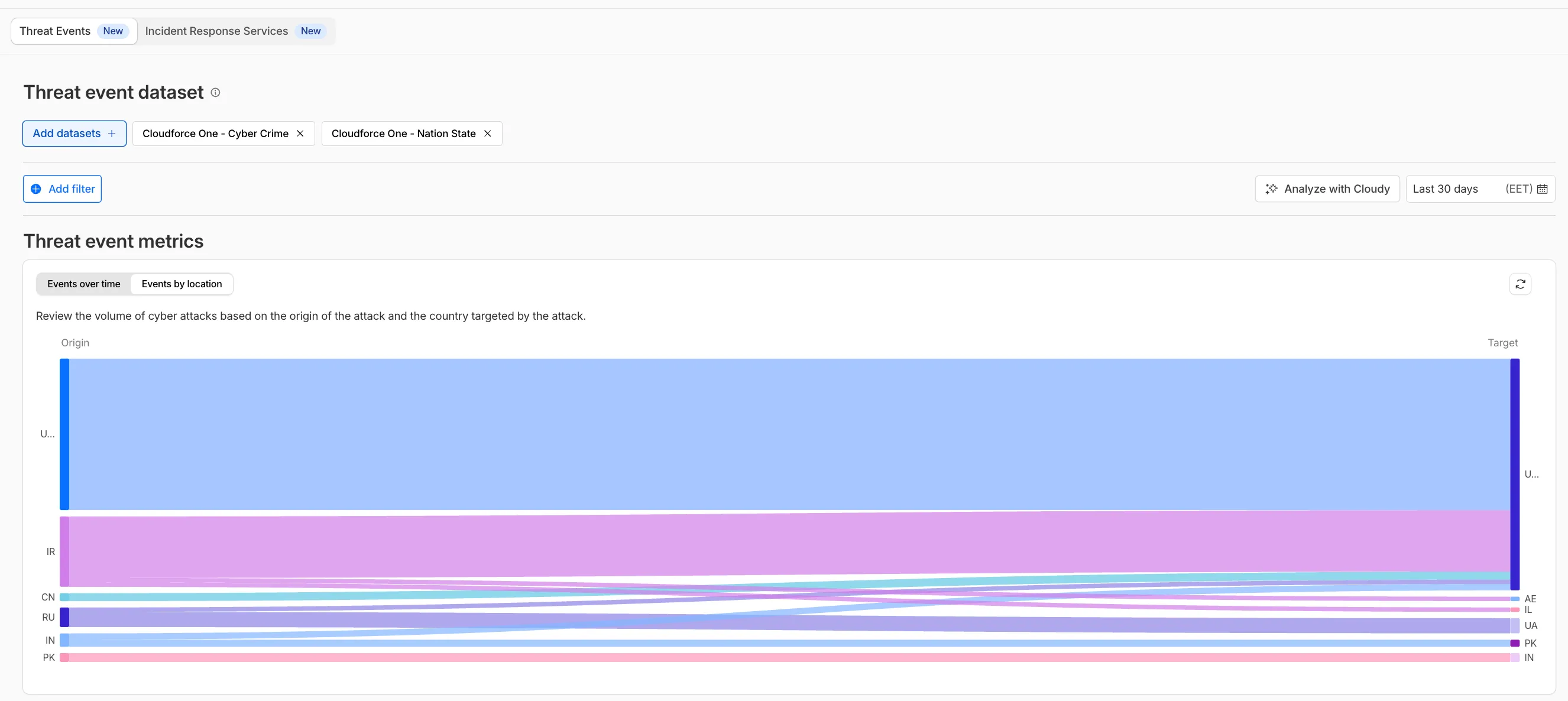
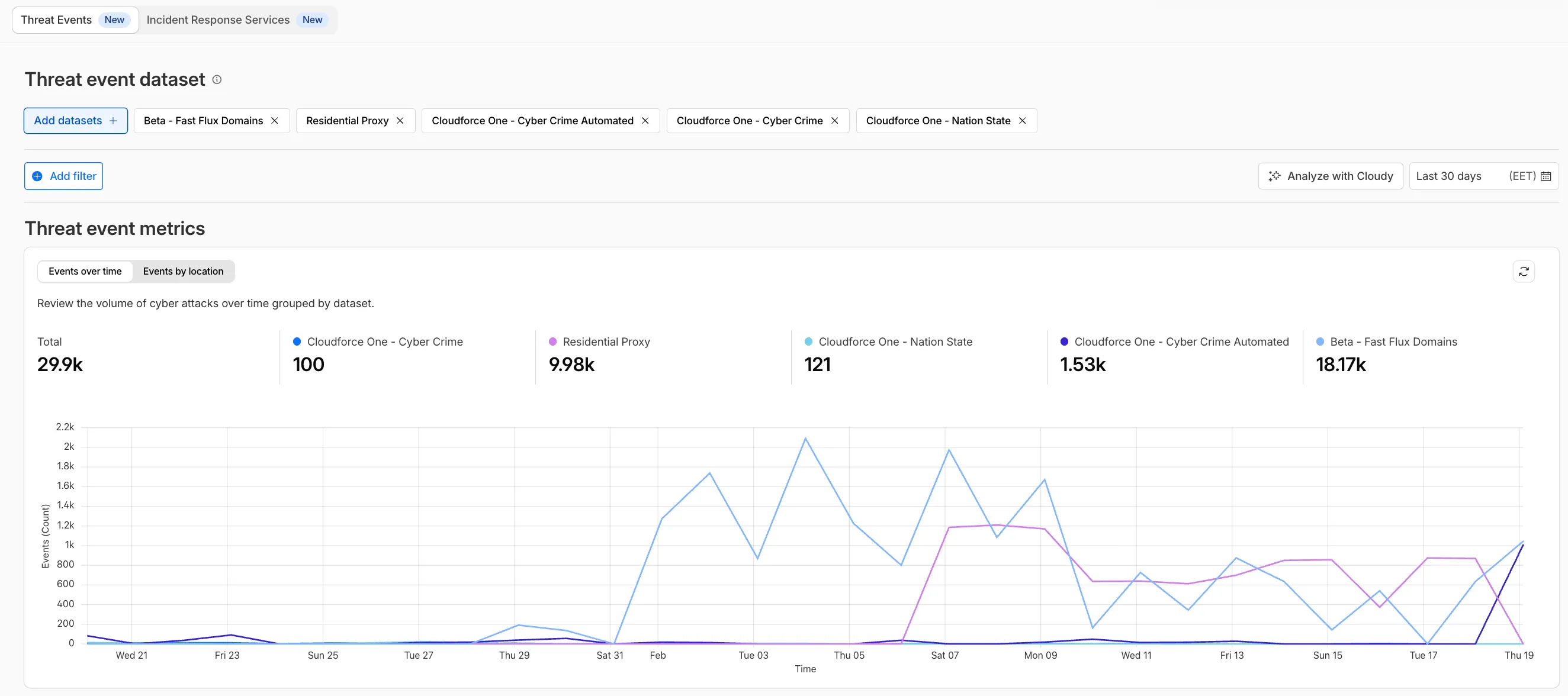
We have introduced dynamic visualizations to the Threat Events dashboard to help you better understand the threat landscape and identify emerging patterns at a glance.
What's new:
- Sankey Diagrams: Trace the flow of attacks from country of origin to target country to identify which regions are being hit hardest and where the threat infrastructure resides.
- Dataset Distribution over time: Instantly pivot your view to understand if a specific campaign is targeting your sector or if it is a broad-spectrum commodity attack.
- Enhanced Filtering: Use these visual tools to filter and drill down into specific attack vectors directly from the charts.
Cloudforce One subscribers can explore these new views now in Application Security > Threat Intelligence > Threat Events ↗.
This week’s release introduces new detections for CVE-2025-68645 and CVE-2025-31125.
Key Findings
- CVE-2025-68645: A Local File Inclusion (LFI) vulnerability in the Webmail Classic UI of Zimbra Collaboration Suite (ZCS) 10.0 and 10.1 allows unauthenticated remote attackers to craft requests to the
/h/restendpoint, improperly influence internal dispatching, and include arbitrary files from the WebRoot directory. - CVE-2025-31125: Vite, the JavaScript frontend tooling framework, exposes content of non-allowed files via
?inline&importwhen its development server is network-exposed, enabling unauthorized attackers to read arbitrary files and potentially leak sensitive information.
Ruleset Rule ID Legacy Rule ID Description Previous Action New Action Comments Cloudflare Managed Ruleset N/A Zimbra - Local File Inclusion - CVE:CVE-2025-68645 Log Block This is a new detection. Cloudflare Managed Ruleset N/A Vite - WASM Import Path Traversal - CVE:CVE-2025-31125 Log Block This is a new detection. - CVE-2025-68645: A Local File Inclusion (LFI) vulnerability in the Webmail Classic UI of Zimbra Collaboration Suite (ZCS) 10.0 and 10.1 allows unauthenticated remote attackers to craft requests to the
We have significantly upgraded our Logo Matching capabilities within Brand Protection. While previously limited to approximately 100% matches, users can now detect a wider range of brand assets through a redesigned matching model and UI.
- Configurable match thresholds: Users can set a minimum match score (starting at 75%) when creating a logo query to capture subtle variations or high-quality impersonations.
- Visual match scores: Allow users to see the exact percentage of the match directly in the results table, highlighted with color-coded lozenges to indicate severity.
- Direct logo previews: Available in the Cloudflare dashboard — similar to string matches — to verify infringements at a glance.
- Expose sophisticated impersonators who use slightly altered logos to bypass basic detection filters.
- Faster triage of the most relevant threats immediately using visual indicators, reducing the time spent manually reviewing matches.
Ready to protect your visual identity? Learn more in our Brand Protection documentation.
This week’s release changes the rule action from BLOCK to Disabled for Anomaly:Header:User-Agent - Fake Google Bot.
Ruleset Rule ID Legacy Rule ID Description Previous Action New Action Comments Cloudflare Managed Ruleset N/A Anomaly:Header:User-Agent - Fake Google Bot Enabled Disabled We are changing the action for this rule from BLOCK to Disabled
Identifying threat actors can be challenging, because naming conventions often vary across the security industry. To simplify your research, Cloudflare Threat Events now include an Also known as field, providing a list of common aliases and industry-standard names for the groups we track.
This new field is available in both the Cloudflare dashboard and via the API. In the dashboard, you can view these aliases by expanding the event details side panel (under the Attacker field) or by adding it as a column in your configurable table view.
- Easily map Cloudflare-tracked actors to the naming conventions used by other vendors without manual cross-referencing.
- Quickly identify if a detected threat actor matches a group your team is already monitoring via other intelligence feeds.
For more information on how to access this data, refer to the Threat Events API documentation ↗.
This week’s release introduces new detections for CVE-2025-64459 and CVE-2025-24893.
Key Findings
- CVE-2025-64459: Django versions prior to 5.1.14, 5.2.8, and 4.2.26 are vulnerable to SQL injection via crafted dictionaries passed to QuerySet methods and the
Q()class. - CVE-2025-24893: XWiki allows unauthenticated remote code execution through crafted requests to the SolrSearch endpoint, affecting the entire installation.
Ruleset Rule ID Legacy Rule ID Description Previous Action New Action Comments Cloudflare Managed Ruleset N/A XWiki - Remote Code Execution - CVE:CVE-2025-24893 2 Log Block This is a new detection. Cloudflare Managed Ruleset N/A Django SQLI - CVE:CVE-2025-64459 Log Block This is a new detection. Cloudflare Managed Ruleset N/A NoSQL, MongoDB - SQLi - Comparison - 2 Block Block Rule metadata description refined. Detection unchanged. - CVE-2025-64459: Django versions prior to 5.1.14, 5.2.8, and 4.2.26 are vulnerable to SQL injection via crafted dictionaries passed to QuerySet methods and the
You can now control how Cloudflare buffers HTTP request and response bodies using two new settings in Configuration Rules.
Controls how Cloudflare buffers HTTP request bodies before forwarding them to your origin server:
Mode Behavior Standard (default) Cloudflare can inspect a prefix of the request body for enabled functionality such as WAF and Bot Management. Full Buffers the entire request body before sending to origin. None No buffering — the request body streams directly to origin without inspection. Controls how Cloudflare buffers HTTP response bodies before forwarding them to the client:
Mode Behavior Standard (default) Cloudflare can inspect a prefix of the response body for enabled functionality. None No buffering — the response body streams directly to the client without inspection. {"action": "set_config","action_parameters": {"request_body_buffering": "standard","response_body_buffering": "none"}}For more information, refer to Configuration Rules.
This week’s release introduces new detections for denial-of-service attempts targeting React CVE-2026-23864 (https://www.cve.org/CVERecord?id=CVE-2026-23864 ↗).
Key Findings
- CVE-2026-23864 (https://www.cve.org/CVERecord?id=CVE-2026-23864 ↗) affects
react-server-dom-parcel,react-server-dom-turbopack, andreact-server-dom-webpackpackages. - Attackers can send crafted HTTP requests to Server Function endpoints, causing server crashes, out-of-memory exceptions, or excessive CPU usage.
Ruleset Rule ID Legacy Rule ID Description Previous Action New Action Comments Cloudflare Managed Ruleset N/A React Server - DOS - CVE:CVE-2026-23864 - 1 N/A Block This is a new detection. Cloudflare Managed Ruleset N/A React Server - DOS - CVE:CVE-2026-23864 - 2 N/A Block This is a new detection. Cloudflare Managed Ruleset N/A React Server - DOS - CVE:CVE-2026-23864 - 3 N/A Block This is a new detection. - CVE-2026-23864 (https://www.cve.org/CVERecord?id=CVE-2026-23864 ↗) affects
Cloudflare Rulesets now includes
encode_base64()andsha256()functions, enabling you to generate signed request headers directly in rule expressions. These functions support common patterns like constructing a canonical string from request attributes, computing a SHA256 digest, and Base64-encoding the result.
Function Description Availability encode_base64(input, flags)Encodes a string to Base64 format. Optional flagsparameter:ufor URL-safe encoding,pfor padding (adds=characters to make the output length a multiple of 4, as required by some systems). By default, output is standard Base64 without padding.All plans (in header transform rules) sha256(input)Computes a SHA256 hash of the input string. Requires enablement
Encode a string to Base64 format:
encode_base64("hello world")Returns:
aGVsbG8gd29ybGQEncode a string to Base64 format with padding:
encode_base64("hello world", "p")Returns:
aGVsbG8gd29ybGQ=Perform a URL-safe Base64 encoding of a string:
encode_base64("hello world", "u")Returns:
aGVsbG8gd29ybGQCompute the SHA256 hash of a secret token:
sha256("my-token")Returns a hash that your origin can validate to authenticate requests.
Compute the SHA256 hash of a string and encode the result to Base64 format:
encode_base64(sha256("my-token"))Combines hashing and encoding for systems that expect Base64-encoded signatures.
For more information, refer to the Functions reference.
-
Cloudflare Rulesets now include new functions that enable advanced expression logic for evaluating arrays and maps. These functions allow you to build rules that match against lists of values in request or response headers, enabling use cases like country-based blocking using custom headers.
Function Description split(source, delimiter)Splits a string into an array of strings using the specified delimiter. join(array, delimiter)Joins an array of strings into a single string using the specified delimiter. has_key(map, key)Returns trueif the specified key exists in the map.has_value(map, value)Returns trueif the specified value exists in the map.
Check if a country code exists in a header list:
has_value(split(http.response.headers["x-allow-country"][0], ","), ip.src.country)Check if a specific header key exists:
has_key(http.request.headers, "x-custom-header")Join array values for logging or comparison:
join(http.request.headers.names, ", ")For more information, refer to the Functions reference.
This week's release focuses on improvements to existing detections to enhance coverage.
Key Findings
- Existing rule enhancements have been deployed to improve detection resilience against SQL injection.
Ruleset Rule ID Legacy Rule ID Description Previous Action New Action Comments Cloudflare Managed Ruleset N/A SQLi - Comment - Beta Log Block This rule is merged into the original rule "SQLi - Comment" (ID: Cloudflare Managed Ruleset N/A SQLi - Comparison - Beta Log Block This rule is merged into the original rule "SQLi - Comparison" (ID: