
AI Search supports a
wrangler ai-searchcommand namespace. Use it to manage instances from the command line.The following commands are available:
Command Description wrangler ai-search createCreate a new instance with an interactive wizard wrangler ai-search listList all instances in your account wrangler ai-search getGet details of a specific instance wrangler ai-search updateUpdate the configuration of an instance wrangler ai-search deleteDelete an instance wrangler ai-search searchRun a search query against an instance wrangler ai-search statsGet usage statistics for an instance The
createcommand guides you through setup, choosing a name, source type (r2orweb), and data source. You can also pass all options as flags for non-interactive use:Terminal window wrangler ai-search create my-instance --type r2 --source my-bucketUse
wrangler ai-search searchto query an instance directly from the CLI:Terminal window wrangler ai-search search my-instance --query "how do I configure caching?"All commands support
--jsonfor structured output that scripts and AI agents can parse directly.For full usage details, refer to the Wrangler commands documentation.
Access authentication logs and Gateway activity logs (DNS, Network, and HTTP) now feature a refreshed user interface that gives you more flexibility when viewing and analyzing your logs.
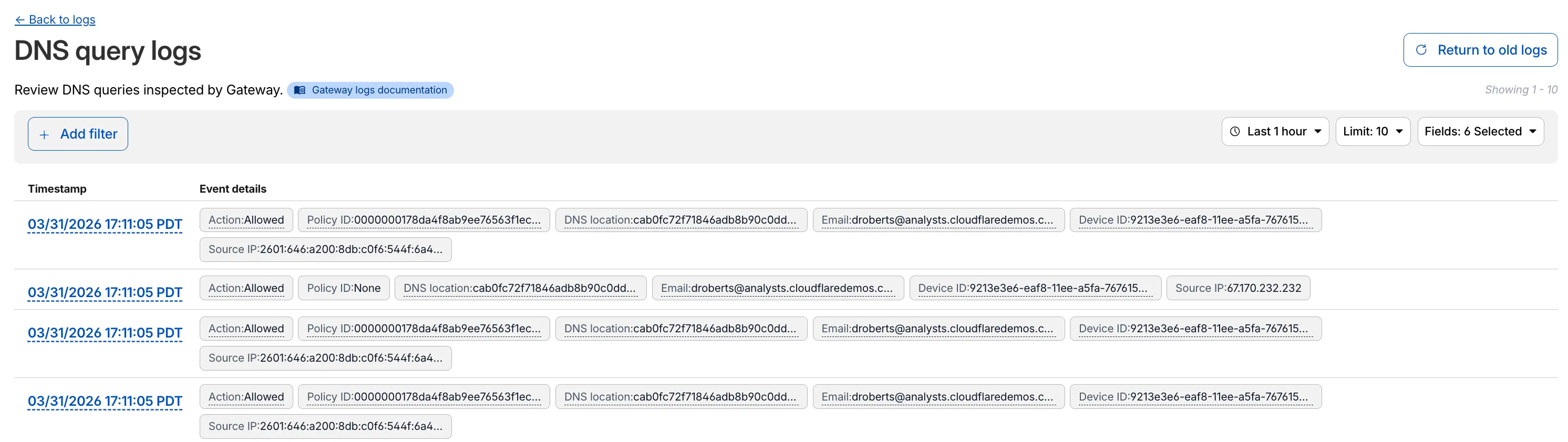
The updated UI includes:
- Filter by field - Select any field value to add it as a filter and narrow down your results.
- Customizable fields - Choose which fields to display in the log table. Querying for fewer fields improves log loading performance.
- View details - Select a timestamp to view the full details of a log entry.
- Switch to classic view - Return to the previous log viewer interface if needed.
For more information, refer to Access authentication logs and Gateway activity logs.
Radar now features an expanded Routing section ↗ with dedicated sub-pages, providing a more organized and in-depth view of the global routing ecosystem. This restructuring lays the groundwork for additional routing features and widgets coming in the near future.
The single Routing page has been split into three focused sub-pages:
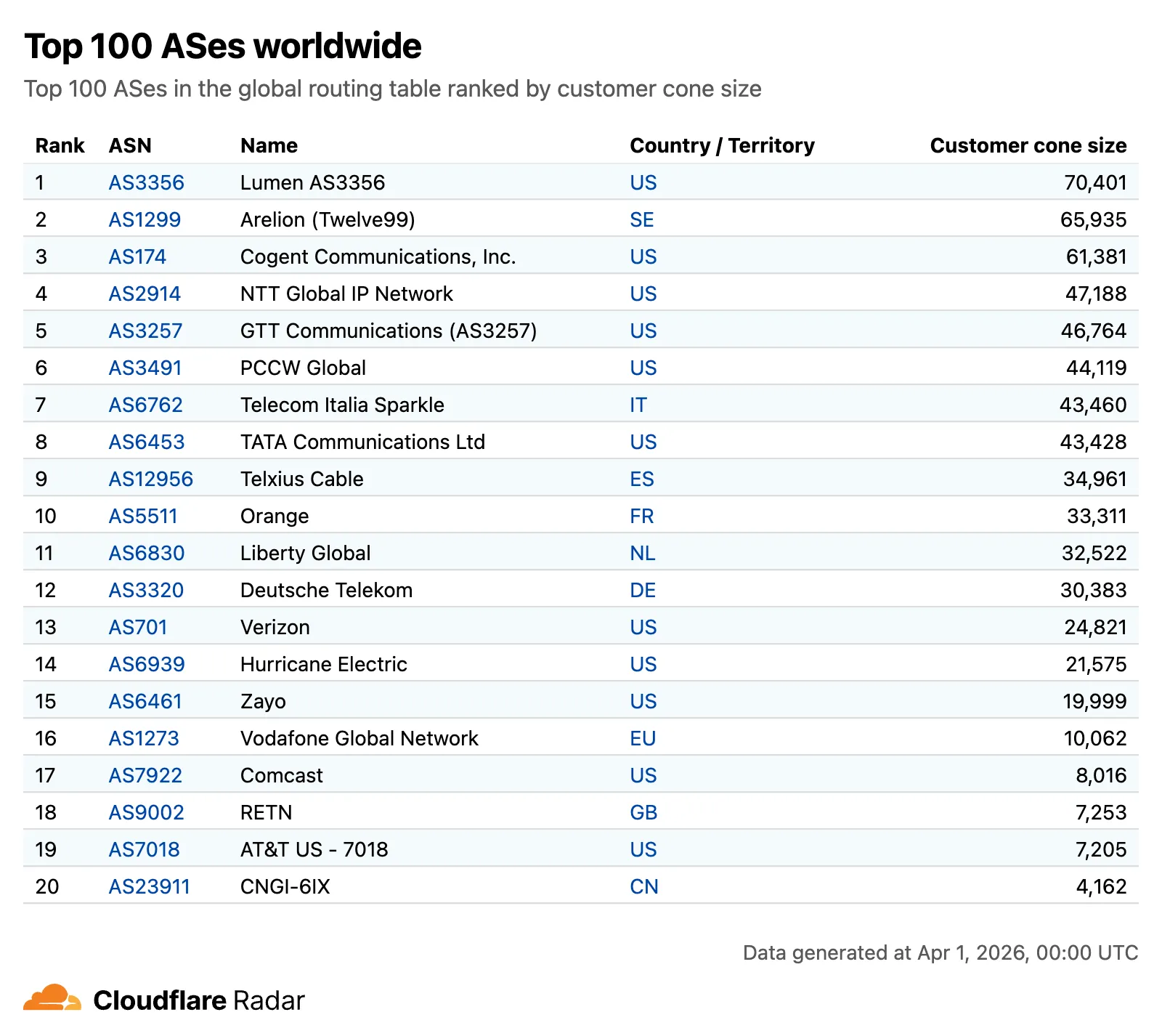
- Overview ↗ — Routing statistics, IP address space trends, BGP announcements, and the new Top 100 ASes ranking.
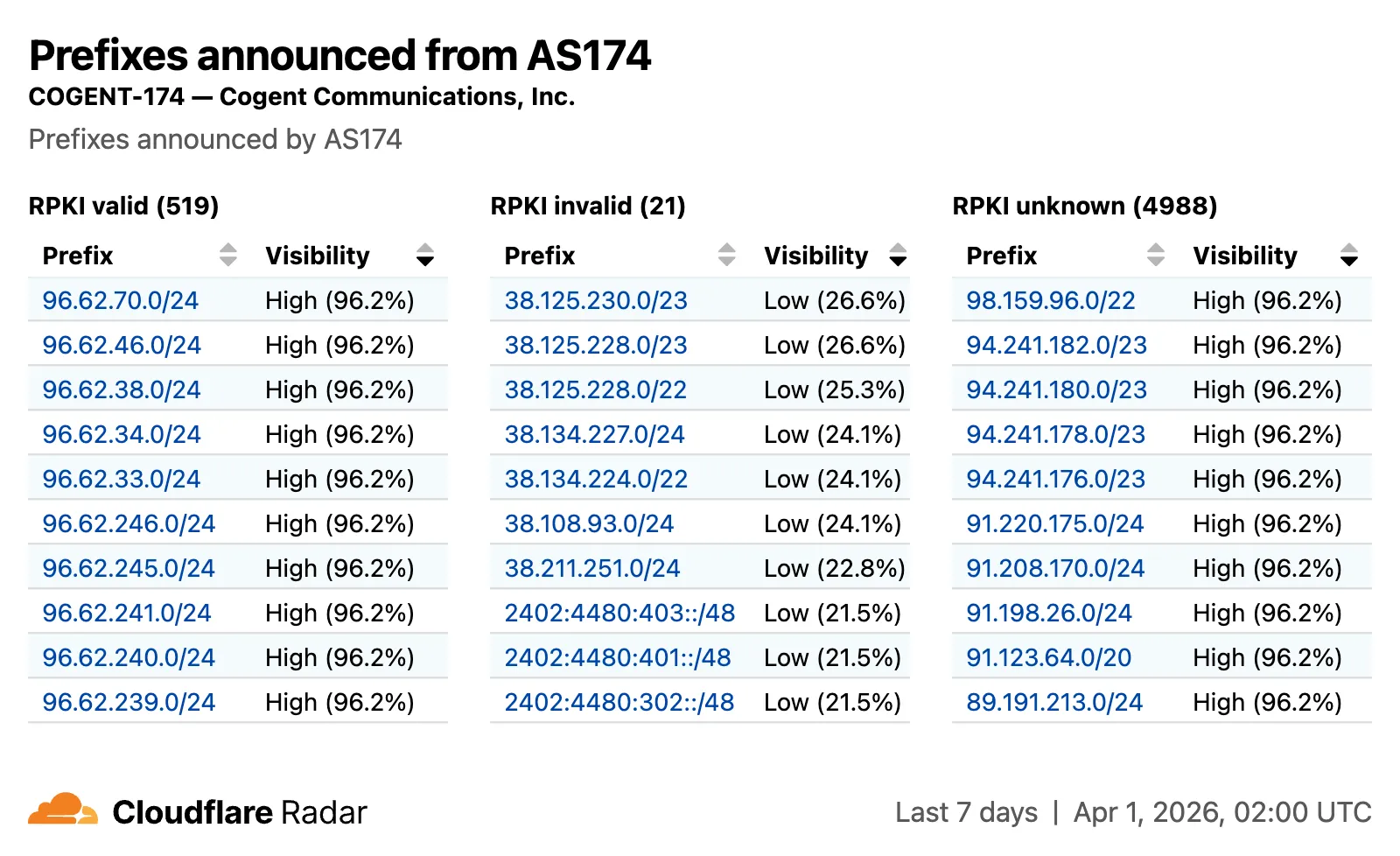
- RPKI ↗ — RPKI validation status, ASPA deployment trends, and per-ASN ASPA provider details.
- Anomalies ↗ — BGP route leaks, origin hijacks, and Multi-Origin AS (MOAS) conflicts.
The routing overview now includes a Top 100 ASes table ranking autonomous systems by customer cone size, IPv4 address space, or IPv6 address space. Users can switch between rankings using a segmented control.
The RPKI sub-page introduces a RPKI validation view for per-ASN pages, showing prefixes grouped by RPKI validation status (Valid, Invalid, Unknown) with visibility scores.
The IP address space ↗ chart now displays both IPv4 and IPv6 trends stacked vertically and is available on global, country, and AS views.
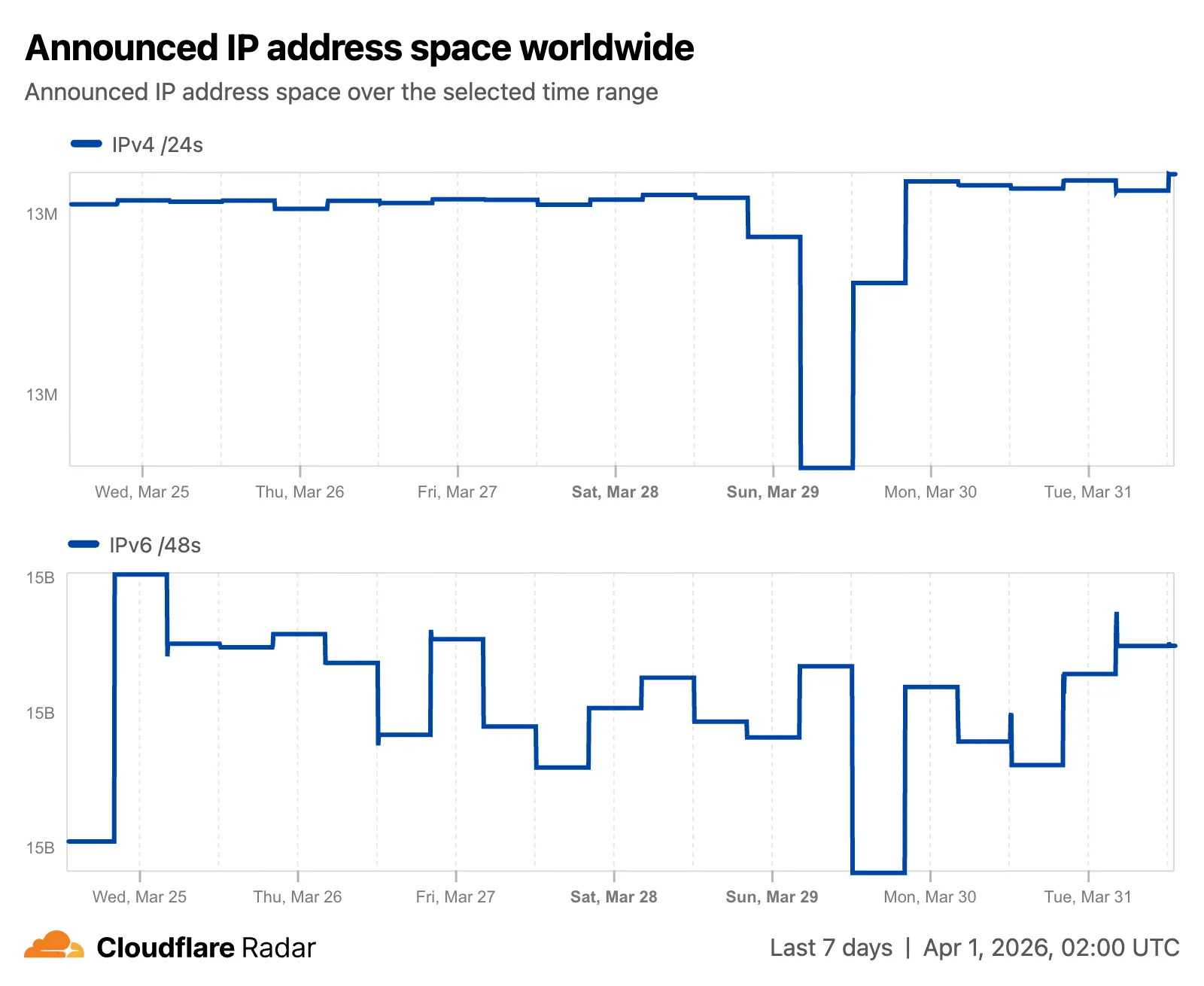
Check out the Radar routing section ↗ to explore the data, and stay tuned for more routing insights coming soon.
Two new fields are now available in rule expressions that surface Layer 4 transport telemetry from the client connection. Together with the existing
cf.timings.client_tcp_rtt_msecfield, these fields give you a complete picture of connection quality for both TCP and QUIC traffic — enabling transport-aware rules without requiring any client-side changes.Previously, QUIC RTT and delivery rate data was only available via the
Server-Timing: cfL4response header. These new fields make the same data available directly in rule expressions, so you can use them in Transform Rules, WAF Custom Rules, and other phases that support dynamic fields.Field Type Description cf.timings.client_quic_rtt_msecInteger The smoothed QUIC round-trip time (RTT) between Cloudflare and the client in milliseconds. Only populated for QUIC (HTTP/3) connections. Returns 0for TCP connections.cf.edge.l4.delivery_rateInteger The most recent data delivery rate estimate for the client connection, in bytes per second. Returns 0when L4 statistics are not available for the request.Use a request header transform rule to tag requests from high-latency connections, so your origin can serve a lighter page variant:
Rule expression:
cf.timings.client_tcp_rtt_msec > 200 or cf.timings.client_quic_rtt_msec > 200Header modifications:
Operation Header name Value Set X-High-Latencytruecf.edge.l4.delivery_rate > 0 and cf.edge.l4.delivery_rate < 100000For more information, refer to Request Header Transform Rules and the fields reference.
Workers Builds now supports Deploy Hooks — trigger builds from your headless CMS, a Cron Trigger, a Slack bot, or any system that can send an HTTP request.
Each Deploy Hook is a unique URL tied to a specific branch. Send it a
POSTand your Worker builds and deploys.Terminal window curl -X POST "https://api.cloudflare.com/client/v4/workers/builds/deploy_hooks/<DEPLOY_HOOK_ID>"To create one, go to Workers & Pages > your Worker > Settings > Builds > Deploy Hooks.
Since a Deploy Hook is a URL, you can also call it from another Worker. For example, a Worker with a Cron Trigger can rebuild your project on a schedule:
JavaScript export default {async scheduled(event, env, ctx) {ctx.waitUntil(fetch(env.DEPLOY_HOOK_URL, { method: "POST" }));},};TypeScript export default {async scheduled(event: ScheduledEvent, env: Env, ctx: ExecutionContext): Promise<void> {ctx.waitUntil(fetch(env.DEPLOY_HOOK_URL, { method: "POST" }));},} satisfies ExportedHandler<Env>;You can also use Deploy Hooks to rebuild when your CMS publishes new content or deploy from a Slack slash command.
- Automatic deduplication: If a Deploy Hook fires multiple times before the first build starts running, redundant builds are automatically skipped. This keeps your build queue clean when webhooks retry or CMS events arrive in bursts.
- Last triggered: The dashboard shows when each hook was last triggered.
- Build source: Your Worker's build history shows which Deploy Hook started each build by name.
Deploy Hooks are rate limited to 10 builds per minute per Worker and 100 builds per minute per account. For all limits, see Limits & pricing.
To get started, read the Deploy Hooks documentation.
Three new properties are now available on
request.cfin Workers that expose Layer 4 transport telemetry from the client connection. These properties let your Worker make decisions based on real-time connection quality signals — such as round-trip time and data delivery rate — without requiring any client-side changes.Previously, this telemetry was only available via the
Server-Timing: cfL4response header. These new properties surface the same data directly in the Workers runtime, so you can use it for routing, logging, or response customization.Property Type Description clientTcpRttnumber | undefined The smoothed TCP round-trip time (RTT) between Cloudflare and the client in milliseconds. Only present for TCP connections (HTTP/1, HTTP/2). For example, 22.clientQuicRttnumber | undefined The smoothed QUIC round-trip time (RTT) between Cloudflare and the client in milliseconds. Only present for QUIC connections (HTTP/3). For example, 42.edgeL4Object | undefined Layer 4 transport statistics. Contains deliveryRate(number) — the most recent data delivery rate estimate for the connection, in bytes per second. For example,123456.JavaScript export default {async fetch(request) {const cf = request.cf;const rtt = cf.clientTcpRtt ?? cf.clientQuicRtt ?? 0;const deliveryRate = cf.edgeL4?.deliveryRate ?? 0;const transport = cf.clientTcpRtt ? "TCP" : "QUIC";console.log(`Transport: ${transport}, RTT: ${rtt}ms, Delivery rate: ${deliveryRate} B/s`);const headers = new Headers(request.headers);headers.set("X-Client-RTT", String(rtt));headers.set("X-Delivery-Rate", String(deliveryRate));return fetch(new Request(request, { headers }));},};For more information, refer to Workers Runtime APIs: Request.
Internal DNS is now in open beta.
Internal DNS is bundled as a part of Cloudflare Gateway and is now available to every Enterprise customer with one of the following subscriptions:
- Cloudflare Zero Trust Enterprise
- Cloudflare Gateway Enterprise
To learn more and get started, refer to the Internal DNS documentation.
This week's release introduces new detections for a critical authentication bypass vulnerability in Fortinet products (CVE-2025-59718), alongside three new generic detection rules designed to identify and block HTTP Parameter Pollution attempts. Additionally, this release includes targeted protection for a high-impact unrestricted file upload vulnerability in Magento and Adobe Commerce.
Key Findings
-
CVE-2025-59718: An improper cryptographic signature verification vulnerability in Fortinet FortiOS, FortiProxy, and FortiSwitchManager. This may allow an unauthenticated attacker to bypass the FortiCloud SSO login authentication using a maliciously crafted SAML message, if that feature is enabled on the device.
-
Magento 2 - Unrestricted File Upload: A critical flaw in Magento and Adobe Commerce allows unauthenticated attackers to bypass security checks and upload malicious files to the server, potentially leading to Remote Code Execution (RCE).
Impact
Successful exploitation of the Fortinet and Magento vulnerabilities could allow unauthenticated attackers to gain administrative control or deploy webshells, leading to complete server compromise and data theft.
Ruleset Rule ID Legacy Rule ID Description Previous Action New Action Comments Cloudflare Managed Ruleset N/A Generic Rules - Parameter Pollution - Body Log Disabled This is a new detection. Cloudflare Managed Ruleset N/A Generic Rules - Parameter Pollution - Header - Form Log Disabled This is a new detection. Cloudflare Managed Ruleset N/A Generic Rules - Parameter Pollution - URI Log Disabled This is a new detection. Cloudflare Managed Ruleset N/A Magento 2 - Unrestricted file upload Log Block This is a new detection. Cloudflare Managed Ruleset N/A Fortinet FortiCloud SSO - Authentication Bypass - CVE:CVE-2025-59718 Log Block This is a new detection. -
Four new fields are now available on
request.cf.tlsClientAuthin Workers for requests that include a mutual TLS (mTLS) client certificate. These fields encode the client certificate and its intermediate chain in RFC 9440 ↗ format — the same standard format used by theClient-CertandClient-Cert-ChainHTTP headers — so your Worker can forward them directly to your origin without any custom parsing or encoding logic.Field Type Description certRFC9440String The client leaf certificate in RFC 9440 format ( :base64-DER:). Empty if no client certificate was presented.certRFC9440TooLargeBoolean trueif the leaf certificate exceeded 10 KB and was omitted fromcertRFC9440.certChainRFC9440String The intermediate certificate chain in RFC 9440 format as a comma-separated list. Empty if no intermediates were sent or if the chain exceeded 16 KB. certChainRFC9440TooLargeBoolean trueif the intermediate chain exceeded 16 KB and was omitted fromcertChainRFC9440.JavaScript export default {async fetch(request) {const tls = request.cf.tlsClientAuth;// Only forward if cert was verified and chain is completeif (!tls || !tls.certVerified || tls.certRevoked || tls.certChainRFC9440TooLarge) {return new Response("Unauthorized", { status: 401 });}const headers = new Headers(request.headers);headers.set("Client-Cert", tls.certRFC9440);headers.set("Client-Cert-Chain", tls.certChainRFC9440);return fetch(new Request(request, { headers }));},};For more information, refer to Client certificate variables and Mutual TLS authentication.
MCP server portals support code mode, a technique that reduces context window usage by replacing individual tool definitions with a single code execution tool. Code mode is turned on by default on all portals.
To turn it off, edit the portal in Access controls > AI controls and turn off Code mode under Basic information.
When code mode is active, the portal exposes a single
codetool instead of listing every tool from every upstream MCP server. The connected AI agent writes JavaScript that calls typedcodemode.*methods for each upstream tool. The generated code runs in an isolated Dynamic Worker environment, keeping authentication credentials and environment variables out of the model context.To use code mode, append
?codemode=search_and_executeto your portal URL when connecting from an MCP client:https://<subdomain>.<domain>/mcp?codemode=search_and_executeFor more information, refer to code mode.
MCP server portals support two context optimization options that reduce how many tokens tool definitions consume in the model's context window. Both options are activated by appending the
optimize_contextquery parameter to the portal URL.Strips tool descriptions and input schemas from all upstream tools, leaving only their names. The portal exposes a special
querytool that agents use to retrieve full definitions on demand. This provides up to 5x savings in token usage.https://<subdomain>.<domain>/mcp?optimize_context=minimize_toolsHides all upstream tools and exposes only two tools:
queryandexecute. Thequerytool searches and retrieves tool definitions. Theexecutetool runs the upstream tools in an isolated Dynamic Worker environment. This reduces the initial token cost to a small constant, regardless of how many tools are available through the portal.https://<subdomain>.<domain>/mcp?optimize_context=search_and_executeFor more information, refer to Optimize context.
Containers and Sandboxes now support connecting directly to Workers over HTTP. This allows you to call Workers functions and bindings, like KV or R2, from within the container at specific hostnames.
Define an
outboundhandler to capture any HTTP request or useoutboundByHostto capture requests to individual hostnames and IPs.JavaScript export class MyApp extends Sandbox {}MyApp.outbound = async (request, env, ctx) => {// you can run arbitrary functions defined in your Worker on any HTTP requestreturn await someWorkersFunction(request.body);};MyApp.outboundByHost = {"my.worker": async (request, env, ctx) => {return await anotherFunction(request.body);},};In this example, requests from the container to
http://my.workerwill run the function defined withinoutboundByHost, and any other HTTP requests will run theoutboundhandler. These handlers run entirely inside the Workers runtime, outside of the container sandbox.Each handler has access to
env, so it can call any binding set in Wrangler config. Code inside the container makes a standard HTTP request to that hostname and the outbound Worker translates it into a binding call.JavaScript export class MyApp extends Sandbox {}MyApp.outboundByHost = {"my.kv": async (request, env, ctx) => {const key = new URL(request.url).pathname.slice(1);const value = await env.KV.get(key);return new Response(value ?? "", { status: value ? 200 : 404 });},"my.r2": async (request, env, ctx) => {const key = new URL(request.url).pathname.slice(1);const object = await env.BUCKET.get(key);return new Response(object?.body ?? "", { status: object ? 200 : 404 });},};Now, from inside the container sandbox,
curl http://my.kv/some-keywill access Workers KV andcurl http://my.r2/some-objectwill access R2.Use
ctx.containerIdto reference the container's automatically provisioned Durable Object.JavaScript export class MyContainer extends Container {}MyContainer.outboundByHost = {"get-state.do": async (request, env, ctx) => {const id = env.MY_CONTAINER.idFromString(ctx.containerId);const stub = env.MY_CONTAINER.get(id);return stub.getStateForKey(request.body);},};This provides an easy way to associate state with any container instance, and includes a built-in SQLite database.
Upgrade to
@cloudflare/containersversion 0.2.0 or later, or@cloudflare/sandboxversion 0.8.0 or later to use outbound Workers.Refer to Containers outbound traffic and Sandboxes outbound traffic for more details and examples.
DLP now processes ZIP files using a streaming handler that scans archive contents element-by-element as data arrives. This removes previous file size limitations and improves memory efficiency when scanning large archives.
Microsoft Office documents (DOCX, XLSX, PPTX) also benefit from this improvement, as they use ZIP as a container format.
This improvement is automatic — no configuration changes are required.
ctx.id.jurisdictioninside a Durable Object now reports the jurisdiction the object was created in — for example"eu"when accessed throughenv.MY_DURABLE_OBJECT.jurisdiction("eu")— so you can make region-aware decisions without passing the jurisdiction through method arguments or persisting it in storage. For the full list of ID-construction paths that preservejurisdiction, refer to the Durable Object ID documentation.JavaScript export class RegionalRoom extends DurableObject {async fetch(request) {// "eu" when accessed through env.MY_DURABLE_OBJECT.jurisdiction("eu")const region = this.ctx.id.jurisdiction;return new Response(`Hello from ${region ?? "the default region"}!`);}}// Workerexport default {async fetch(request, env) {const stub = env.MY_DURABLE_OBJECT.jurisdiction("eu").getByName("general");return stub.fetch(request);},};ctx.id.jurisdictionisundefinedfor Durable Objects that were not created in a jurisdiction-restricted namespace. Alarms scheduled before 2026-03-15 also do not havejurisdictionstored; to backfill the value, reschedule the alarm from afetch()or RPC handler.
Radar ships several improvements to the URL Scanner ↗ that make scan reports more informative and easier to share:
- Live screenshots — the summary card now includes an option to capture a live screenshot of the scanned URL on demand using the Browser Rendering API.
- Save as PDF — a new button generates a print-optimized document aggregating all tab contents (Summary, Security, Network, Behavior, and Indicators) into a single file.
- Download as JSON — raw scan data is available as a JSON download for programmatic use.
- Redesigned summary layout — page information and security details are now displayed side by side with the screenshot, with a layout that adapts to narrower viewports.
- File downloads — downloads are separated into a dedicated card with expandable rows showing each file's source URL and SHA256 hash.
- Detailed IP address data — the Network tab now includes additional detail per IP address observed during the scan.
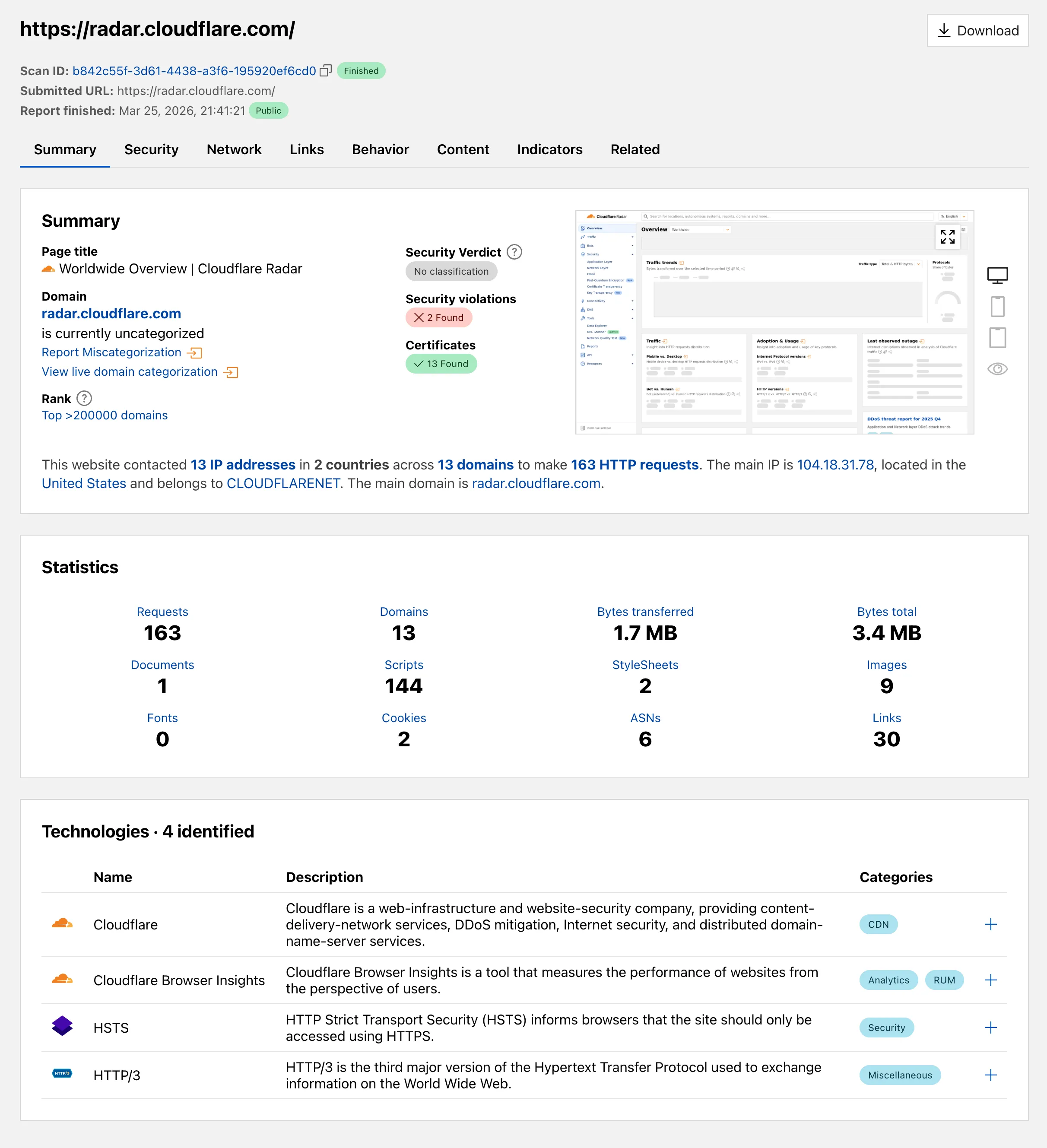
Explore these improvements on the Cloudflare Radar URL Scanner ↗.
HTTP Archive (HAR) files are used by engineering and support teams to capture and share web traffic logs for troubleshooting. However, these files routinely contain highly sensitive data — including session cookies, authorization headers, and other credentials — that can pose a significant risk if uploaded to third-party services without being reviewed or cleaned first.
Gateway now includes a predefined DLP profile called Unsanitized HAR that detects HAR files in HTTP traffic. You can use this profile in a Gateway HTTP policy to either block HAR file uploads entirely or redirect users to a sanitization tool before allowing the upload to proceed.
In the Cloudflare dashboard ↗, go to Zero Trust > Traffic policies > Firewall Policies > HTTP and create a new HTTP policy using the DLP Profile selector:
Selector Operator Value Action DLP Profile in Unsanitized HAR Then choose one of the following actions:
- Block: Prevents the upload of any HAR file that has not been sanitized by Cloudflare's sanitizer. Use this for strict environments where HAR file sharing must be disallowed entirely.
- Block with Gateway Redirect: Intercepts the upload and redirects the user to
https://har-sanitizer.pages.dev/, where they can sanitize the file. Once sanitized, the user can re-upload the clean file and proceed with their workflow.
HAR files processed by the Cloudflare HAR sanitizer receive a tamper-evident sanitized marker. DLP recognizes this marker and will not re-trigger the policy on a file that has already been sanitized and has not been modified since. If a previously sanitized file is edited, it will be treated as unsanitized and flagged again.
Gateway logs will reflect whether a detected HAR file was classified as Unsanitized or Sanitized, giving your security team full visibility into HAR file activity across your organization.
For more information, refer to predefined DLP profiles.
Logpush now supports higher-precision timestamp formats for log output. You can configure jobs to output timestamps at millisecond or nanosecond precision. This is available in both the Logpush UI in the Cloudflare dashboard and the Logpush API.
To use the new formats, set
timestamp_formatin your Logpush job'soutput_options:rfc3339ms—2024-02-17T23:52:01.123Zrfc3339ns—2024-02-17T23:52:01.123456789Z
Default timestamp formats apply unless explicitly set. The dashboard defaults to
rfc3339and the API defaults tounixnano.For more information, refer to the Log output options documentation.
Cloudflare now exposes four new fields in the Transform Rules phase that encode client certificate data in RFC 9440 ↗ format. Previously, forwarding client certificate information to your origin required custom parsing of PEM-encoded fields or non-standard HTTP header formats. These new fields produce output in the standardized
Client-CertandClient-Cert-Chainheader format defined by RFC 9440, so your origin can consume them directly without any additional decoding logic.Each certificate is DER-encoded, Base64-encoded, and wrapped in colons. For example,
:MIIDsT...Vw==:. A chain of intermediates is expressed as a comma-separated list of such values.Field Type Description cf.tls_client_auth.cert_rfc9440String The client leaf certificate in RFC 9440 format. Empty if no client certificate was presented. cf.tls_client_auth.cert_rfc9440_too_largeBoolean trueif the leaf certificate exceeded 10 KB and was omitted. In practice this will almost always befalse.cf.tls_client_auth.cert_chain_rfc9440String The intermediate certificate chain in RFC 9440 format as a comma-separated list. Empty if no intermediate certificates were sent or if the chain exceeded 16 KB. cf.tls_client_auth.cert_chain_rfc9440_too_largeBoolean trueif the intermediate chain exceeded 16 KB and was omitted.The chain encoding follows the same ordering as the TLS handshake: the certificate closest to the leaf appears first, working up toward the trust anchor. The root certificate is not included.
Add a request header transform rule to set the
Client-CertandClient-Cert-Chainheaders on requests forwarded to your origin server. For example, to forward headers for verified, non-revoked certificates:Rule expression:
cf.tls_client_auth.cert_verified and not cf.tls_client_auth.cert_revokedHeader modifications:
Operation Header name Value Set Client-Certcf.tls_client_auth.cert_rfc9440Set Client-Cert-Chaincf.tls_client_auth.cert_chain_rfc9440To get the most out of these fields, upload your client CA certificate to Cloudflare so that Cloudflare validates the client certificate at the edge and populates
cf.tls_client_auth.cert_verifiedandcf.tls_client_auth.cert_revoked.For more information, refer to Mutual TLS authentication, Request Header Transform Rules, and the fields reference.
The new
secretsconfiguration property lets you declare the secret names your Worker requires in your Wrangler configuration file. Required secrets are validated during local development and deploy, and used as the source of truth for type generation.JSONC {"secrets": {"required": ["API_KEY", "DB_PASSWORD"],},}TOML [secrets]required = [ "API_KEY", "DB_PASSWORD" ]When
secretsis defined,wrangler devandvite devload only the keys listed insecrets.requiredfrom.dev.varsor.env/process.env. Additional keys in those files are excluded. If any required secrets are missing, a warning is logged listing the missing names.wrangler typesgenerates typed bindings fromsecrets.requiredinstead of inferring names from.dev.varsor.env. This lets you run type generation in CI or other environments where those files are not present. Per-environment secrets are supported — the aggregatedEnvtype marks secrets that only appear in some environments as optional.wrangler deployandwrangler versions uploadvalidate that all secrets insecrets.requiredare configured on the Worker before the operation succeeds. If any required secrets are missing, the command fails with an error listing which secrets need to be set.For more information, refer to the
secretsconfiguration property reference.
AI Crawl Control now supports extending the underlying WAF rule with custom modifications. Any changes you make directly in the WAF custom rules editor — such as adding path-based exceptions, extra user agents, or additional expression clauses — are preserved when you update crawler actions in AI Crawl Control.
If the WAF rule expression has been modified in a way AI Crawl Control cannot parse, a warning banner appears on the Crawlers page with a link to view the rule directly in WAF.
For more information, refer to WAF rule management.
You can now control how Cloudflare handles origin responses without changing your origin. Cache Response Rules let you modify
Cache-Controldirectives, manage cache tags, and strip headers likeSet-Cookiefrom origin responses before they reach Cloudflare's cache. Whether traffic is cached or passed through dynamically, these rules give you control over origin response behavior that was previously out of reach.Cache Rules previously only operated on request attributes. Cache Response Rules introduce a new response phase that evaluates origin responses and lets you act on them before caching. You can now:
- Modify
Cache-Controldirectives: Set or remove individual directives likeno-store,no-cache,max-age,s-maxage,stale-while-revalidate,immutable, and more. For example, remove ano-cachedirective your origin sends so Cloudflare can cache the asset, or set ans-maxageto control how long Cloudflare stores it. - Set a different browser
Cache-Control: Send a differentCache-Controlheader downstream to browsers and other clients than what Cloudflare uses internally, giving you independent control over edge and browser caching strategies. - Manage cache tags: Add, set, or remove cache tags on responses, including converting tags from another CDN's header format into Cloudflare's
Cache-Tagheader. This is especially useful if you are migrating from a CDN that uses a different tag header or delimiter. - Strip headers that block caching: Remove
Set-Cookie,ETag, orLast-Modifiedheaders from origin responses before caching, so responses that would otherwise be treated as uncacheable can be stored and served from cache.
- No origin changes required: Fix caching behavior entirely from Cloudflare, even when your origin configuration is locked down or managed by a different team.
- Simpler CDN migration: Match caching behavior from other CDN providers without rewriting your origin. Translate cache tag formats and override directives that do not align with Cloudflare's defaults.
- Native support, fewer workarounds: Functionality that previously required workarounds is now built into Cache Rules with full Tiered Cache compatibility.
- Fine-grained control: Use expressions to match on request and response attributes, then apply precise cache settings per rule. Rules are stackable and composable with existing Cache Rules.
Configure Cache Response Rules in the Cloudflare dashboard ↗ under Caching > Cache Rules, or via the Rulesets API ↗. For more details, refer to the Cache Rules documentation ↗.
- Modify
Containers now support Docker Hub ↗ images. You can use a fully qualified Docker Hub image reference in your Wrangler configuration ↗ instead of first pushing the image to Cloudflare Registry.
JSONC {"containers": [{// Example: docker.io/cloudflare/sandbox:0.7.18"image": "docker.io/<NAMESPACE>/<REPOSITORY>:<TAG>",},],}TOML [[containers]]image = "docker.io/<NAMESPACE>/<REPOSITORY>:<TAG>"Containers also support private Docker Hub images. To configure credentials, refer to Use private Docker Hub images.
For more information, refer to Image management.
Cloudflare Gateway now supports OIDC Claims as a selector in Firewall, Resolver, and Egress policies. Administrators can use custom OIDC claims from their identity provider to build fine-grained, identity-based traffic policies across all Gateway policy types.
With this update, you can:
- Filter traffic in DNS, HTTP, and Network firewall policies based on OIDC claim values.
- Apply custom resolver policies to route DNS queries to specific resolvers depending on a user's OIDC claims.
- Control egress policies to assign dedicated egress IPs based on OIDC claim attributes.
For example, you can create a policy that routes traffic differently for users with
department=engineeringin their OIDC claims, or restrict access to certain destinations based on a user's role claim.To get started, configure custom OIDC claims on your identity provider and use the OIDC Claims selector in the Gateway policy builder.
For more information, refer to Identity-based policies.
The top-level Interconnects page in the Cloudflare dashboard has been removed. Interconnects are now located under Connectors > Interconnects.
Your existing configurations and functionality remain the same.
Dynamic Workers are now in open beta ↗ for all paid Workers users. You can now have a Worker spin up other Workers, called Dynamic Workers, at runtime to execute code on-demand in a secure, sandboxed environment. Dynamic Workers start in milliseconds, making them well suited for fast, secure code execution at scale.
- Code Mode: LLMs are trained to write code. Run tool-calling logic written in code instead of stepping through many tool calls, which can save up to 80% in inference tokens and cost.
- AI agents executing code: Run code for tasks like data analysis, file transformation, API calls, and chained actions.
- Running AI-generated code: Run generated code for prototypes, projects, and automations in a secure, isolated sandboxed environment.
- Fast development and previews: Load prototypes, previews, and playgrounds in milliseconds.
- Custom automations: Create custom tools on the fly that execute a task, call an integration, or automate a workflow.
Dynamic Workers support two loading modes:
load(code)— for one-time code execution (equivalent to callingget()with a null ID).get(id, callback)— caches a Dynamic Worker by ID so it can stay warm across requests. Use this when the same code will receive subsequent requests.
JavaScript export default {async fetch(request, env) {const worker = env.LOADER.load({compatibilityDate: "2026-01-01",mainModule: "src/index.js",modules: {"src/index.js": `export default {fetch() {return new Response("Hello from a dynamic Worker");},};`,},// Block all outbound network access from the Dynamic Worker.globalOutbound: null,});return worker.getEntrypoint().fetch(request);},};TypeScript export default {async fetch(request: Request, env: Env): Promise<Response> {const worker = env.LOADER.load({compatibilityDate: "2026-01-01",mainModule: "src/index.js",modules: {"src/index.js": `export default {fetch() {return new Response("Hello from a dynamic Worker");},};`,},// Block all outbound network access from the Dynamic Worker.globalOutbound: null,});return worker.getEntrypoint().fetch(request);},};Here are 3 new libraries to help you build with Dynamic Workers:
-
@cloudflare/codemode↗: Replace individual tool calls with a singlecode()tool, so LLMs write and execute TypeScript that orchestrates multiple API calls in one pass. -
@cloudflare/worker-bundler↗: Resolve npm dependencies and bundle source files into ready-to-load modules for Dynamic Workers, all at runtime. -
@cloudflare/shell↗: Give your agent a virtual filesystem inside a Dynamic Worker with persistent storage backed by SQLite and R2.
Dynamic Workers Starter
Use this starter ↗ to deploy a Worker that can load and execute Dynamic Workers.
Dynamic Workers Playground
Deploy the Dynamic Workers Playground ↗ to write or import code, bundle it at runtime with
@cloudflare/worker-bundler, execute it through a Dynamic Worker, and see real-time responses and execution logs.For the full API reference and configuration options, refer to the Dynamic Workers documentation.
Dynamic Workers pricing is based on three dimensions: Dynamic Workers created daily, requests, and CPU time.
Included Additional usage Dynamic Workers created daily 1,000 unique Dynamic Workers per month +$0.002 per Dynamic Worker per day Requests ¹ 10 million per month +$0.30 per million requests CPU time ¹ 30 million CPU milliseconds per month +$0.02 per million CPU milliseconds ¹ Uses Workers Standard rates and will appear as part of your existing Workers bill, not as separate Dynamic Workers charges.
Note: Dynamic Workers requests and CPU time are already billed as part of your Workers plan and will count toward your Workers requests and CPU usage. The Dynamic Workers created daily charge is not yet active — you will not be billed for the number of Dynamic Workers created at this time. Pricing information is shared in advance so you can estimate future costs.